
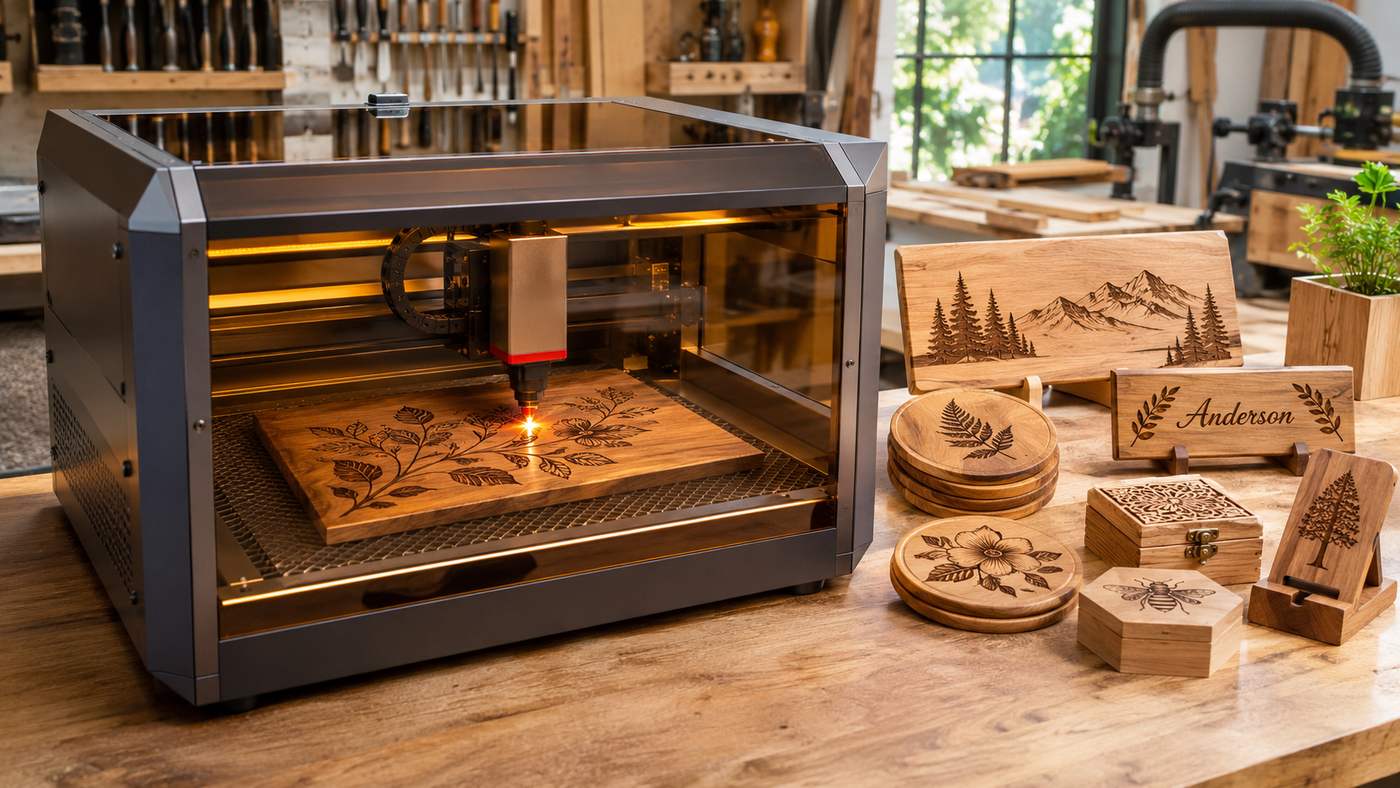
A laser engraver for wood allows hobbyists, woodworkers, designers, and small business owners to transform ordinary wooden surfaces into detailed, personalized creations. From custom signs and decorative wall art to engraved cutting boards and personalized gifts, laser engraving offers a precise way to create designs that would be difficult to reproduce consistently by hand. However, selecting suitable equipment requires understanding laser technology, wood compatibility, machine features, and essential safety practices. This comprehensive guide explains how wood laser engraving works, which equipment features matter most, and how to achieve professional looking results while managing costs and operational risks.
Understanding How Wood Laser Engraving Works
Laser engraving uses a concentrated beam of light to heat and alter the surface of wood according to a digital design. The laser removes or carbonizes a controlled amount of material, producing visible marks, patterns, letters, or images.
Unlike traditional mechanical engraving tools, a laser operates without the cutting head physically contacting the workpiece. This makes it suitable for intricate patterns, personalized lettering, and consistent production of repeated designs.
The final appearance depends on several variables, including wood density, grain direction, surface preparation, beam focus, laser power, and engraving speed.
Engraving Versus Laser Cutting
Although engraving and cutting use related technology, they produce different results.
Engraving modifies the surface to create visible detail or shallow recessed areas. Cutting directs sufficient energy through the material to separate it into pieces.
A laser engraver for wood may support both processes, but its cutting capability depends on the installed laser source, material thickness, and machine specifications.
For example, a low power machine may engrave a hardwood plaque successfully while struggling to cut the same material.
Understanding this distinction helps prevent unrealistic expectations when purchasing equipment.
1. Choose the Right Laser Technology for Wood
Different laser technologies interact with materials in different ways. Selecting the appropriate laser source is one of the most important decisions for woodworking projects.
Diode Laser Engravers
Diode lasers are widely used in desktop engraving equipment. Many woodworking models use blue light laser sources that can effectively mark wood, paper, leather, and certain compatible materials.
A diode laser engraver for wood is worth considering for beginners who want to create personalized gifts, decorative products, or small woodworking projects.
Common advantages include relatively compact machine designs, a range of available power levels, and options suitable for home workshops.
However, engraving speed and cutting capability vary considerably between models. Lower powered devices may require more time to achieve a particular result, especially with dense or thick materials.
CO2 Laser Engravers
CO2 laser machines use a different wavelength that is well suited to processing many nonmetallic materials, including wood.
These systems are frequently used for decorative panels, signage, detailed engraving, and cutting applications.
CO2 equipment can be attractive to businesses that need larger working areas or more demanding production capabilities.
However, machine size, cooling requirements, ventilation arrangements, and maintenance costs must be considered.
A CO2 laser engraver for wood is not automatically the better choice for every user. A smaller diode machine may be more practical when the primary requirement is engraving modest quantities of wooden products.
Fiber Laser Engravers
Fiber laser systems are generally associated with marking and engraving metals.
They are not the usual first choice for processing untreated wood because their wavelength interacts differently with organic materials.
Which Laser Type Should Beginners Choose?
For many beginners focused on wood engraving, a suitable diode system can provide a practical starting point.
For workshops expecting substantial cutting work or greater production demands, an appropriately specified CO2 machine may be worth evaluating.
The correct decision should depend on the actual projects, approved materials, safety features, and available workspace rather than laser power alone.
2. Select the Best Wood for Laser Engraving
Wood selection has a direct influence on engraving quality. Different species react differently to concentrated heat because of variations in density, grain, moisture, and natural composition.
A carefully selected material can make detailed engraving easier and reduce unnecessary testing.
Basswood for Beginners
Basswood is a popular material for engraving practice because it generally has a relatively fine, consistent grain and a light appearance.
Its surface can provide good contrast for engraved lettering, illustrations, and simple patterns.
Basswood is particularly useful for practicing alignment, designing small decorative items, and evaluating different engraving settings.
However, even pieces from the same wood species can behave differently, so test engravings remain necessary.
Birch and Maple for Detailed Designs
Birch is commonly used for laser engraving projects, including decorative panels, signs, and craft products.
Its relatively light surface can make dark engraved details easier to distinguish.
Maple can also produce attractive results, particularly for crisp lettering and refined decorative work.
When using a laser engraver for wood, consider the direction and consistency of the grain before positioning an intricate design.
Prominent grain patterns may affect how consistently darker engraved areas appear.
Walnut and Other Dark Hardwoods
Walnut provides a distinctive appearance that suits premium gifts, decorative plaques, and personalized home accessories.
However, darker wood can offer less visible contrast for some engraved patterns.
Design adjustments may be necessary to maintain readability, especially when engraving small text.
Hardwood density can also affect processing requirements and cutting performance.
Choosing Between Solid Wood and Plywood
Solid wood offers natural grain patterns and can produce attractive personalized products.
Plywood may provide a more consistent sheet format, but its adhesives and internal layers can influence processing behavior.
Some plywood products are specifically manufactured for laser processing, while others contain adhesives or coatings unsuitable for a particular machine.
Medium density fiberboard and other engineered materials require additional caution because their binders may generate hazardous emissions.
Always confirm that a material is approved for the exact machine and ventilation system before processing it.
Avoid Unknown or Incompatible Materials
Never assume that a wood product is safe simply because its exterior resembles natural timber.
Paints, adhesives, laminates, and protective coatings may contain substances that are hazardous when heated.
PVC and vinyl containing materials should not be processed with ordinary laser engraving equipment because they can release dangerous corrosive gases.
For a laser engraver for wood, untreated materials with known composition are generally easier to evaluate than unidentified composite products.
3. Compare Machine Features That Improve Engraving Quality
A machine’s overall performance depends on much more than advertised wattage.
Before purchasing, compare specifications that affect engraving precision, safety, usability, and long term ownership.
Understand Laser Output Power
Manufacturers may describe electrical consumption and actual laser output using different figures.
These measurements should not be treated as interchangeable.
Optical output power provides useful information, but wavelength, beam quality, focus, and machine design also influence performance.
A more powerful laser does not guarantee sharper engraving if the wood is poorly prepared or the settings are unsuitable.
Consider your actual engraving and cutting requirements before paying for additional power.
Examine Working Area and Positioning
The usable engraving area determines the maximum project size that fits inside the machine.
Smaller equipment can be sufficient for coasters, ornaments, jewelry boxes, and gift tags.
Larger equipment may be necessary for furniture components, wall decorations, or business signage.
Why Working Area Matters
A laser engraver for wood with an appropriate working area can reduce repositioning and simplify repeated production.
Check the actual usable dimensions rather than relying only on the external machine size.
Also consider the available height for thicker wooden objects and whether compatible positioning accessories are supported.
Look for Reliable Safety Features
Protective enclosures, effective interlocks, accessible emergency controls, and suitable extraction arrangements deserve priority.
Enclosed equipment can help control access to hazardous laser radiation when properly designed and operated.
Open frame equipment may require additional safeguards and wavelength appropriate protective eyewear under the manufacturer’s procedures.
Do not assume that ordinary tinted glasses provide adequate laser protection.
Consider Air Assist and Exhaust Systems
Air assist directs a controlled flow of air toward the processing area where supported by the machine.
It can help reduce debris accumulation and improve cutting quality under suitable conditions.
Exhaust ventilation addresses a different requirement by removing smoke and potentially harmful airborne contaminants.
A laser engraver for wood should have an extraction solution appropriate for the materials being processed and the installation environment.
Evaluate Software Compatibility
User friendly design software can significantly improve the experience of working with a laser machine.
Look for support for common design formats, accurate positioning, material testing, and repeatable job settings.
Some systems work with dedicated manufacturer software, while others support compatible third party programs.
Always verify software support for the exact machine rather than assuming universal compatibility.
4. Prepare Wooden Surfaces for Professional Results
Even high quality equipment cannot fully compensate for poorly prepared materials.
Wood preparation affects engraving clarity, consistency, and the appearance of the finished product.
Start With a Clean Surface
Inspect the wood for cracks, knots, uneven areas, and contamination.
Dust, oils, and surface irregularities can influence the appearance of laser marks.
For appropriate unfinished wood, light sanding can help create a smoother surface before engraving.
Remove sanding dust using suitable cleaning methods and ensure the material is completely ready before starting the machine.
Avoid applying unidentified chemicals or coatings immediately before laser processing.
Choose the Right Design
Digital artwork should match the capabilities of the laser and the dimensions of the wooden object.
Simple typography, vector illustrations, decorative borders, and high contrast graphics are often practical starting points.
For photographs, additional image preparation may be necessary to translate tonal detail into laser marks.
Keep Small Details Readable
Extremely thin lines and tiny letters may disappear into the grain or become difficult to distinguish after engraving.
Adjust the design to account for material texture and the intended viewing distance.
A laser engraver for wood can produce intricate artwork, but designing for the characteristics of timber is essential.
Position the Material Accurately
Secure the workpiece using methods approved by the equipment manufacturer.
Check that it is flat, stable, and correctly aligned with the intended engraving area.
Use the machine’s framing or positioning function, where available, to confirm that the design fits before beginning.
For repeated projects, a suitable jig can improve consistency between multiple wooden pieces.
5. Optimize Laser Settings for Cleaner Engraving
Laser settings directly affect engraving darkness, depth, clarity, and processing time.
There is no universal combination that works perfectly across every machine and wood species.
Understand Power and Speed
Power determines how much laser energy the system delivers at a selected operating level.
Speed influences how long the focused beam interacts with a particular section of material.
Higher energy exposure can create darker or deeper marks, but excessive exposure may cause charring, smoke, and loss of fine detail.
Moving too quickly at an unsuitable power level may produce faint or incomplete patterns.
The correct combination depends on the machine, material, design, and desired result.
Use a Material Test Grid
A reliable method involves engraving several small samples using different approved settings.
Compare contrast, edge definition, consistency, and signs of excessive burning.
Where supported, software material tests can automate comparisons involving speed, power, and other parameters.
A laser engraver for wood should be calibrated using sample material from the actual project whenever practical.
Record Your Successful Settings
Create a simple record containing the wood species, material thickness, laser type, selected settings, and observed results.
Include notes about whether the material was unfinished, coated, or previously sanded.
This information helps improve repeatability and reduces unnecessary waste when producing similar items.
Set the Correct Focus
Laser focus influences the size and concentration of the beam at the material surface.
Improper focus can result in blurred details, inconsistent lines, or reduced cutting performance.
Follow the manufacturer’s focusing procedure and verify material height before processing.
Do not make manual adjustments inside an operating machine unless the equipment specifically supports a safe adjustment procedure.
Adjust Image Resolution Carefully
Engraving resolution affects how closely adjacent engraving lines are placed.
Extremely dense line spacing does not automatically produce better detail because beam size and wood characteristics impose practical limits.
Overlapping passes can increase heat exposure and darken fine details excessively.
Testing different line intervals can identify a suitable balance between appearance and processing time.
6. Follow Essential Laser Engraving Safety Practices
Safety should be treated as a fundamental part of every engraving project.
Wood is combustible, and laser processing can generate smoke, airborne particles, harmful gases, and intense optical radiation.
Use Appropriate Ventilation
A laser engraver for wood should not operate without a suitable, functioning exhaust or filtration arrangement.
Smoke should be managed according to the machine manufacturer’s installation requirements.
Depending on the system, this may involve properly designed external exhaust or specialized filtration.
Ordinary household ventilation is not automatically sufficient.
Check filters, hoses, extraction connections, and airflow before beginning a project.
Never Leave an Operating Laser Unattended
Wood can ignite during engraving or cutting.
Even well configured equipment may experience unexpected flare ups due to material characteristics, debris, or operating conditions.
Remain present and monitor the machine throughout the process.
Keep the work area free from unnecessary combustible materials and understand the manufacturer’s emergency shutdown procedure.
An appropriate, maintained fire extinguisher should be available, and operators should know how to respond safely to an incident.
Protect Your Eyes and Skin
Laser radiation can cause serious injury when protective systems are absent, defeated, or used incorrectly.
Keep protective covers closed during operation and never bypass safety interlocks.
Follow machine specific instructions about eye protection, restricted access, and safe maintenance.
Understand Laser Safety Classifications
A fully enclosed system may provide a safer user accessible classification even when it contains a higher hazard laser source internally.
An exposed Class 4 laser presents substantially different risks.
Check the product’s classification, labeling, safety documentation, and installation requirements before use.
Inspect Materials Before Processing
Do not engrave unknown plastics, unidentified coatings, or unsuitable composite materials.
Some substances release toxic or corrosive emissions when exposed to laser energy.
Verify material composition with the supplier and consult the equipment’s approved material guidance.
When compatibility cannot be established, do not process the material.
Maintain a Clean Workspace
Dust and debris can contribute to fire hazards and interfere with equipment operation.
Clean the work area and machine components according to the maintenance instructions.
Allow processed materials to cool and ensure remaining smoke is extracted before opening the enclosure where required.
A properly maintained laser engraver for wood is easier to operate consistently and less likely to suffer avoidable performance problems.
7. Plan Project Costs and Creative Applications
A thoughtful purchasing decision considers the entire cost of ownership rather than the machine price alone.
Calculate the Real Equipment Budget
Depending on the equipment, additional costs may include:
- Suitable exhaust or filtration equipment
- Manufacturer approved air assist accessories
- Protective enclosures or other required safeguards
- Design software subscriptions or licenses
- Replacement filters and maintenance supplies
- Wood blanks and test materials
- Appropriate workshop preparation
A lower priced machine can become less attractive if essential safety equipment or accessories must be purchased separately.
Consider Practical Wood Engraving Projects
A laser engraver for wood can support a range of decorative and functional products.
Popular project categories include personalized name plaques, decorative wall signs, wooden coasters, custom gift boxes, wedding decorations, desk organizers, and engraved ornaments.
Small business owners may also explore branded merchandise, presentation packaging, and customized corporate gifts.
For objects that may contact food, consider whether engraving creates grooves that are difficult to clean and ensure any finish or intended use meets appropriate safety requirements.
Evaluate Commercial Production Carefully
Selling engraved products involves additional responsibilities beyond producing attractive designs.
Calculate the cost of raw materials, preparation, machine time, rejected pieces, packaging, and finishing.
Include equipment maintenance and the time required to communicate with customers.
Build Repeatable Quality Standards
Use consistent artwork dimensions, test approved materials, and inspect completed items before packaging.
Document customer approved designs to minimize errors.
When producing personalized merchandise, verify names, dates, and spelling before starting the engraving process.
Consistent preparation can be more valuable than increasing production speed at the expense of quality.
Avoid Overestimating Profit Potential
A laser engraver for wood can support a small creative business, but profitability is not guaranteed.
Demand, pricing, competition, production efficiency, and customer acquisition costs all influence financial performance.
Start with manageable project volumes, assess real expenses, and expand only when the business can support additional investment.
Common Wood Laser Engraving Problems and How to Fix Them
Even experienced users occasionally encounter inconsistent results.
Understanding common problems makes troubleshooting more systematic.
Why Does Wood Become Excessively Dark?
Excessive charring can result from unsuitable power, speed, focus, or repeated exposure.
Compare test samples and follow the machine manufacturer’s recommendations.
Also inspect ventilation, material composition, and the condition of the work surface.
Why Does Engraving Look Uneven?
Natural grain variations, uneven wood surfaces, incorrect focus, and inconsistent positioning can contribute to irregular results.
Prepare a flat workpiece, verify focus, and test another section of the same material.
Why Are Fine Details Blurry?
Small designs can lose clarity when line spacing, beam focus, artwork resolution, or exposure settings are unsuitable.
Simplify intricate artwork where necessary and evaluate a small material test before processing the final piece.
Why Does the Machine Produce More Smoke Than Expected?
Excessive smoke may indicate unsuitable materials, incorrect settings, inadequate extraction, or maintenance problems.
Stop the process safely, inspect the system, and resolve the underlying issue before resuming.
Do not compensate for poor ventilation by continuing to operate the machine.
Frequently Asked Questions
What is the best laser engraver for wood for beginners?
An enclosed diode laser with suitable safety features, dependable ventilation, accessible software, and adequate working space can be a practical beginner option. Choose according to your projects and budget.
Can a laser engraver for wood cut thick wooden boards?
Some machines can cut wood, but maximum thickness depends on laser type, output power, wood density, and material composition. Follow the manufacturer’s tested capabilities.
Which wood is easiest to laser engrave?
Basswood is often beginner friendly because of its fine grain and relatively consistent surface. Birch and maple can also produce attractive results with appropriate settings.
Is laser engraving wood safe for home use?
It can be performed more safely with suitable enclosed equipment, extraction, approved materials, training, and constant supervision. Improper operation can create serious fire and exposure hazards.
Can a laser engraver for wood create detailed photographs?
Yes, compatible machines can reproduce photographic designs using suitable image processing and engraving settings. Results depend on resolution, wood grain, contrast, and material preparation.
How long does laser engraving on wood take?
Processing time varies with design size, complexity, laser type, speed, resolution, and the number of passes. A small name may require much less time than a detailed full surface illustration.
Conclusion
Choosing the right laser engraver for wood involves understanding machine technology, selecting compatible materials, and prioritizing safe operating practices. Diode and CO2 systems can both produce excellent woodworking results when matched to appropriate projects and properly configured. Careful preparation, material testing, and consistent maintenance help improve engraving quality while reducing unnecessary waste. Whether you are developing a new hobby or planning a creative business, informed equipment selection and reliable workmanship provide the foundation for lasting results.
