
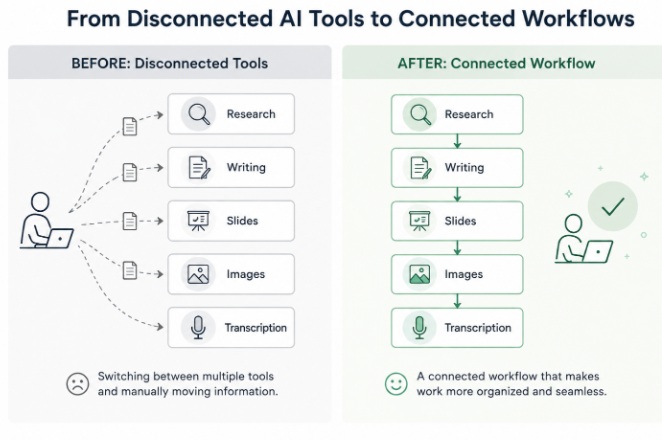
Few people actually sat down and built their AI tools. One marketer chose a writing AI. The sales team opted for a slide AI. Some operations leader decided to use a transcription AI by analyzing call recordings. While each AI performs well, the integration between them is where people encounter friction.
How would a customer conversation be transformed into a proposal? One AI would transcribe the conversation. Then, probably in a chat, people would paste the transcription into the document. Research would be conducted in approximately twelve different browser tabs. Finally, someone would create the proposal in yet another part of the workflow. Essentially, the data would be moved four times and, ultimately, people are unsure which is the most recent.
That’s essentially what AI workflow automation aims to close. In this article, we’ll learn how to align AI with your team’s tasks, how to connect them all together, how to decide between using numerous tools versus one overall platform, and how to manage data and quality throughout the process.
The Problem with Fragmented AI Tool Stack
Many teams don’t realize how much it will cost. It’s not the cost of the tools. There are three recurring issues:
Constant copy-and-paste. Whenever switching between tools, there is copying, downloading, uploading, reformatting. Each is a minor task, performed dozens of times weekly. Every step is a potential point of failure: losing or distorting information.
No shared context. The writing tool has no idea what the research tool learned. The slide tool has never read the brief. Because of this, every tool starts from scratch as people have to explain the background information repeatedly.
Scattered data. Typically, using five AI tools requires managing five accounts, five different sets of preferences, and five ways of handling uploaded information. If people ask where their data went, the accurate reply is often “we’d have to check.”
It is not that using individual AI tools is wrong. It is that using multiple AI productivity tools requires having a strategy for how they should be connected, just like any other set of software
Mapping AI to Different Knowledge-Work Tasks
Before connecting anything, get clear on what your team actually uses AI for. A useful exercise is to list your recurring tasks and sort them by the kind of output they produce.
| Task | What AI helps with | Typical output |
| Research | Gathering sources, summarizing, organizing findings | Briefing document |
| Writing | Drafting, rewriting, adjusting tone and length | Articles, emails, reports |
| Visuals | Generating and editing images and short video | Campaign assets, illustrations |
| Meetings and calls | Turning audio into text, pulling out action items | Transcripts, summaries |
| Presentations | Turning an outline or briefing into slides | Decks |
Then comes the step people skip: not every task needs the same model. Models differ in speed, cost, and how well they handle long or complex material. A quick social caption doesn’t need the same horsepower as a competitor analysis built from thirty sources. Treating “which AI should we use?” as a per-task decision instead of a company-wide one keeps quality high where it matters and cost down where it doesn’t. That habit is the foundation of any workable generative AI workflow.
Connecting Research, Content, Presentations, and Transcription
Here’s how this would look in a real-world example: The company is releasing a new feature and wants to go to market with this.
- Research. This would gather information like market context, people’s likely questions, and how to position against competitors – all compiled into one briefing
- Content. This briefing would be used to create the social media post, the email, and the announcement post – all would be identical
- Presentation. This would also be used to create the presentation to share internally when launching
- Transcription. By transcribing and distilling customer phone calls after going to market, the team would return to step one to use this information for the next iteration.
Each step starts from the previous step’s output instead of a blank page. That is the difference between a pile of tools and a workflow.
This is the kind of chain an AI workspace like Kooko is built around. It brings presentations, images, video, writing, transcription, and Deep Research into one place. Deep Research covers the first step, gathering information and organizing it into a briefing the rest of the work can build on. Its AI agents can combine several tools to handle multi-step tasks, which is where the chain above starts running with fewer manual handoffs.
A practical way to test any setup: take one real project and see whether you can go from raw research to a finished draft without leaving the workspace or retyping context. If you can’t, the tools aren’t connected yet.
Choosing Between Specialized AI Tools and an Integrated Workspace
Both are appropriate – using whichever is best based on your project’s needs
Using a specialized tool would be best if you are primarily doing one task that would benefit from being deep and having most of the value. This would include using a legal team that would benefit from having a tool specifically for contracts or a design team that primarily uses an image editor.
Using an integrated tool would be best if your primary task often involves switching formats, being passed between people, etc. This would include most operations, marketing, and consulting tasks.
To ultimately decide between the two, ask yourself these five questions:
• How often does your average project switch between tools?
• Do you require your content to be consistent across visual, slide, and document content?
• Who needs to use it, and on what devices?
• Can it integrate with other tools your team frequently uses?
• What will happen to content that you upload?
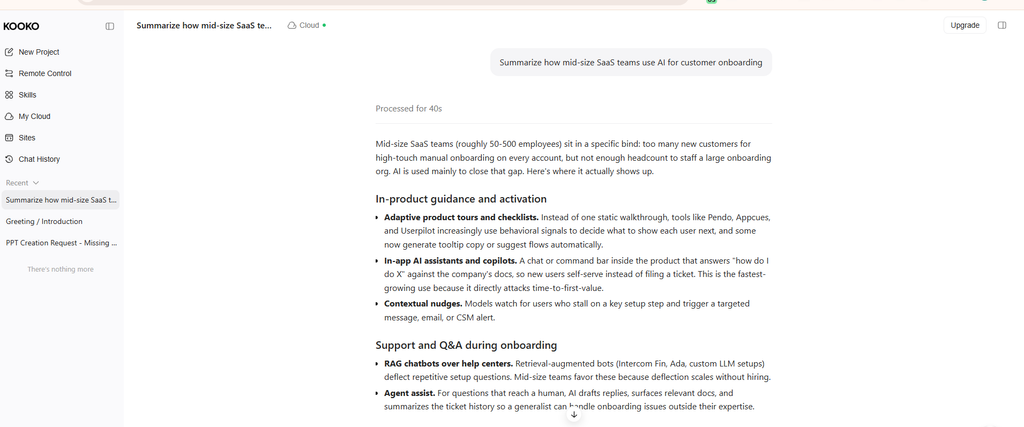
In a practical sense, Kooko uses one integrated space with many different AI tools and models so individuals can select the best tool for the job without having to switch tabs. Additionally, Kooko can be used on a desktop app and through a browser to access local projects and content to ultimately help remote workers continue working across many different devices. Additionally, for frequently created or researched content, users can visit the AI workflow tools library to see available skills to use.
The only disclaimer I want to be honest about is that, ultimately, neither will ultimately surpass using the best specialized tool for the specific task it was designed to do. Because of this, many use both – using the specialized tool when they require depth, and the integrated tool for everything else that switches between different formats.
Governance, Data Handling, Human Oversight, and Output Quality
Connecting tools makes work faster, which also means mistakes travel faster. A few guardrails are worth setting before you scale.
Decide what data can go in. Write a short list of what’s off-limits, such as client contracts, personal data, or unreleased financials, and what’s fine. Before adopting any tool, check how the vendor stores uploaded files and whether they’re used to train models.
Keep a human in the loop. AI drafts are starting points. Anyone who publishes or sends AI-assisted work should check names, figures, quotes, and claims against the original source. For business process automation that touches customers or money, add an approval step so a person signs off before anything goes out.
Define “good enough” in writing. A one-page checklist covering accuracy, tone, brand terms, and required sources keeps quality consistent when several people use the same tools.
Use an existing framework. If your team needs something more formal, the NIST AI Risk Management Framework offers a structured way to think about AI risks and responsibilities.
Frequently Asked Questions
What is AI workflow automation?
It means connecting AI-assisted tasks such as research, writing, slide creation, and transcription so that the output of one step feeds the next, with fewer manual handoffs.
How should a business choose AI tools?
The right AI tools for business depend on how your work moves. Specialist tools suit tasks that need deep, narrow capability. A shared workspace suits work that crosses formats and passes between people. Many teams use a mix of both.
What can Kooko do?
Kooko is an AI workspace that covers presentations, images, video, writing, transcription, and Deep Research. It also includes AI agents and access to multiple models and tools. Features and plans can change, so check its website for current details.
How do I keep AI-generated work accurate and safe?
Set clear rules for what data can be uploaded, check names, figures, and claims against original sources, and have a person approve anything that reaches customers. A framework like NIST’s can help you formalize these habits.
Conclusion
You don’t need to rebuild everything at once. Pick one process that repeats every week, such as turning research into a client deck. Map each step, note where information gets copied by hand, and test whether a connected setup removes those handoffs. Add governance rules from the beginning, even if they’re simple.
Connected AI work comes down to fewer handoffs, shared context, and a person who checks the result. Tools like Kooko show what that can look like inside one workspace, but the same principles apply whichever setup you choose. Get the first workflow running well, then repeat the pattern.
