
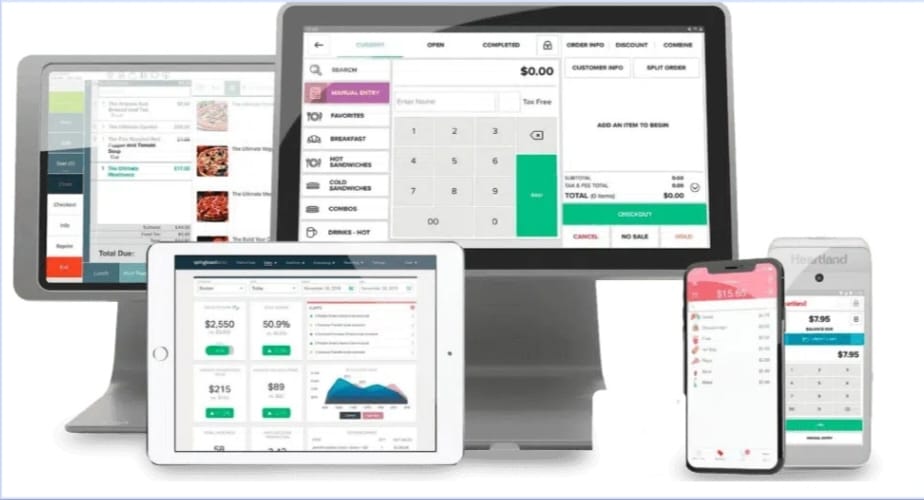
You’re running a restaurant in 2026. Point-of-sale hardware isn’t just a tool—it’s the backbone of your operation. Heartland POS hardware handles transactions, inventory, and staff workflows every single day. But does it actually hold up under pressure? Let me walk you through what Heartland brings to the table, what specs matter, and whether the investment makes sense for your venue.
What is Heartland POS Hardware? An Overview for Restaurants
Heartland Restaurant POS operates on a modular hardware ecosystem designed to work seamlessly with their software platform. You’re looking at iPad-based terminals, PC/Mac workstations, EMV payment devices (PAX terminals), cash drawers, receipt printers, and barcode scanners that all talk to each other through Ethernet or Wi-Fi. There’s no kitchen display system bundled here—that’s a deliberate design choice that keeps costs down but means you’ll need to handle kitchen orders differently, either through printed tickets or a separate display solution.
The hardware synergy is straightforward: each device connects to the Manager menu via Payment Terminals interface, which lets you control payment processing, failover priorities, and device status in real time. It’s not fancy, but it works. The system supports NFC contactless, EMV chip, and magstripe payments across all terminals, so you’re covered for most payment types your guests will throw at you.
What makes this relevant in 2026 is that Heartland kept the architecture lean. Your staff doesn’t need to memorize complex workflows. Tap, insert, or swipe—the terminal handles it. When something goes wrong (and it will), you have clear diagnostics on the Device Info screen showing network status, app version, IP address, and socket priority for failover redundancy.
Heartland POS Terminal Specs: A Detailed Comparison
Comparing Core Heartland POS Workstations
Here’s where the rubber meets the road. Heartland supports three core hardware configurations: iPad-based, Mac-based, and PC-based terminals. Let me break down what each needs to run smoothly in 2026.
| Configuration | Processor | RAM | Storage | Display | OS | Best For |
| iPad Register | Modern ARM (A-series) | 2–4GB | 64–128GB | 9.7″–12.9″ touchscreen | iOS 14+ | Counter registers, bar POS |
| Mac Workstation | 1GHz+ 64-bit Intel/Apple Silicon | 8GB minimum | 16GB available | External monitor (15″–27″) | macOS 11.3+ | Kitchen prep, management station |
| PC Workstation | 1GHz+ 64-bit x86 | 8GB minimum | 16GB available | External monitor (15″–27″) | Windows 10 64-bit | High-volume registers, back office |
That RAM discrepancy you might see floating around? Older docs list 2GB minimum for PC/Mac, but Heartland Retail support updated guidance in 2023 to 8GB. The reality: 2GB chokes under load. At dinner rush, when you have multiple users logged in and the system’s syncing transaction data, 2GB tanks performance. Go with 8GB. You won’t regret it.
Key Hardware Features for Restaurant Operations
Durability matters when your staff is running around a hot kitchen. Heartland hardware doesn’t pretend to be industrial-grade, but iPad registers handle spills better than you’d expect (don’t test it deliberately). PAX terminals survive bump and repeated swipes. Receipt printers clog if you don’t maintain them—that’s not Heartland’s fault, that’s just paper.
Integrated payments are the whole point. You connect a PAX EMV terminal via the Manager menu, and it auto-pairs. NFC? Works. Magstripe? Works. Contactless card? Works. Chromebooks don’t fully work here—printer driver support is broken, so don’t bother trying to stretch your budget that way.
Peripheral connectivity is plug-and-play for standard USB devices: cash drawers, barcode scanners, label printers. Ethernet or Wi-Fi both work, but Ethernet is more stable if you have infrastructure for it. Wi-Fi is convenient for mobile carts or temporary setups—just know that network latency can delay transactions by a second or two during peak traffic.
Touchscreen responsiveness on the iPad registers is snappy. Taps register immediately. No lag between order entry and payment. On Mac/PC workstations, responsiveness depends on your monitor quality and system load—not Heartland’s control.
Heartland POS Hardware Cost vs. Performance: Is It Worth It?
Understanding the Investment in Heartland Hardware
Hardware cost breaks into three buckets: the register device itself, peripherals, and the payment processing fee structure. An iPad register runs $300–$600, depending on storage capacity. A PAX terminal adds another $250–$400. Receipt printer, another $150–$300. Cash drawer, $80–$150. Total for a single register setup: roughly $800–$1,500 before software licensing.
That’s not cheap, but it’s competitive. The real cost surprise happens when you look at Heartland Pos Pricing for transaction fees. Heartland’s model is transparent compared to some competitors, but they’re not the cheapest. You’ll pay per-transaction fees, batch fees, and gateway fees. For a mid-volume restaurant (2–3 registers, $50K monthly volume), expect $150–$300/month in processing fees. That compounds to $1,800–$3,600 annually just for payment processing on top of your hardware investment.
Is it worth it? If you’re comparing to Square or Clover, Heartland is roughly equivalent in hardware cost but often cheaper on processing fees for higher volumes.If you’re considering Clover as an alternative, reading Clover POS reviews can help you compare its features, pricing, and overall performance before choosing a system. If you’re comparing to legacy systems like Oracle MICROS, Heartland is significantly cheaper—you’re not locked into a vendor contract that bleeds you dry.
User Reviews and Real-World Performance
In the field, Heartland hardware gets mixed marks. Reliability is solid—devices don’t randomly crash during service. Speed is acceptable—checkout completes in 3–5 seconds under normal load. The weak point? Support responsiveness when something breaks. If your EMV terminal goes offline at 7 pm on Friday, Heartland’s support queue is long. You need a backup device or a workaround ready.
One recurring complaint: failed printer connections. If your receipt printer disconnects, you’ll see nothing on the Cash Screen. Solution is buried in the Heartland Retail hardware testing guide—you have to re-pair via the Connect app on Mac/PC or the iPad app. Not intuitive. Your staff shouldn’t have to troubleshoot this during service.
Cash drawer detachment after checkout is another gotcha. If your drawer pops open and doesn’t close properly, you can’t process the next cash transaction until you physically reattach a working drawer. It’s a safety feature, but it’s annoying when your old drawer mechanism wears out mid-shift.
Software Compatibility: Pairing Hardware with the Right POS System
The Heartland Restaurant POS Software Ecosystem
Heartland’s native software—Heartland Restaurant POS—is tightly integrated with the hardware. You get inventory tracking, labor management, customer profiles, and reporting dashboards. It’s not cutting-edge, but it covers the fundamentals. Payment integration is automatic once you configure terminals. Reporting pulls data from all devices into a central manager view. The learning curve is gentle; staff gets up to speed in a day or two.
What Heartland software doesn’t do: advanced kitchen workflow automation, third-party loyalty integration, or deep analytics. If you need those features, you’re looking at add-ons or workarounds.
Can You Use Other Software? (Focus on Bar POS)
Technically, Heartland hardware can run other POS software if it supports the underlying operating system. An iPad can run any iOS app. A Mac can run restaurant POS software built for macOS. A Windows PC can run Windows-based POS platforms. But here’s the catch: you lose native integration with Heartland’s payment processing, which means you’re handling payment routing separately, adding complexity and support overhead.
For bar operations specifically, Bar Pos Software designed for high-speed drink ordering and tab management (like Tap, Square for Restaurants, or Lightspeed) can technically run on Heartland hardware if you have a Mac or Windows workstation. Bar staff often repeat the same setup steps every shift — opening the till, launching the POS app, checking printer connections — and doing this manually adds up over a busy week. Some bar owners use lightweight Mac automation tools to handle these repetitive clicks. This is where looking into Tinytask alternatives can help, since Mac users need a native option rather than the Windows-only original Tinytask. But you’d be better served buying hardware that matches your software choice. Forcing Heartland hardware to run third-party bar software is a workaround, not a solution.
The practical answer: Use Heartland hardware with Heartland software for simplicity, or buy hardware that’s endorsed by your chosen software vendor. Mixing and matching creates support black holes—nobody takes responsibility when something breaks.
Frequently Asked Questions (FAQ)
What peripherals are compatible with Heartland POS hardware?
Standard USB peripherals work: cash drawers, barcode scanners, label printers, receipt printers. PAX EMV terminals connect via Payment Terminals menu. Older serial-port devices don’t work. Bluetooth peripherals are hit-or-miss—stick with wired USB for reliability.
How does Heartland hardware compare to competitors like Toast or Square?
Toast hardware is more expensive but includes kitchen display integration. Square is cheaper upfront but locks you into higher per-transaction fees. Heartland sits in the middle: moderate cost, transparent fees, adequate feature set. Choose based on your volume and complexity needs, not brand hype.
Can I buy Heartland POS hardware separately?
Yes. Heartland sells hardware à la carte through their website and reseller network. You don’t have to buy a full bundle. However, individual component prices are higher than bundled deals, and support is less straightforward if you DIY your setup.
Conclusion
Heartland Restaurant POS hardware in 2026 is reliable, straightforward, and reasonably priced. Specs are modest—nothing fancy—but they’re sufficient for most restaurant operations. The real decision is whether Heartland’s software ecosystem and payment fees align with your business model. If they do, the hardware is a solid choice. If not, explore alternatives that bundle hardware and software together.
