
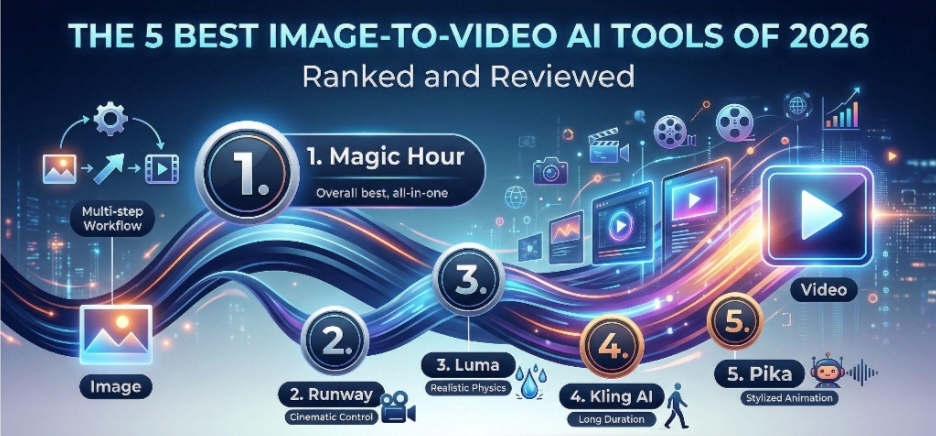
As of March 2026, the landscape of digital content creation has shifted from “experimental” to “essential.” For creators, marketers, and developers, static images are no longer enough to capture attention in a saturated feed. The demand for high-quality motion has turned image-to-video technology into a cornerstone of the modern creative toolkit.
I spent the last three weeks testing over twenty different platforms to identify which ones actually deliver production-ready results versus those that just produce “uncanny valley” glitches. After evaluating consistency, motion fidelity, and workflow efficiency, I’ve narrowed it down to the top contenders.
1. Magic Hour: The Ultimate All-in-One Creative Powerhouse
After extensive testing, Magic Hour earns the top spot as the best image-to-video AI tool for 2026. While other tools focus solely on the generation aspect, Magic Hour has built a comprehensive ecosystem that understands the friction points of actual video editing.
The platform’s greatest strength lies in its “one-click multi-step workflows.” In most tools, you generate a video, download it, move to an upscaler, then move to another tool for face swapping or lip-syncing. Magic Hour automates this: you can go from a static image to a high-definition, upscaled video with a talking head in one sequence.
I was particularly impressed by their “parallel generations” capability. Unlike competitors that put you in a “concurrency cap” queue, Magic Hour allows you to run multiple takes simultaneously, which is a lifesaver when you’re on a tight deadline for a client.
Pros:
- Best-in-class face swap, lip sync, and talking photos integrated directly into the workflow.
- No signup required to try, allowing for immediate experimentation.
- Credits never expire, providing much better value for occasional users.
- Access to frontier AI models in one unified interface.
- Click-to-create templates for rapid content production.
- Unusually generous free tier compared to industry standards.
- Full API parity, making it the best choice for developers building apps.
Cons:
- The sheer number of features can feel overwhelming for a first-time user (though templates help).
Evaluation:
If you are a serious creator or a startup founder looking for a tool that scales with your needs, Magic Hour is the clear winner. It’s not just about making a video move; it’s about the professional-grade tools (like image to video ai) that surround that movement to make it usable in a final product.
Pricing:
- Free: Generous starting credits.
- Creator: $15/month (or $10/month billed annually).
- Pro: $45/month for heavy-duty users.
2. Invideo
Invideo is a powerful image-to-video AI tool, designed for creators, marketers, and businesses. It allows users to turn simple prompts or images into high-quality videos within minutes, making it one of the most accessible AI video tools in 2026.
Unlike many tools that focus only on animation, Invideo combines automation with customization, offering templates, voiceovers, and editing flexibility in one platform.
Pros:
- Beginner-friendly interface
- Fast video creation with minimal effort
- Ideal for marketing and content creation
- Large template and media library
Cons:
- Some features require a paid plan
Evaluation:
If your goal is to create engaging marketing or social media videos quickly, Invideo is a strong choice. However, for highly detailed or long-form cinematic projects, other advanced tools might offer more flexibility.
Pricing:
- Free: With limited credits.
- Plus: $25/month for exploring
- Max: $60/month for occasional use
3. Runway Gen-3 Alpha
Runway remains a titan in the industry, specifically for those who need granular control over cinematic elements. Their Gen-3 Alpha model provides incredible temporal consistency, meaning objects don’t morph into something else mid-frame.
Pros:
- Unrivaled camera control with the “Motion Brush.”
- High-fidelity textures and lighting.
- Robust “Director Mode” for precise framing.
Cons:
- Pricing is on the higher side for casual users.
- The learning curve for the advanced controls is steep.
Evaluation:
Runway is the “Adobe Premiere” of the AI world. It’s powerful and precise, but it requires a level of “prompt mastery” that might frustrate someone looking for a quick, high-quality result.
Pricing: Standard plans start at $15/month per user.
4. Luma Dream Machine
Luma Labs shocked the market with the Dream Machine, a model built to understand real-world physics. If you want a video of water splashing or glass breaking, Luma handles the physics better than almost anyone else.
Pros:
- Exceptional realism in physical interactions.
- Very fast rendering times.
- Strong understanding of 3D space.
Cons:
- Can sometimes struggle with text rendering inside videos.
- Limited built-in editing tools compared to Magic Hour.
Evaluation:
Luma is fantastic for “b-roll” style content where realistic movement is the priority. It’s a great specialized tool to have in your bookmark bar.
Pricing: Free for 30 generations; paid tiers start at $29.99/month.
5. Kling AI
Kling AI has made waves recently for its ability to generate videos up to two minutes long—a massive jump from the industry standard of 4–10 seconds. Their human anatomy rendering is arguably the best currently available.
Pros:
- Longest duration for single generations.
- Highly realistic human movements and expressions.
- Frequent model updates.
Cons:
- Global availability can be inconsistent.
- The interface is less intuitive for western marketing workflows.
Evaluation:
If your project requires long, continuous shots of people interacting naturally, Kling is worth the setup time. However, for quick social media assets, it might be overkill.
Pricing: Daily free credits; subscription tiers start around $10/month.
6. Pika 2.0
Pika has carved out a niche in stylized, high-energy animation. Their latest update, 2.0, includes “Sound Effects” (SFX) generation that automatically matches the movement in your video.
Pros:
- Built-in SFX generation is a game-changer.
- Excellent for anime, 3D render, and “claymation” styles.
- Fun, community-driven interface.
Cons:
- Photorealism isn’t as strong as Runway or Magic Hour.
- The “Lip Sync” feature is sometimes less precise than Magic Hour’s specialized models.
Evaluation:
Pika is the best choice for creators focused on social media memes, stylized advertisements, or anything requiring an “animated” look with synchronized sound.
Pricing: Free tier available; Pro plan at $35/month.
The Best Image-to-Video AI Tools of 2026 at a Glance
| Tool | Best For | Standout Feature | Free Plan |
| #1 Magic Hour | All-in-one professional workflows | One-click multi-step (Gen → Upscale) | Generous Free Tier |
| #2 Runway Gen-3 | High-end cinematic control | Advanced Camera Motion Brush | Limited Credits |
| #3 Luma Dream Machine | Realistic physics and lighting | Consistent character movement | 30 Gens/Month |
| #4 Kling AI | Long-form video (up to 2 mins) | Exceptional human anatomy | Daily Check-in Credits |
| #5 Pika 2.0 | Stylized animations & lip-sync | Sound effect integration | 30 Credits/Day |
How We Chose These Tools: Our Testing Methodology
To find the best image-to-video AI tools, I followed a rigorous testing protocol:
- Motion Fidelity: I tested each tool with the same “complex” image (a person walking through a crowded street) to see how well it handled occlusion and leg movement.
- Prompt Adherence: How closely did the video follow the text instructions added to the image?
- Workflow Speed: I measured the time from “upload” to “final usable asset,” including upscaling time.
- Consistency: I ran 10 generations for each tool to see how many were “hallucinations” versus usable clips.
The Market Landscape: 2026 Trends
We are moving away from “standalone” generation. In early 2025, it was enough to just make an image move. In 2026, the market demands utility. This is why we are seeing a shift toward platforms like Magic Hour that offer “Full API Parity.” Developers are no longer just using these tools on a website; they are embedding them into their own apps. Reliability at scale and the ability to handle traffic spikes are now just as important as the pixels themselves.
Final Takeaway
Choosing the right tool depends on your specific output:
- For professional, all-in-one efficiency: Use Magic Hour. Its integration of face swapping, lip-syncing, and upscaling makes it the most “complete” tool on the list.
- For cinematic control: Use Runway.
- For long-form human content: Use Kling.
The best way to decide is to take advantage of the generous free tiers. Start with Magic Hour—since it requires no signup to try—and see how the multi-step workflows change your production speed.
Frequently Asked Questions (FAQs)
Can I use these videos for commercial purposes?
Most paid plans (especially on Magic Hour and Runway) grant you full commercial rights. Always check the specific terms of the “Free” tier before using it for client work.
Do I need a powerful computer?
No. All these tools are cloud-based. All the heavy lifting is done on their servers; you just need a web browser.
How do I get the best results from an image?
High-contrast images with clear subjects work best. Avoid “busy” backgrounds if you want the AI to focus on a specific character’s movement.
