

Although the process of live streaming happens quickly, the videos tend to be short-lived. This is a major issue for viewers, researchers, or individuals wishing to create content, as once the live stream comes to an end, it may no longer be available. Earlier on, live streaming was recorded manually through the process of screen recording locally. This was a method that involved missing the beginning of the video, abrupt stops, loss of pictures, or storage space shortage on the phone.
Now things are different. Digital media has improved, and the industry uses cloud tools that can save high-quality video straight from main servers. This guide shows how saving live streams has changed over the years. You will see why cloud storage is better than using your own device, and learn How to Watch TikTok Live Archives (tiktok ライブ アーカイブ 見る方法) with tools that do the work for you.
1. The Early Eras of Live Streaming Recording: Device-Level Screen Recording
Direct Answer
Device-side screen capture means using a screen recorder on your computer or smartphone. It captures each video frame as you see it on your screen. This can work if you need short clips. But this way is limited by what your device can do. You also have to keep an eye on things yourself while recording.
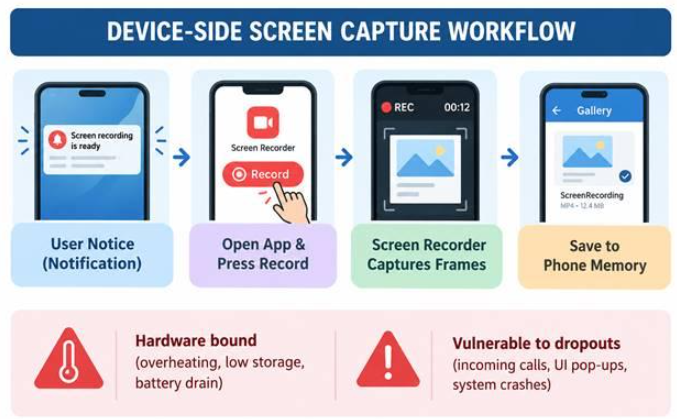
Technical Limitations of Manual Recording
● Battery Drain: Screen capturing requires a lot of battery power, as the process needs the device to be able to analyze streams and make videos at once. Consequently, the device becomes hot, and the battery gets exhausted quickly.
● Storage Concerns: In order to record an hour-long quality stream, one requires between 1.5 and 3 GB of storage capacity on the device. Consequently, the storage capacity will go down rapidly, even causing recording interruptions midway.
● On-Screen Problems: There are several instances where different notifications, calls, and alerts pop up on the screen. These remain on the screen in the recorded video.
● Stream Data Loss: To be able to record a stream, an individual needs to watch the stream right from the start of it. This means that by joining late, one will lose the initial half of the stream.
2. The Technological Paradigm Shift: 24/7 Server-Side Cloud Repositories
Direct Answer
Cloud server archiving ensures that videos can be recorded without needing your personal phone or computer. The recording is not of the content on your device screen, but rather the cloud server directly links to where the video is taking place and gets the full HD video stream.
Key Architectural Advantages
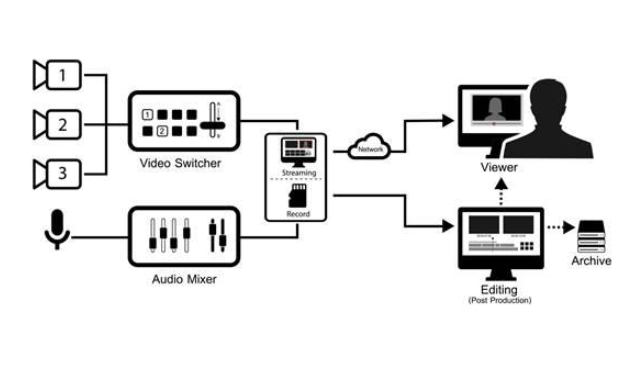
- Independence from Any Device: Recording is done on distant cloud servers; therefore, your phone or computer could be switched off, operated in flight mode, or even not connected to the Internet network. The recording will not be affected by this.
- Recording Replay: Contemporary cloud recorders track the streams continuously. In case you start recording after the stream begins, intelligent cloud servers gather the whole stream starting from the very beginning rather than from the moment you clicked the record button.
- Privacy and Anonymity: Server-based recording works independently. It does not require any chat rooms or viewers’ identification. Thus, your recorded videos remain private, and you do not participate in any public chats.
- Recording Multiple Streams: Cloud solutions provide flexibility in server locations for monitoring and recording multiple streams at the same time. There are no overlapping problems among channels.
3. Comparison: Manual Screen Recording vs. Automated Cloud Repositories
| Key Feature | Manual Device Screen Capture | Automated Cloud Repository |
| Execution Location | Local Mobile/Desktop Hardware | Off-Site Server Infrastructure |
| Phone Status Required | Screen On, Unlocked, Active App | Phone Off, Offline, or Airplane Mode |
| Storage Impact | Consumes Local Phone Memory | Saved to Expandable Cloud Storage |
| Stream Completeness | Captures only from button-press | Full broadcast from minute zero |
| Multi-Tasking Support | Interruptions during phone calls | Uninterrupted 24/7 background capture |
| Video Quality | Compressed screen-pixel capture | Original HD source stream quality |
4. Modern Live Stream Archiving Workflows
Direct Answer
Moving to an automated cloud archiving method happens in three main steps. First, you need to find the target profile. Next, set up the server to be watched automatically. The last step is remote cloud management.
1. Add Creator Username: No personal login required.
Type in the public name of the streamer on your cloud dashboard. You will not need to enter the platform password or log in with other details.
2. Automated Server Monitoring: The system always watches the cloud servers, both day and night.
Cloud servers keep checking public platform APIs all the time. As soon as the chosen creator starts to go live, the remote system starts to record right away in full HD.
3. See, Play, or Get: You can use cloud or local storage.
Stream archives are kept in big cloud storage spaces. Users can watch old streams whenever they want or they can save the files on their own device to keep them offline.
5. Overcoming Content Ephemerality: Unlocking Historical Streams
Direct Answer
The modern-day automated archives not only preserve live streams that will occur in the future but also maintain huge collections of content at all times. This way, individuals will be able to access and view those streams that were cut off some hours, days, and even weeks ago. There is no need to follow the creator during the streaming event.
Key Benefits for Digital Archivists and Content Researchers
● Elimination of Digital Loss: Stops important live shows, lessons, and art events from getting lost for good.
● Offline Availability: The easy exporting feature allows one to view high-quality video or audio offline, without having to wait for it to load.
● Cloud Storage Options: One can choose from various cloud storage options starting from 50 GB to even more, hence ensuring no lack of space.
Before you finish setting up your digital archiving, make sure you pick tools that let you do a direct TikTok Live Download (tiktok ライブ ダウンロード). This will help you save your live library without any trouble. It works on both iOS and Android, so you can back up everything with ease.
Frequently Asked Questions
Can cloud archives record live streams if my phone is turned off?
Yes. Cloud recording happens fully on remote servers. So your phone can be off, not online, or in airplane mode, and it will not stop the stream from being recorded.
Does automated recording capture live streams from the very beginning?
Yes. New server-side archiving methods take in the stream right from when it starts. This helps you get the full video, even if you turn on the system after the first part of the stream.
Is my profile visible in the live viewer list when cloud recording?
No. Cloud archives work by using server requests outside of your social media accounts. They do not log into any personal accounts. This makes the process private and does not show who you are.
Conclusion
The move from saving screens on your device to using automated cloud storage is a big step forward in how we keep digital media safe. This way, you do not fill up your phone or run your battery down. Recordings also do not get stopped. The cloud-based storage option is very convenient not only for the fans but also for the creators and researchers. Once you arrange an automatic cloud-based storage system, you can be sure that you will never miss another live broadcast. The live broadcasts remain safe to view at any moment in the future.
