

When a business operates across several locations, keeping everyone connected becomes more complicated. Employees need reliable access to cloud applications, shared databases, communication tools, and internal systems, whether they work at headquarters or a regional branch.
A slow connection at one office can delay customer orders, interrupt meetings, and prevent employees from accessing essential information. As businesses expand, these disruptions become harder to manage without a clear network strategy.
The solution is not simply to purchase faster internet. Enterprises need an infrastructure that connects their locations reliably, protects business data, and adapts to changing demands.
1. Identify the Connectivity Needs of Each Location
Not every office uses the network in the same way. A headquarters might handle large data transfers, while a retail branch depends on payment systems and inventory software.
Understanding these differences helps businesses allocate resources more effectively.
Start by evaluating:
- Bandwidth requirements: How much data does each location typically use?
- Application priorities: Which systems must remain available throughout the working day?
- Connection reliability: How much downtime can each location tolerate?
- Local infrastructure: Which internet services are available at each site?
- Future demand: Will employee numbers, applications, or data usage increase?
This assessment helps IT teams identify underperforming connections and prioritize upgrades based on business needs.
It also prevents organizations from paying for unnecessary capacity at locations that require less bandwidth.
2. Simplify Network Management With SD-WAN
Traditional wide area networks can become difficult to manage as businesses add more offices. Network teams may need to configure individual devices, troubleshoot separate connections, and adjust routing policies manually.
Software-defined wide area networking (SD-WAN) offers a more flexible alternative.
SD-WAN uses software-based policies to manage traffic across available connections. It can help organizations direct applications along suitable network paths based on factors such as performance, availability, and business priorities.
For example, video conferencing requires consistent performance, while routine file downloads may tolerate some delays. Network policies can prioritize these different needs.
Businesses looking to simplify connectivity across multiple locations can use an sd-wan managed service to manage network traffic and support consistent application performance.
The right solution should match the organization’s existing infrastructure, security requirements, and internal IT resources. Businesses should also assess how easily the network can accommodate new branches without extensive reconfiguration.
3. Don’t Overlook Last-Mile Connectivity
Even an advanced network depends on the connection serving each physical location. This is known as last-mile connectivity, the link between a business site and the provider’s network.
If that connection is unreliable, employees may experience slow applications or complete service interruptions, regardless of how well the rest of the network performs.
Consider a company with a well-connected headquarters and several regional offices. If one branch relies on an unreliable local connection, employees there may struggle to access centralized business applications.
To reduce these problems, evaluate the following before selecting a provider:
- Availability of fiber, broadband, or alternative access technologies
- Expected installation and repair times
- Service-level agreements and uptime commitments
- Available bandwidth and upgrade options
- Possibility of using physically diverse connection routes
Reviewing site connectivity options can help businesses assess the access infrastructure needed to connect individual locations to their wider network.
The objective is to ensure that each site has a connection suited to its operational importance, rather than assuming every location needs the same solution.
4. Create a Backup Plan for Network Outages
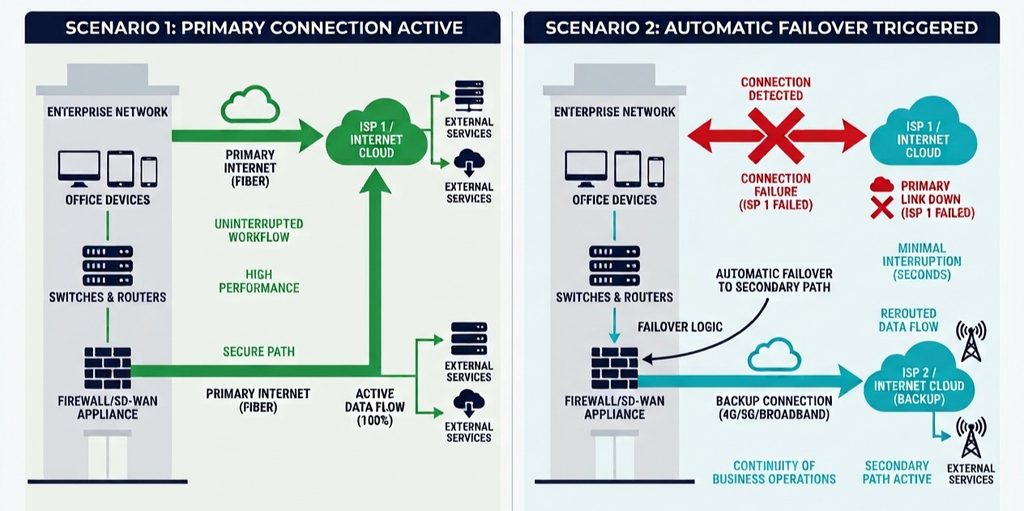
Internet outages can result from equipment failures, damaged cables, power interruptions, or provider maintenance. For businesses that depend on cloud applications, even a short interruption can affect productivity and customer service.
Redundant connectivity helps reduce this risk by providing an alternative connection when the primary service fails.
Depending on the location, a backup could involve a second internet provider, a separate physical route, or a wireless connection.
However, having two connections does not automatically guarantee resilience. If both services depend on the same underlying infrastructure, a single failure could disrupt them simultaneously.
Businesses should also determine which applications deserve priority during an outage. A backup connection might not have enough capacity to support every system at once.
A practical approach: Test failover regularly, verify that backup connections have sufficient capacity, and document the steps employees should follow during an interruption.
5. Apply Consistent Security Policies Across Sites
Connecting multiple locations creates more entry points that businesses must protect. Each office, device, and remote connection needs appropriate security controls.
Without consistent policies, one poorly configured branch can create unnecessary risks for the wider organization.
Enterprises should focus on a few essential measures:
- Access control: Give employees access only to the systems they need.
- Encryption: Protect sensitive information as it travels across networks.
- Network segmentation: Separate guest Wi-Fi, business devices, and critical systems.
- Regular updates: Keep network equipment and security software updated.
- Continuous monitoring: Investigate suspicious activity and unexpected traffic changes.
Centralized management makes it easier to apply these controls consistently across different locations. The same logic applies to how businesses track and manage IT assets across onboarding, offboarding, and daily operations, since a network is only as secure as the visibility a business has into every device and account connected to it.
Security should also be considered when selecting network services, not treated as a separate task after deployment. This reduces configuration gaps as the business expands.
6. Monitor Network Performance Before Problems Escalate
A connection may appear operational while still delivering poor performance. Employees might experience delayed video calls, slow cloud applications, or interrupted file transfers even when the internet is technically available.
Monitoring helps IT teams identify these issues before they cause significant disruption.
Important performance indicators include:
| Metric | Why it matters |
| Latency | Measures how long data takes to travel between endpoints |
| Packet loss | Identifies data packets that fail to reach their destination |
| Jitter | Measures variation in packet arrival times |
| Bandwidth usage | Shows whether available capacity is becoming insufficient |
| Availability | Tracks whether network services remain accessible |
Centralized monitoring is especially valuable for organizations with many branches. It allows IT teams to compare performance across locations and identify recurring problems without relying entirely on employee complaints.
Businesses should also establish clear service-level expectations with providers, including response times, fault resolution, and availability commitments.
7. Prepare the Network for Future Growth
Connectivity requirements change as organizations adopt cloud platforms, introduce AI-powered tools, hire additional employees, and open new offices.
A network designed only for current demand may become a bottleneck within a few years.
Instead, businesses should review network capacity regularly and account for expected growth. This includes evaluating application requirements, increasing data volumes, and the potential need for additional connections.
Standardized configurations can also simplify expansion. When a new branch opens, IT teams should be able to apply established security policies and network settings without designing everything from scratch.
Cloud adoption deserves particular attention. Applications hosted outside the corporate office may require different routing and performance considerations from systems hosted locally.
Coordinating connectivity planning with cloud infrastructure, cybersecurity, and digital transformation initiatives helps organizations avoid expensive redesigns later. This kind of coordination matters even more once a business realizes what actually happens when different tech systems don’t work together, since a disconnected network strategy tends to create the exact same silos and inefficiencies as disconnected software does.
Build a Connectivity Strategy Around Business Needs
Reliable connectivity across multiple locations requires more than faster internet. Enterprises need appropriate network architecture, dependable access services, backup connections, consistent security policies, and ongoing performance monitoring.
The most effective approach begins with understanding what each location needs to accomplish. From there, businesses can prioritize investments, address weak connections, and establish standards that support future expansion.
With a well-planned network, organizations can reduce avoidable downtime, simplify IT management, and give employees more consistent access to the tools they depend on every day.
