
Artificial intelligence has transformed how designers, marketers, businesses, and content creators produce visual material. Tasks that previously required extensive illustration experience, photography resources, or complicated editing software can now begin with a written description and a capable image-generation model.
GPT Image 2 represents an important step in the development of AI image generation and editing. The model can turn descriptive prompts into visual content, work with image inputs, and support creative tasks ranging from product concepts to marketing graphics.
However, producing professional results involves more than entering a few words and downloading the first image. Image quality depends on prompt clarity, composition, reference material, editing instructions, and the creative decisions made after generation.
AI-generated images can also contain inaccuracies. Small typography errors, inconsistent product details, unexpected changes during editing, and misleading visual representations remain important considerations.
This guide explores seven practical ways to use modern GPT image-generation technology, how the process works, common business applications, essential prompting techniques, and methods for creating more consistent visual results.
What Is GPT Image 2?
GPT Image 2 is an artificial intelligence model developed by OpenAI for generating and editing images.
It accepts textual instructions and can also work with image inputs to produce visual outputs based on the requested changes.
The model was introduced as part of OpenAI’s image-generation technology in April 2026. Its capabilities include high-quality visual generation, flexible output dimensions, and image-based editing.
Since then, OpenAI has continued developing newer image-generation models, making it important to distinguish the capabilities of a particular version from those of later releases.
How AI Image Generation Works
Modern image-generation systems learn complex relationships between visual features and descriptive information during training.
When a person submits a prompt, the model uses the information to generate an image consistent with the requested content.
A prompt might describe a subject, background, lighting, camera perspective, artistic style, and intended purpose.
For example:
“A realistic product photograph of a matte black wireless headset resting on a wooden desk, illuminated by soft morning light, with a neutral studio background.”
The model interprets these instructions and generates a visual composition.
The result may need further editing to correct details, improve consistency, or better match the intended design.
Text-to-Image vs. Image-to-Image Generation
Text-to-image generation creates visual content using a written prompt.
Image-to-image workflows use an existing image alongside instructions.
For example, a user might upload a product photograph and request a different background while preserving the product’s appearance.
Image-based editing is useful when the project requires continuity with existing visual assets.
1. Write Detailed Prompts for Better AI Images
Prompt quality is one of the most important factors influencing AI-generated images.
A vague description may produce an attractive result, but it often leaves important creative decisions to the model.
Detailed instructions help communicate the desired outcome.
Describe the Main Subject
Begin by identifying what should appear in the image.
A subject might be a person, product, building, landscape, interface, or abstract concept.
Instead of writing “a modern office,” describe the specific environment.
For example:
“A contemporary creative agency workspace featuring a large monitor, drawing tablet, wooden desk, indoor plants, and warm natural light.”
This gives the model a more useful starting point.
Specify the Composition
Composition describes how visual elements are arranged.
Useful instructions include:
- Close-up product shot
- Wide-angle interior photograph
- Eye-level perspective
- Overhead flat-lay composition
- Centered subject
- Shallow depth of field
- Negative space for a headline
Composition is particularly important when images will be used in website banners, advertisements, and blog posts.
Describe the Lighting
Lighting affects the overall appearance and mood.
A product photographed under soft studio lighting may look very different from the same product photographed outdoors at sunset.
Consider whether the image should have daylight, warm evening illumination, dramatic side lighting, or a clean commercial studio appearance.
Define the Visual Style
Modern AI image generators can support different visual treatments.
Examples include photorealistic commercial photography, editorial illustration, watercolor artwork, cinematic scenes, and three-dimensional product concepts.
Choose a style that suits the final purpose.
A medical education article may require a realistic and restrained visual, while a fantasy game may benefit from imaginative illustration.
Sample Professional Prompt
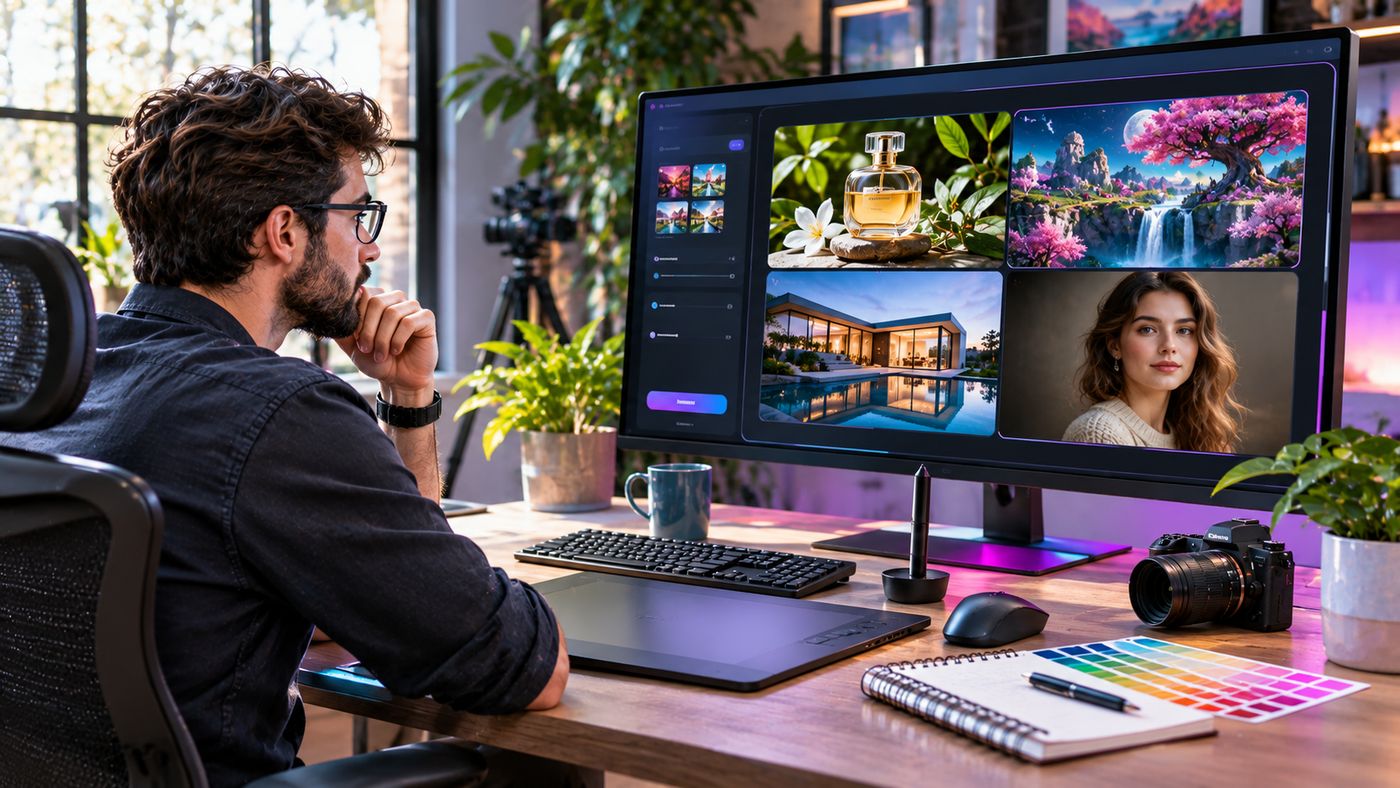
“Create an ultra-realistic editorial photograph of a digital designer working at a modern desk, reviewing colorful image-generation previews on a large widescreen monitor. Include a drawing tablet, professional camera, neutral workspace, natural daylight, authentic human proportions, balanced composition, and sharp product details. Landscape 16:9 format, without branding or watermarks.”
The prompt establishes the subject, surroundings, style, and technical expectations.
2. Create Marketing and Advertising Visuals
AI image generation can support businesses producing content for digital campaigns.
Marketing teams regularly need visuals for social media posts, newsletters, website banners, and promotional materials.
Social Media Campaigns
Different social platforms use different image dimensions and creative formats.
A single campaign might require a square image, vertical story, and wide promotional banner.
AI-assisted generation can help explore compositions designed for these placements.
However, users should confirm that important subjects remain visible after resizing.
Advertising Concepts
Before investing in a full production campaign, marketers can use generated images to explore visual ideas.
For example, a travel company might compare beach, mountain, and urban themes for an upcoming promotion.
These concepts can support internal discussions and help teams choose a direction.
Blog Featured Images
Content publishers may use generated visuals to illustrate informative articles.
A unique image should reflect the actual article topic rather than relying on unrelated stock-style visuals.
For SEO purposes, publishers should also use descriptive filenames, meaningful alternative text, and appropriately compressed files.
Maintain Brand Consistency
AI outputs should follow the company’s established colors, visual style, and messaging.
Generated results may need manual refinement to match brand guidelines.
An image generator should support creative direction rather than replace it.
3. Improve AI Product Photography and E-Commerce Images
Online shoppers rely heavily on product photographs.
Clear visual presentation helps buyers understand appearance, materials, and design details.
AI image generation can assist with certain aspects of product photography and creative planning.
Generate Lifestyle Concepts
Businesses can create illustrative lifestyle scenes showing how products might appear in different environments.
For example, a furniture brand could explore a chair in several interior design settings.
A cosmetics company might experiment with backgrounds, lighting, and decorative arrangements.
Create Background Variations
Image editing tools can help replace or refine backgrounds.
A product initially photographed against a plain surface might be presented in a styled environment.
However, the product itself should remain accurate.
Changing its dimensions, color, packaging, or functionality could mislead customers.
Explore Packaging Concepts
Designers can generate preliminary ideas for labels, boxes, and promotional presentations.
These should be treated as visual concepts rather than final print-ready artwork.
Important details such as ingredient information, safety notices, trademarks, and legal declarations require verification.
Preserve Product Authenticity
Generated content should not imply that an unverified feature exists.
For example, AI-generated images should not depict accessories, materials, or capabilities that a product does not actually include.
When using synthetic lifestyle photographs, businesses should consider appropriate disclosure and applicable advertising rules.
4. Use Image Editing to Refine Existing Visuals
Image generation becomes more useful when creators can modify an existing result instead of starting again.
Editing workflows allow users to request targeted changes.
Change Backgrounds
A creator might replace an office background with a studio setting.
A good editing instruction should specify which elements must remain unchanged.
For example:
“Replace the background with a bright contemporary studio. Preserve the subject’s facial features, clothing, pose, and proportions.”
Adjust Lighting and Atmosphere
Editing can help explore different lighting conditions.
A daylight scene might be transformed into an evening composition with warm interior lights.
However, lighting changes may affect textures and fine details.
Review the image carefully after every significant edit.
Remove Unwanted Objects
Some image editing workflows can remove distracting objects from a scene.
This may be useful for general creative material, but it requires caution in documentary, journalistic, or evidentiary contexts.
Removing objects can change the factual meaning of an image.
Maintain Character Consistency
Projects involving recurring people or fictional characters benefit from visual continuity.
Reference images may help preserve clothing, hairstyles, appearance, and other characteristics.
Nevertheless, consistency is not guaranteed.
Creators should check facial features, accessories, hands, and other details across outputs.
5. Explore Text Rendering and Graphic Design
Text within generated images can be useful for posters, packaging concepts, social graphics, and promotional materials.
However, accurate text rendering remains an important quality-control consideration.
Creating Posters
A poster combines imagery, typography, and visual hierarchy.
An AI model can help create early concepts based on detailed layout instructions.
A prompt might describe the headline position, main artwork, typography style, and color palette.
Product Packaging Concepts
Generated mockups can help designers visualize how packaging may look in different settings.
However, exact product copy should always be checked.
AI-generated spelling, punctuation, legal text, and brand names may contain mistakes.
Multilingual Visuals
Some modern image models can generate text in multiple languages.
Performance varies depending on the language, typography, image complexity, and requested layout.
Avoid assuming that every character will be correct.
Finalize Important Text in Design Software
When precise wording is essential, a practical workflow is to generate the visual background and add the final text using professional graphic design software.
This allows designers to control fonts, spacing, alignment, and accessibility more reliably.
Review Third-Party Feature Claims
Some online image-generation platforms advertise highly accurate typography and image consistency.
For example, the third-party GPT Image 2 website promotes text-to-image and image-to-image generation, multilingual text rendering, realistic imagery, and different output resolutions.
Its website describes a prompt-based workflow in which users select a model, enter instructions, choose image settings, and generate an output.
These descriptions explain the service’s advertised functionality. Claims such as error-free text, exact character consistency, or particular generation speeds should be evaluated through independent testing rather than assumed.
The site is separate from OpenAI’s official API documentation.
6. Generate Visual Concepts for Websites and Applications
AI image generation can also support user interface and product design.
Designers often need illustrations, conceptual screens, background graphics, and visual directions before finalizing a digital product.
Website Hero Images
A hero image is a prominent visual near the top of a webpage.
AI can generate illustrations or photographs that support the page’s message.
For example, a cybersecurity company might use a concept involving secure networks and digital infrastructure.
A hospitality website might use an inviting restaurant interior.
Application Mockups
Generated interface concepts can help teams discuss potential layouts.
However, a rendered image of an application is not the same as functional software.
Buttons, forms, navigation, and interactive components still need to be designed and implemented.
Visual Design Exploration
Designers can experiment with color palettes, shapes, textures, and visual styles.
This can help teams compare alternatives before investing in detailed production.
Create Supporting Illustrations
AI-generated images may serve as supporting graphics for onboarding screens, educational pages, and presentations.
Consistency matters when several illustrations appear within the same product.
Validate Accessibility
Generated visuals should be reviewed for legibility, contrast, and visual complexity.
Text added to an image should remain readable across relevant screen sizes.
Where necessary, use actual interface text and accessible components instead of embedding essential information into a static illustration.
7. Build an Efficient AI Image Production Workflow
Professional image creation often involves several stages.
Using a repeatable workflow can improve quality and reduce unnecessary revisions.
Step 1: Define the Objective
Identify the image’s intended purpose.
A featured blog image requires different composition choices from a product listing, advertisement, or presentation slide.
Step 2: Identify the Required Dimensions
Choose a suitable aspect ratio and output size.
Common examples include:
| Application | Common aspect ratio |
|---|---|
| Blog featured image | 16:9 |
| Square social media image | 1:1 |
| Vertical story | 9:16 |
| Portrait editorial graphic | 4:5 |
| Presentation visual | 16:9 |
Exact pixel dimensions should reflect the publishing platform’s requirements.
Step 3: Create a Detailed Prompt
Describe the main subject, background, style, composition, lighting, and important restrictions.
Avoid contradictory instructions.
Step 4: Generate and Review
Inspect the first image for visual quality and factual accuracy.
Look carefully at hands, faces, product details, typography, reflections, and object relationships.
Step 5: Refine Specific Problems
Use targeted editing instructions rather than rewriting the entire prompt unnecessarily.
For example:
“Keep the existing composition unchanged. Remove the extra object from the desk and preserve the monitor, lighting, and subject.”
Step 6: Prepare the Final Asset
Resize the image to its intended dimensions.
Compress the file while maintaining acceptable quality.
For website use, descriptive image filenames and appropriate alternative text improve content accessibility and organization.
Step 7: Perform Final Quality Checks
Confirm that the delivered image matches its stated purpose.
Check licensing conditions, intellectual property concerns, platform policies, and any necessary disclosure requirements.
GPT Image 2 vs. Traditional Design Tools
AI image generators and conventional design applications serve complementary purposes.
| Capability | AI image generation | Traditional design software |
|---|---|---|
| Initial visual concepts | Fast prompt-based creation | Often manually assembled |
| Precise typography | Requires verification | Strong manual control |
| Photo-style visuals | Can generate synthetic scenes | Uses photography and editing |
| Layered design control | Depends on platform | Usually extensive |
| Brand consistency | Requires careful review | Supports reusable assets |
| Image editing | Prompt-based capabilities | Detailed manual tools |
| Functional UI development | Not supplied by a static image | Requires separate design/development tools |
AI image generation is particularly valuable for ideation and visual exploration.
Traditional design tools remain important when the work requires exact typography, editable layers, production specifications, or detailed manual control.
How to Choose an AI Image Generator
Choosing an image-generation platform involves more than comparing example galleries.
Verify the Model Being Used
A platform may advertise a particular AI model while operating as a third-party interface.
Ask whether it actually provides access to that model and how its service is delivered.
Compare Output Quality
Test the system with realistic prompts relevant to your projects.
Look for consistent subject representation, appropriate composition, and accurate details.
Evaluate Editing Capabilities
Some platforms support image uploads and modifications.
Others focus primarily on text-to-image generation.
Check the tools required for your workflow.
Review Pricing
Image-generation services may charge per image, credit, subscription, or API usage.
Before purchasing, examine resolution-based charges, credit expiration, refunds, and commercial-use conditions.
Check Privacy Policies
Uploaded reference photographs may contain personal or confidential information.
Review how the platform handles uploads, generated images, retention, and access.
Confirm Commercial Usage Terms
Creators should understand the service’s terms before using images in advertisements, merchandise, client projects, or other commercial applications.
Rights and restrictions can vary across platforms.
Common Mistakes When Using AI Image Generators
Using Vague Prompts
A short prompt may leave too many creative decisions unspecified.
Add relevant details about composition, subject, lighting, and style.
Expecting Perfect Results Immediately
Generated images may need multiple revisions.
Inspect important details before publishing.
Ignoring Image Authenticity
Synthetic product imagery should not misrepresent real merchandise or actual customer results.
Forgetting Copyright and Privacy Considerations
Avoid uploading material without appropriate rights or permission.
Be careful when generating images of identifiable people or using existing brand assets.
Publishing Incorrect Text
AI-generated words may contain errors.
Check headlines, labels, prices, and other important information.
Neglecting File Optimization
Large images can slow websites.
Use appropriate dimensions and compression for the intended platform.
Assuming Every Model Version Has Identical Features
Image-generation technology evolves quickly.
Capabilities, pricing, supported sizes, and editing options may differ across models and service providers.
Is GPT Image 2 Suitable for Professional Projects?
GPT Image 2 can support creative projects, but suitability depends on specific requirements.
For concept art, editorial illustrations, and marketing drafts, AI-assisted generation may be a productive starting point.
For projects requiring precise physical dimensions, legally regulated labels, verified documentary imagery, or exact product representation, additional review and specialized tools are essential.
Businesses should establish clear approval procedures for generated content.
The most effective approach combines AI-assisted production with human creative direction and quality control.
The Future of AI Image Generation
Image-generation technology continues to advance through improvements in visual fidelity, editing precision, output formats, and workflow integration.
Newer image models can support increasingly sophisticated creative tasks.
Developers can also integrate image generation into applications through supported APIs.
However, rapid technological improvement does not eliminate the need for trustworthy content practices.
Organizations must still address intellectual property, transparency, privacy, and the potential for misleading images.
Professional creators will benefit most from treating AI as a tool that expands creative options while preserving human accountability for the finished work.
Frequently Asked Questions
1. What is GPT Image 2?
GPT Image 2 is an OpenAI image-generation model that supports creating and editing visual content from text and image inputs. Its exact capabilities depend on the model version and service used.
2. Can GPT Image 2 generate realistic images?
Yes. It is designed for high-quality image generation, including realistic visual styles. However, users should inspect generated details because errors and inconsistencies remain possible.
3. Can GPT Image 2 edit existing photos?
Yes. Supported workflows can accept image inputs and editing instructions. Results depend on the requested changes, image complexity, and platform capabilities.
4. Is gptimage-2.co the official OpenAI website?
No official affiliation was established from the site’s publicly available information. It is a separate website using GPT Image branding. OpenAI’s official model and API information is available through its own developer documentation.
Conclusion
GPT Image 2 demonstrates how AI-powered image generation can support creative production, marketing, product visualization, and digital design.
By combining clear prompts, appropriate reference material, careful editing, and human review, creators can improve the usefulness of generated images.
The best results come from treating AI as a creative assistant while maintaining responsibility for accuracy, originality, and the quality of published content.
