
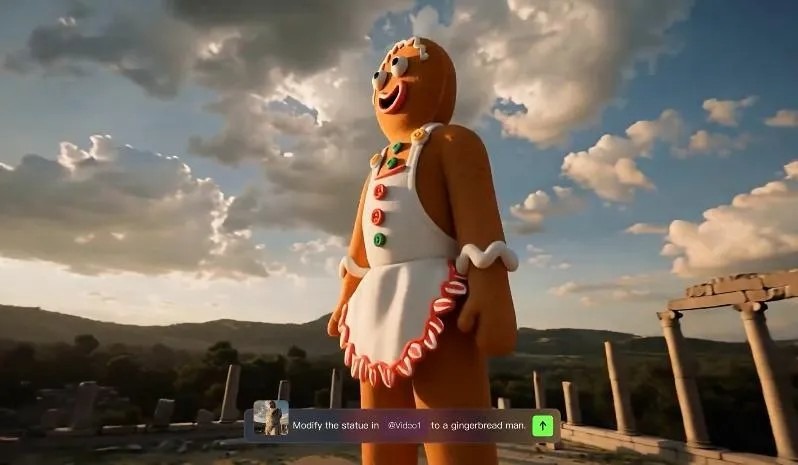
An AI video generator turns written instructions into animated scenes by analyzing language, visual context, motion, and timing. Instead of editing clips manually, you describe what should happen, and the system builds frames that match your prompt. This process combines natural language understanding with video generation models trained on large amounts of visual and motion data. The result can range from short concept clips to polished cinematic sequences. Modern tools also add features that make outputs more usable, such as character consistency, camera control, audio generation, and lip-sync. Understanding how text-to-video AI works helps you write better prompts, avoid common mistakes, and get results that look closer to what you imagined from the start.
From Written Words to Moving Scenes
What Is a Text-to-Video AI Generator?
A text-to-video AI generator is a tool that creates video content from a written prompt. You describe a subject, action, setting, mood, camera angle, or visual style, and the AI converts that description into a sequence of moving images. Unlike a basic image generator, it must keep objects, people, and motion coherent across many frames. That means it handles not only appearance, but also movement, timing, and scene continuity. Some systems also support image-to-video creation, where a static image becomes an animated clip. More advanced platforms can generate audio, dialogue, and lip-sync within the same workflow. Their purpose is simple: reduce production time while making video creation more accessible to creators, marketers, educators, and teams.
What Can You Create From a Text Prompt?
A text prompt can produce many types of video, from short social clips to cinematic scenes, product visuals, explainers, animations, and concept trailers. You can describe a person walking through a rainy street, a spacecraft landing on a frozen planet, or a clean product shot with slow camera movement and studio lighting. Text-to-video AI can also create stylized scenes, such as realistic footage, illustrated animation, or dramatic film looks. With more advanced generation, you can build multi-shot sequences instead of a single brief clip. Kling 3.0, for example, supports text-to-video and image-to-video creation, native audio and lip-sync, strong character consistency from reference images, and up to 15-second multi-shot cinematic output in 4K, which expands what a prompt can realistically produce.
How Does an AI Video Generator Work?
Step 1: AI Reads and Understands Your Text Prompt
The first step is language interpretation. The AI breaks your prompt into meaningful parts, identifying the subject, environment, actions, style, camera direction, and emotional tone. If you write “a woman in a red coat runs through a foggy forest at dawn, handheld camera,” the model maps each phrase to visual concepts it has learned during training. It also interprets relationships between details, such as who is moving, where the action happens, and what atmosphere should dominate the scene. Strong systems understand modifiers like “slow motion,” “close-up,” or “cinematic lighting,” which shape the result. This stage matters because the AI can only build a strong video when your text clearly defines the core elements it needs to generate.
Step 2: AI Turns the Prompt Into Moving Frames
After understanding the prompt, the ai video generator generates a stream of frames that visually match the description and connect smoothly over time. It predicts how subjects should look in each moment, how they move, and how the background changes as the action progresses. The model must maintain continuity, so a face, object, or costume stays consistent from one frame to the next instead of shifting unpredictably. Motion is equally important: walking, turning, speaking, and camera movement all need believable transitions. Many systems generate a rough visual structure first, then refine details such as lighting, texture, and timing. If audio is included, the AI can also align speech and lip movement, creating a more complete video rather than a silent sequence of animated frames.
How to Turn Text Into an AI Video
Write a Detailed Video Prompt
A strong prompt gives the AI clear creative direction. Start with the main subject, then describe the action, setting, visual style, mood, camera angle, and lighting. For example, instead of writing “a dog in a park,” write “a golden retriever runs through a sunny city park, slow-motion shot, warm afternoon light, shallow depth of field, joyful mood.” Specificity helps the model make better decisions and reduces random results. Include movement cues such as “panning shot,” “close-up,” or “wide cinematic view” when needed. If character consistency matters, mention reference images or defining traits. Keep the prompt focused and visual. Strong prompts do not overload the model with unrelated details; they prioritize what must appear clearly on screen.
Generate, Review, and Refine Your Video
Once your prompt is ready, generate the first version and evaluate it like an editor. Check whether the subject looks correct, motion feels natural, and the scene matches your intended tone. If something is off, revise the prompt with clearer instructions rather than starting over blindly. You might tighten the camera direction, simplify the action, or add details about pacing and composition. Refinement is where quality improves most. Generate again, compare outputs, and keep adjusting until the video feels coherent. If your tool supports storyboard controls, reference images, or built-in audio, use them to guide the result more precisely. The best AI videos usually come from short feedback loops: prompt, review, revise, and regenerate with sharper creative intent.
Conclusion
An AI video generator turns text into video by first understanding your written instructions, then transforming those instructions into a sequence of coherent moving frames. The quality of the result depends on two things: how well the model handles motion, continuity, and scene detail, and how clearly you describe what you want. That is why better prompts lead to better videos. A useful workflow is straightforward: define the subject and action, generate a first draft, review the output, and refine the prompt until the scene matches your goal. As these tools improve, text-to-video creation becomes faster and more practical for both quick ideas and polished production. Knowing how the process works helps you create stronger, more accurate, and more visually compelling AI-generated videos.
