
When shopping for home internet, you usually come down to a handful of options, and cable and DSL still show up on most lists. Both connections run through wires already in your walls, yet they behave quite differently once you start streaming, working, or gaming.
This guide compares speed, reliability, price, and availability so you can choose what fits your home and budget.
How Cable and DSL Reach Your Home
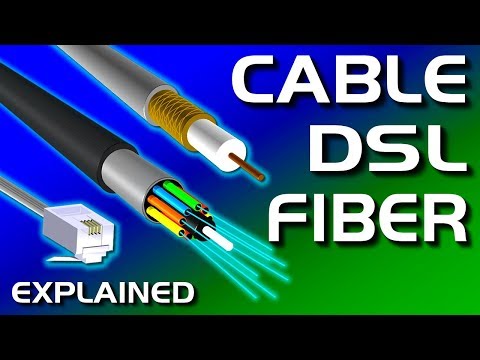
Cable internet travels over the same coaxial lines that bring cable TV into your home. DSL, short for digital subscriber line, uses the copper telephone wires that phone companies installed decades ago. Both reuse existing networks, which explains why they spread so quickly and why so many households still have access to at least one.
According to our source at a renowned Wisconsin fiber internet provider, both technologies rely on infrastructure that nobody designed with today’s data demands in mind. Coaxial and copper cables carry signals as electrical pulses, and those pulses weaken and pick up interference over distance. That limitation caps what either connection can deliver.
The wiring itself shapes your experience in practical ways. Coaxial cable has a much higher capacity than a thin pair of copper phone wires, so cable plans can push far more data at once. Copper lines, on the flip side, run straight from your home to the provider’s equipment, so you don’t share that line with the neighbors.
Fiber internet sits in a different category altogether. It sends data as pulses of light through glass strands, letting it reach symmetrical gigabit speeds and stay steady over long distances. You’ll still find cable and DSL in plenty of areas, though, so it pays to know how these two compare before you sign anything.
Speed and Performance Head to Head
Cable pulls ahead most clearly on speed. Most cable providers offer plans from 100 Mbps to 1 Gbps, and some areas offer multigigabit options. DSL usually tops out around 25 to 100 Mbps, depending on the line type. Upload speeds lag behind on both, with cable often capping uploads at a fraction of its download speed.
DSL has one quirk that cable doesn’t share. The farther you live from the provider’s nearest hub, the weaker the signal gets, and your speed drops along with it. Households a few miles out can end up with a small slice of the advertised rate, so you should always ask what speed your exact address can actually get.
Cable has its own weak spot, and it shows up in the evening. Cable customers in the same neighborhood share bandwidth through a common node. When everyone gets home and starts streaming at once, that shared pipe fills up, and speeds can dip noticeably until the rush dies down later at night.
Response time matters as much as raw speed for gaming and video calls. Both connections fall within a similar range, with cable usually responding slightly faster than DSL. A stable ping, the delay between your click and the server’s reply, keeps your character from lagging in online matches and stops your voice from cutting out halfway through a work meeting.
Pricing, Contracts, and Hidden Fees
DSL usually costs less per month, with many plans landing somewhere between $40 and $60. Cable plans start around $50 and can climb well past $80 for the fastest tiers. The gap makes sense when you factor in speed, since cable often gives you more megabits per dollar.
Take a close look at introductory pricing before you sign up. Many providers advertise a low monthly rate that lasts only the first 12 months. After that, your bill can jump by $20 or more, so read the fine print and mark the promo expiration date on your calendar.
Equipment fees add up faster than most people expect. Renting a modem or gateway from your provider can cost $10 to $15 every month, which works out to well over $100 a year. Buying a compatible modem yourself usually pays for itself within a year, and installation fees can add a one-time charge.
Bundles can trim your total bill if you still want TV or a landline. Cable companies love to package internet with TV channels, while phone companies often pair DSL with home phone service. Just make sure you’ll actually use everything in the bundle, because paying for channels you never watch can cancel out the discount.
Availability in Rural and Urban Areas
DSL’s biggest advantage might be its reach. Because it runs over telephone lines, it can show up in small towns and rural areas where no cable company ever laid coax. For plenty of households outside city limits, DSL has long been the only wired option besides satellite or fixed wireless.
Cable covers most cities and suburbs, and the networks keep expanding into denser parts of the country. If you live in a town with cable TV service, odds are good that you can order cable internet too. Competition in these areas also keeps prices in check, since many homes can pick between cable, fiber, and wireless providers.
DSL won’t stick around forever. Several major phone companies have stopped selling new DSL connections and shifted their money into fiber instead. If you sign up for DSL today, there’s a real chance your provider retires the service in the coming years and nudges you toward a newer and pricier plan.
The easiest way to see your real options is to check by address. Enter your street address on provider websites or the FCC’s National Broadband Map, which lists the services available at specific locations. Ask your neighbors about their experience too, since advertised speeds and real speeds don’t always match.
Which Connection Suits Your Household
If you mostly check email, browse news sites, and stream a show now and then, DSL can handle the job without breaking a sweat. A 25 Mbps plan covers HD streaming on one screen with room to spare. You’ll save money every month and still get a steady connection that rarely drops when the neighborhood gets busy.
Remote workers need more than decent download speeds. Video calls, cloud backups, and large file transfers lean heavily on upload speed, and that’s where DSL starts to struggle. A midrange cable plan gives you more breathing room, although you might notice some slowdowns if your workday runs into the evening rush.
Big households connect many devices at once. Phones, laptops, smart TVs, game consoles, and smart home gadgets all compete for the same bandwidth. Cable makes more sense here, since a 300 to 500 Mbps plan keeps everyone online without constant buffering or arguments over who’s hogging the Wi-Fi.
Gamers and heavy streamers will hit DSL’s limits pretty quickly. Large game downloads, 4K streams, and live broadcasting all demand fast speeds and low latency. Cable gets the nod over DSL for this crowd, but if fiber reaches your street, grab it, since it handles all three with ease.
Making the Final Call Between Cable and DSL
Cable and DSL both get you online, but they suit different needs. Cable offers faster speeds and more plan options, while DSL provides a cheaper, unshared line that works well for light use.
Before you commit, check which providers serve your address and compare the full cost after promos and equipment fees. If fiber shows up on that list, take a serious look.
