
Creating professional visual content has traditionally required specialized design software, technical skills, and significant production time. From marketing campaigns and product photography to digital illustrations and social media graphics, creative professionals often manage multiple applications to complete a single project.
An AI Creative Canvas offers a more connected approach by bringing artificial intelligence tools into a visual workspace where users can generate images, explore variations, edit existing assets, and develop creative ideas.
Instead of working with isolated outputs, creators can organize their process around references, prompts, and successive design decisions.
Platforms such as Banana Pro AI illustrate how image generation, editing, and video creation can be combined into connected workflows.
Whether you are a small business owner, digital marketer, content creator, or graphic designer, understanding these tools can help you create visual assets more efficiently while maintaining control over quality and originality.
This guide explains how an AI creative workspace works, its key features, practical applications, and seven steps for getting better results.
What Is an AI Creative Canvas?
An AI Creative Canvas is a visual workspace that allows users to create and organize digital content using artificial intelligence.
Unlike a basic AI image generator, which typically accepts a prompt and returns an image, a canvas-based environment can support multiple related creative tasks.
Users may work with reference images, text prompts, generated artwork, editing instructions, and connected workflow components within the same project.
Some systems use an infinite canvas, allowing creative elements to be arranged across a flexible workspace rather than within a fixed page.
How Does an AI Creative Canvas Work?
The process usually begins with a creative idea.
A user enters a description, uploads a reference image, or combines several visual elements.
An AI model then produces an initial result based on those instructions.
The creator reviews the output and decides what needs improvement.
Depending on the platform, the next step might involve modifying the background, changing the visual style, generating additional versions, or developing a short video sequence.
More advanced systems allow these stages to be connected as a repeatable workflow.
The result is a more organized process for developing visual ideas from concept to final production.
Understanding Banana Pro AI and Its Creative Canvas
Businesses and creators exploring an AI Creative Canvas can review Banana Pro AI, a browser-based creative platform offering image generation, AI editing, video creation, and connected visual workflows.
According to its official website, Banana Pro AI combines several creative capabilities within one environment.
Its platform describes text-to-image generation, image-to-image transformation, an AI image editor, an assets library, and a node-based canvas workflow.
The company also advertises access to multiple image and video generation models, allowing users to explore different visual approaches.
A Connected Creative Workspace
One of the platform’s central ideas is connecting creative tasks.
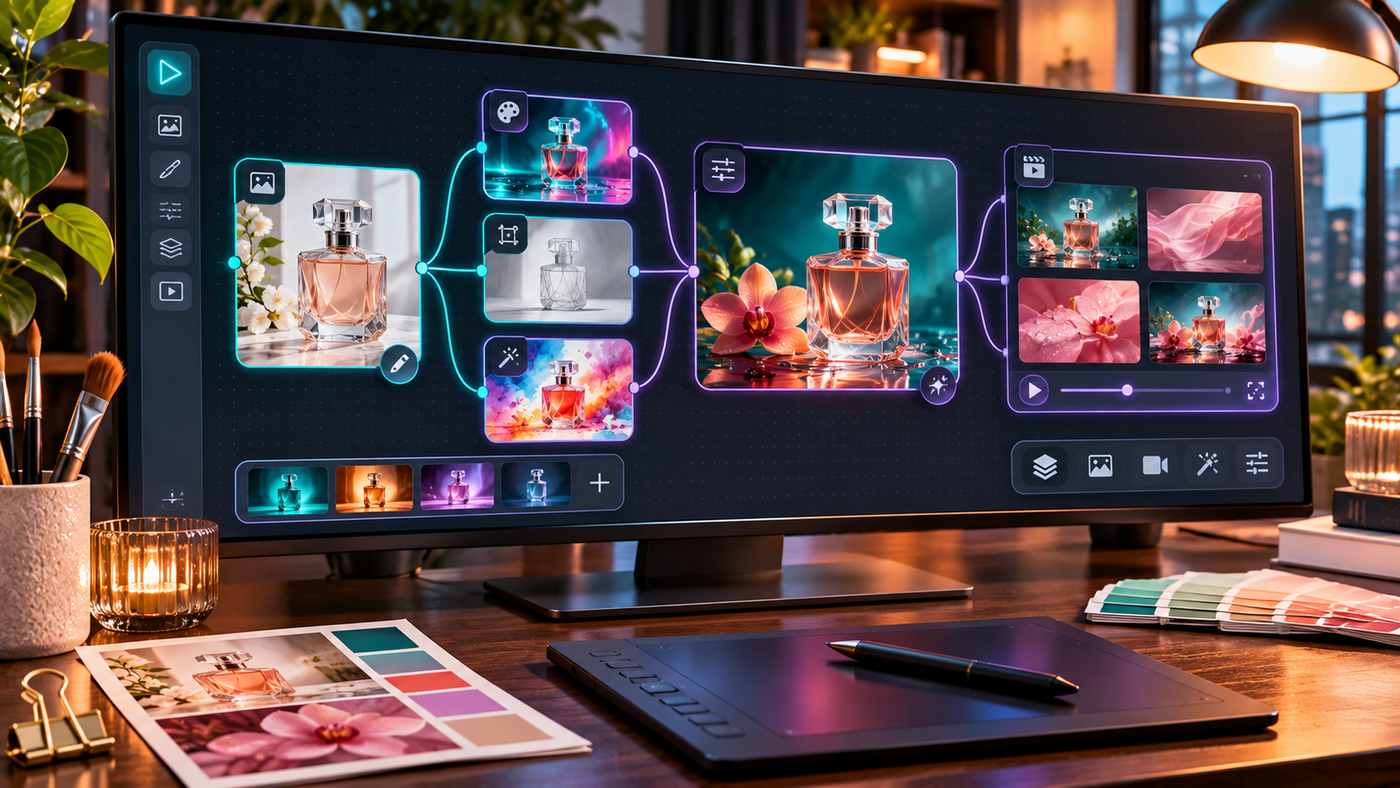
For example, a user might generate a product photograph, create several background variations, and then use a selected result as a reference for a video.
Instead of treating each generated asset as an unrelated file, the workflow can preserve relationships between creative stages.
Banana Pro AI describes this approach as a visual, node-based system.
A node represents a creative operation, such as generating an image, editing an existing visual, or preparing a video output.
Connected nodes can help users understand how each stage contributes to the final result.
Image and Video Creation
The platform’s official descriptions include tools for generating new images from written instructions and transforming existing pictures.
Its video features are designed to support text-to-video and image-to-video creation.
Actual capabilities, model availability, generation limits, and output quality depend on the selected tools and account settings.
Users should review current platform information before committing to a particular production workflow.
Key Features of an AI Creative Canvas
Several capabilities make canvas-based systems useful for creative work.
Text-to-Image Generation
Text-to-image tools transform written descriptions into visual outputs.
A creator might describe a premium skincare product on a marble surface with soft natural lighting.
The AI uses that description to produce an interpretation of the requested scene.
Greater clarity about composition, colors, materials, and intended use generally makes the instructions easier to evaluate and refine.
Image-to-Image Editing
Image-to-image tools begin with an existing visual rather than generating everything from scratch.
Users may upload photographs, product images, sketches, or reference artwork.
They can then request changes to lighting, background, visual style, or other elements.
This approach is particularly useful when an existing image already contains important details that should be preserved.
However, AI editing can unintentionally change product shapes, faces, or other critical features.
Connected Workflow Nodes
Node-based systems make creative processes more visual.
A single source image can potentially lead to several style variations, which can then be compared or developed further.
This provides a structured way to explore alternatives without losing sight of the original concept.
Creative Asset Organization
A useful workspace should make generated files easy to locate.
Banana Pro AI describes an assets library that organizes previous generations, uploaded materials, prompts, and creation details.
Keeping these records can help teams reproduce successful visual directions and avoid repeating unnecessary work.
7 Powerful Ways to Use an AI Creative Canvas
1. Build Professional Product Photography Concepts
Ecommerce businesses need attractive product images that communicate materials, colors, and important details.
An AI canvas can help explore different backgrounds and creative presentations without arranging a separate photoshoot for every concept.
For example, a perfume brand could begin with an approved product photograph and experiment with botanical backgrounds, luxury studio lighting, or seasonal settings.
The essential requirement is maintaining accurate product representation.
Generated images should not introduce misleading packaging details, incorrect product dimensions, or nonexistent features.
2. Create Consistent Social Media Campaigns
Social media campaigns often require several related visual assets.
A brand may need Instagram graphics, promotional images, website banners, and supporting illustrations.
Using a shared creative direction can improve visual consistency across these materials.
Start with a brand palette, reference imagery, and an agreed composition style.
Generate variations for each placement while reviewing whether the results still match the brand’s identity.
Final typography and promotional claims should be checked carefully before publication.
3. Explore Multiple Artistic Styles
AI image tools can help creators explore different visual directions.
A single idea might become a watercolor illustration, cinematic photograph, minimal product render, or editorial-style digital artwork.
This flexibility is useful during brainstorming.
Instead of selecting the first attractive image, compare several approaches according to the intended audience and communication goal.
A children’s educational project may require friendly illustrations, while a luxury furniture campaign may benefit from realistic architectural photography.
4. Improve Existing Visual Assets
Businesses frequently have usable photographs that need refinement.
An AI image editor can assist with conceptual background changes, lighting adjustments, and alternative compositions.
For example, an online retailer might explore how the same product looks against neutral studio backgrounds and lifestyle environments.
However, image editing should not replace necessary quality control.
Check edges, shadows, reflections, product labels, and other details after every important modification.
5. Develop Marketing Storyboards
A storyboard organizes the visual stages of a planned advertisement or video.
A creator can begin with a central image and develop related scenes showing different angles or moments.
For a coffee brand, the sequence might include ingredients, preparation, pouring, and the final serving.
An AI canvas can help visualize these stages before investing in complete production.
Consistent lighting, products, and scene continuity remain important.
6. Test Creative Directions Before Production
Creative teams often spend time debating ideas that are difficult to visualize.
AI-generated concepts can make those discussions more concrete.
A marketing manager might compare a minimalist campaign with a colorful lifestyle concept before approving a production direction.
The purpose is not to treat every AI-generated image as a finished deliverable.
Instead, use the early results to clarify preferences, identify problems, and establish a stronger creative brief.
7. Build Reusable Creative Workflows
Repeated design tasks can become more efficient when the process is documented.
For example, a business producing weekly promotional content may follow the same sequence:
- Collect product information and references.
- Generate initial image concepts.
- Compare visual styles.
- Refine the selected direction.
- Prepare final dimensions and formats.
- Review and export approved assets.
A reusable workflow helps improve consistency while giving designers room to make creative decisions.
How to Write Better AI Image Prompts
A strong prompt gives the AI enough information to interpret the intended scene.
Begin with the subject, then describe the setting, visual style, composition, lighting, and output requirements.
Example of a Detailed Creative Prompt
“Create a premium editorial photograph of a handmade ceramic coffee mug on a natural oak table, with soft morning sunlight, subtle botanical greenery, warm neutral tones, realistic ceramic texture, shallow depth of field, and a clean landscape composition. No text or visible branding.”
This description establishes a clear subject and visual direction.
It also avoids unnecessary instructions that might compete with the main concept.
Refine One Element at a Time
If the first result is close to your goal, avoid changing every instruction simultaneously.
Start with the most important problem.
You might request warmer lighting, more space around the product, or a different camera angle.
Review the new output before making further changes.
This approach makes it easier to understand which instructions improve the result.
AI Canvas vs. Traditional Design Software
AI canvas tools and traditional design applications serve different purposes.
Traditional software gives designers precise control over layers, typography, vector paths, measurements, and individual elements.
Generative AI tools are particularly useful for concept development, stylistic exploration, and producing visual alternatives from natural-language instructions.
However, AI outputs are not always delivered as fully editable designs.
A generated image may look like a layered composition while remaining a flattened file.
For projects requiring accurate branding, print specifications, or detailed typography, traditional design software may still be necessary.
Many professionals benefit from combining both approaches.
They use AI for concept exploration and conventional tools for final corrections and production.
How to Maintain Visual Quality and Brand Consistency
Visual consistency becomes increasingly important when generating multiple campaign assets.
A business should define its core colors, typography preferences, photography style, and product presentation requirements.
Use the same approved reference materials across related projects.
When generating variations, review whether important features remain stable.
For example, a handbag should not change its number of handles between images, and packaging should not display invented product information.
Maintain a simple approval checklist covering composition, product accuracy, colors, text, resolution, and intended placement.
Human review remains essential even when an AI platform supports sophisticated creative workflows.
Copyright, Privacy, and Responsible AI Use
AI-generated content introduces important considerations involving ownership, transparency, and intellectual property.
The US Copyright Office has explained that copyright protection depends on sufficient human authorship. Merely providing prompts does not automatically establish copyright protection for an entirely AI-generated image.
Creators should also avoid uploading materials they lack permission to use.
This includes confidential client assets, copyrighted references, and identifiable photographs used without appropriate authorization.
For commercial campaigns, review the platform’s current terms and applicable model-specific conditions.
Do not assume that every AI tool provides identical commercial usage rights.
Content Credentials and similar provenance technologies can help communicate information about how digital assets were created or modified.
Responsible use means understanding the limitations of the tools and accurately representing the content you publish.
Common Mistakes to Avoid
One frequent mistake is expecting perfect images from vague prompts.
Another is generating dozens of variations without deciding what constitutes a successful result.
Creators should establish clear objectives before beginning.
Avoid using AI-generated product images without checking accuracy.
Also consider the time and cost associated with repeated generations.
A workflow that creates unnecessary versions may consume resources without improving the final design.
Finally, avoid treating impressive visual quality as proof that an image is factually correct or legally suitable for every purpose.
Frequently Asked Questions
1. What is an AI Creative Canvas?
An AI Creative Canvas is a visual workspace that brings together AI image generation, editing, references, and connected creative tasks to help users develop digital content.
2. Can beginners use an AI creative workspace?
Yes. Many platforms accept natural-language instructions, making basic image generation accessible without advanced design experience. More complex workflows may require practice.
3. Does Banana Pro AI support image and video creation?
According to its official website, Banana Pro AI offers text-to-image generation, image editing, video generation, and a node-based canvas workflow.
4. Can AI-generated designs be used commercially?
Commercial use depends on the platform’s terms, the assets involved, intellectual property rights, and applicable laws. Review these requirements before publishing client or advertising content.
Conclusion
An AI Creative Canvas can help creators explore ideas, organize visual workflows, and develop images and videos through a more connected creative process.
Platforms such as Banana Pro AI demonstrate how image generation, editing, and workflow organization can operate within a shared environment.
The most effective results come from clear prompts, thoughtful experimentation, consistent references, and careful human review.
By combining AI assistance with creative judgment, businesses and designers can develop more purposeful visual content while maintaining quality and originality.
