
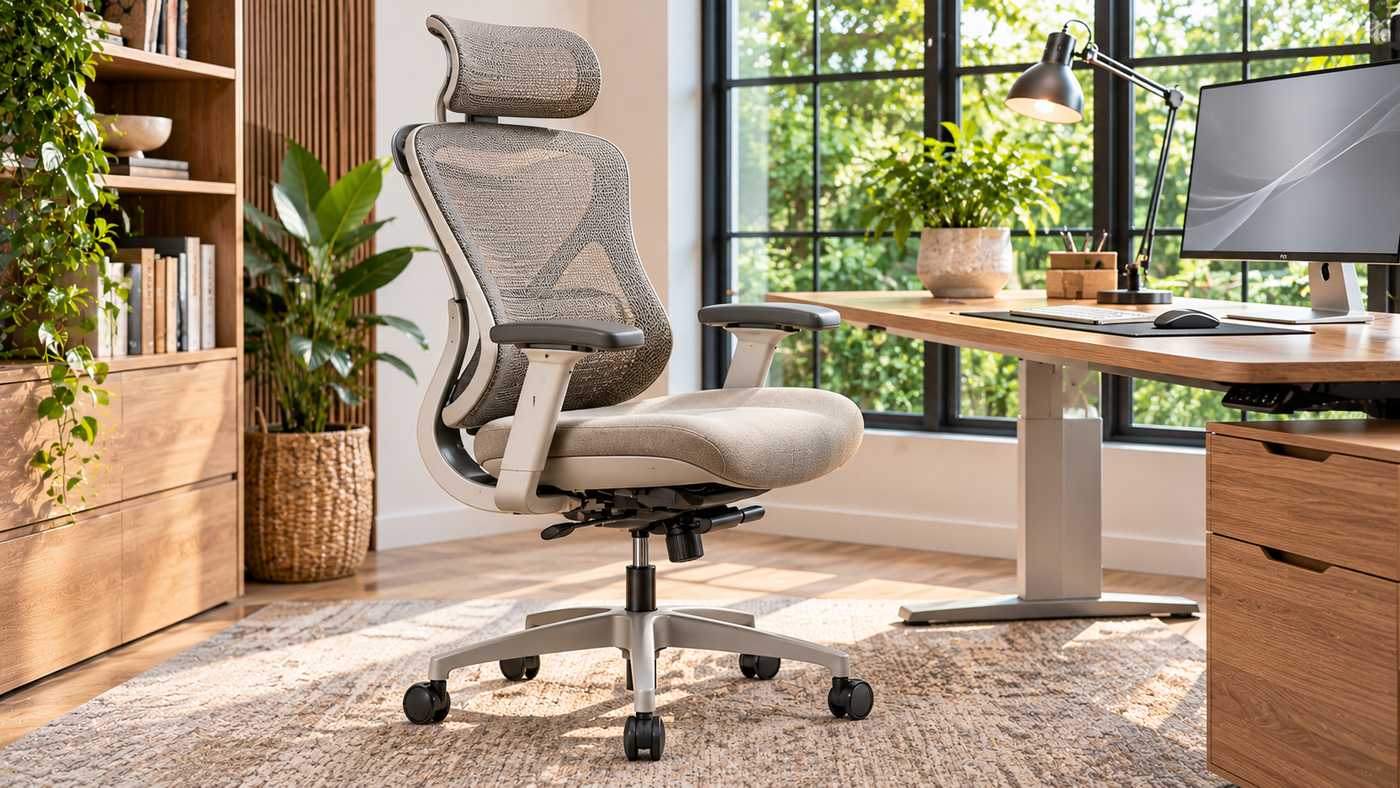
A chair can look supportive in a product photograph and still feel wrong after a normal workday. The Onyx Lira Ergonomic Office Chair is a search name associated with Eureka Ergonomic’s Lira chair, a model featuring a sculpted mesh back, adjustable seating controls, and a cushioned seat. Its appeal is not simply its appearance: the more important question is whether the seat, backrest, armrests, and recline can be adjusted to fit your body and desk. This guide examines the published specifications, offers seven practical fitting tips, and explains what to check before buying. It distinguishes manufacturer claims from what a particular user can verify through measurement and hands-on use.
What Is the Onyx Lira Ergonomic Office Chair?
The product page associated with the Onyx Lira Ergonomic Office Chair identifies the chair as the Lira, model ERK-OC65, by Eureka Ergonomic. That distinction matters because Eureka also sells a separate Onyx chair with different features and dimensions. Product descriptions, retailer titles, and website addresses can blur those names, so buyers should match the model number before comparing prices or reviews.
The Lira is presented as an office chair suitable for home and commercial workspaces. Its published features include a shaped backrest with breathable mesh, a padded seat, three-direction adjustable armrests, a reclining mechanism, and a five-star rolling base. These features create adjustment options, but they do not guarantee comfort or treat a medical condition.
Published Dimensions and Features
The manufacturer lists an overall size of approximately 25.4 inches deep, 25.6 inches wide, and 41.7 to 44.1 inches tall. It describes a seat height adjustment range of 18.1 to 20.5 inches, a seat width of 20.5 inches, an adjustable seat depth of approximately 18.1 to 20.01 inches, and a recline range of 90 to 135 degrees. The stated maximum weight capacity is 300 pounds, with a suggested user height range of 5 feet 1 inch to 6 feet 1 inch. These are manufacturer specifications rather than independently measured test results.
Check the Exact Listing Before Ordering
Product pages change, and variants can affect appearance or availability. Confirm the product code, current dimensions, colour, warranty, and included components with the seller. Do not assume photographs of another chair in the Onyx range describe this Lira model.
1. Start With Seat Height and Supported Feet
The first adjustment for the Onyx Lira Ergonomic Office Chair should usually be the seat height. Sit fully back rather than perching on the front edge. Set the chair so that your feet rest on the floor, or use a stable footrest if the correct desk height leaves them unsupported. Your knees and hips should feel relaxed, without pressure concentrated beneath the thighs.
A published height range is only useful if it accommodates your leg length and working surface. Similar sized people can have different proportions, so treat the suggested user height range as a guide, not a comfort guarantee.
Fit the Chair and Desk Together
Once seated, check whether your elbows can stay near your body while using the keyboard. Raising the chair may improve arm position but leave feet dangling; lowering it may help the legs while bringing the desk too high. A footrest or adjustable desk can resolve some mismatches without encouraging awkward posture.
A Quick Height Check
Place both feet securely, relax your shoulders, and type for several minutes. If you must shrug your shoulders, reach upward, or slide forward to work, change the overall workstation arrangement rather than treating the chair height as the only variable.
2. Adjust Seat Depth for Your Thighs
The Onyx Lira Ergonomic Office Chair lists a seat depth range rather than a single fixed measurement. That can help people with different thigh lengths, provided the mechanism operates as described and the chosen setting is comfortable. Slide back against the backrest, then check the distance between the seat’s front edge and the backs of your knees.
A seat that is too deep may press behind the knees or cause you to sit forward without back support. One that is too short can leave too much of the thighs unsupported. Leave a little clearance behind the knees while following the adjustment instructions.
Consider the Seat Cushion and Width
The manufacturer describes a molded foam cushion and lists a seat width of 20.5 inches. Cushion thickness alone does not tell you how it will feel after several hours. Foam firmness, pressure distribution, fabric, and your body shape all influence comfort. The Onyx Lira Ergonomic Office Chair should allow you to sit without feeling squeezed at the hips or having to balance on the edge.
Test More Than One Posture
Try both upright and relaxed positions. If pressure develops, revisit the depth and height settings.
3. Evaluate the Sculpted Backrest Carefully
A defining design feature of the Onyx Lira Ergonomic Office Chair is its curved backrest and one-piece frame. Eureka describes an adjustable body curve intended to change the support sensation. A visually prominent curve, however, does not establish that the same contour fits every spine. The practical test is whether the lower back feels supported while you can maintain a comfortable and varied sitting position.
Lumbar support should contact the region of the lower back that needs support without feeling like a hard pressure point. If the chair has a lever for altering the backrest curve, test each available position gradually and follow the model’s instructions. Avoid guessing at how a lever works from an image or confusing it with the separate Onyx chair’s lumbar mechanism.
Support Is Not the Same as Forced Posture
Good seating allows movement rather than enforcing one rigid posture. Adjust the support and change positions periodically.
When Back Discomfort Continues
If discomfort persists despite reasonable adjustments, consider the height of your monitor, your activity pattern, and the overall workstation. Recurring pain, numbness, or weakness warrants appropriate medical evaluation instead of assuming another chair setting will solve it.
4. Set the 3D Armrests for Relaxed Shoulders
The Onyx Lira Ergonomic Office Chair is listed with 3D armrests. This usually describes adjustment along three directions, although the precise range and mechanisms should be confirmed in the product instructions. Position them so your forearms can rest lightly while your upper arms stay near the torso and your shoulders remain relaxed.
High armrests can elevate the shoulders, while overly wide ones encourage reaching. Test them with your actual keyboard, mouse, and desk.
Check Desk Clearance Before Purchase
Measure the distance from the floor to the underside of your desk. A chair may fit your body well yet fail to move close enough to the keyboard because the armrests collide with the worktop. For the Onyx Lira Ergonomic Office Chair, verify armrest dimensions or the ability to adjust them sufficiently for your setup.
Armrests Should Not Carry Your Whole Posture
Use them for light support, not to push your shoulders upward or hold your torso in place. If you work better with your forearms supported by the desk surface, arrange the armrests so they do not interfere.
5. Use Recline as a Movement Option
The manufacturer advertises a 90 to 135 degree recline range for the Onyx Lira Ergonomic Office Chair. That range may provide options for upright computer work and for leaning back briefly. Whether a particular reclining angle feels stable depends on the mechanism, your body proportions, and the settings available for tension or locking.
Start with a position that lets you view the screen without craning your neck. Explore the reclining control slowly, using the installation or adjustment instructions. Do not force the back beyond its designed stops or lean sharply backward before understanding the movement. Always keep the base on a suitable level surface.
Why Changing Position Matters
Sitting for prolonged periods in one position can contribute to stiffness and fatigue, even in an expensive chair. Stand, walk, and change tasks regularly when practical. A recline feature is useful when it encourages variation, not when it becomes a reason to remain seated continuously.
Balance Recline With Screen Placement
Reclining changes your screen angle. If it makes you reach or tilt your neck, rearrange the workstation.
6. Consider Breathability, Materials, and Stability
The Onyx Lira Ergonomic Office Chair combines a mesh style back with a cushioned seat. Mesh can promote airflow, although temperature comfort depends on the room, clothing, and use. The padded seat offers a different feel from fully mesh seating.
Eureka specifies a class 4 gas piston and a five-star nylon base. Its marketing also mentions a Donati engineered aluminum mechanism. These terms refer to different components, so avoid interpreting the mechanism description as proof that the rolling base itself is made entirely of aluminum. What matters in everyday use is stable assembly, suitable rolling performance, and compliance with the published load limit.
Match Casters to Your Floor
The Onyx Lira Ergonomic Office Chair should move predictably without sliding too easily or catching on carpet. Check whether its supplied casters suit hardwood, vinyl, tile, or carpet in your workspace. A compatible chair mat can help protect some floors, but mat choice should follow the flooring maker’s guidance.
Inspect the Chair Before Daily Use
Confirm that the base is assembled correctly, wheels are seated securely, and controls work without unusual noise or movement. Loose or damaged components should be addressed through the seller or manufacturer rather than improvised repairs.
7. Evaluate Warranty, Assembly, and Long-Term Value
Consider servicing and returns as well as design. The Onyx Lira Ergonomic Office Chair is currently described by its manufacturer as having a five-year limited warranty. A limited warranty is not a promise that every part, cosmetic issue, or type of wear is covered, and the conditions should be reviewed before paying.
Ask about replacement parts, return shipping, packaging requirements, and damage claims. International buyers should confirm local warranty support.
Approach Assembly Methodically
Before assembling the Onyx Lira Ergonomic Office Chair, identify all components and compare them against the supplied parts list. Use the official instructions, arrange pieces on a protected floor, and avoid overtightening fasteners. If something does not align easily, recheck the sequence rather than forcing it into place.
Think Beyond the Initial Price
Long-term value depends on fit, workmanship, parts, and customer service. A discount means little if the chair does not suit your workstation.
How to Set Up a Complete Ergonomic Workstation
The Onyx Lira Ergonomic Office Chair is one component of a computer workstation, not a complete ergonomic system. Desk height, monitor position, keyboard reach, lighting, and regular movement all contribute to comfort. Occupational ergonomics guidance consistently treats the chair and desk as an integrated arrangement rather than independent purchases.
Align Your Screen and Input Devices
Place the monitor directly in front of you at a height that avoids repeatedly tilting your head. Keep the keyboard and mouse within easy reach, with elbows near your torso and wrists in a comfortable, relatively straight position. If you use a laptop for extended work, a separate keyboard and appropriate screen support may improve the arrangement.
Make Adjustments in a Sensible Order
Begin with stable foot support and a comfortable seat height. Next, set seat depth and back support, then adjust the armrests. Finally, match the desk and screen to the seating position. Retest after changing one setting because several controls affect one another.
Reassess After Real Work
A quick trial may miss problems that emerge during longer tasks. Test the chair longer where possible, or check the return conditions.
Who Might Find This Chair Suitable?
The Onyx Lira Ergonomic Office Chair may appeal to remote workers, students, designers, administrators, and people seeking a contemporary chair with multiple adjustments. Its combination of padded seating and a breathable back may suit buyers who do not want a fully upholstered executive chair. The sculpted form also works visually in minimalist home offices and collaborative workspaces.
Published height and weight ranges cannot guarantee individual fit. Compare adjustment ranges if your proportions or requirements are unusual.
When Another Chair Could Be Better
Someone who needs a headrest, very low seat height, unusually wide seat, specialised pressure management, or a particular medical accommodation should confirm those needs directly. The product’s published specification should not be stretched to imply options that are not listed. A qualified ergonomics practitioner may be helpful when adapting workstations for disability or persistent discomfort.
What to Check Before Ordering Online
For buyers researching the Onyx Lira Ergonomic Office Chair, the most effective comparison is a short list of measurable requirements rather than a collection of promotional adjectives. Confirm the model number ERK-OC65, seat height, depth, width, recline, weight limit, colour, warranty, and the exact controls available on the current version. Compare that information with the space beneath your desk and your preferred sitting position.
Ask for missing dimensions such as armrest clearance or base diameter. Review assembly and return terms; ratings do not guarantee a suitable fit.
A Practical Buyer Checklist
- Confirm the seller lists the Lira model and the correct product code.
- Measure seat and desk heights, leg clearance, and available floor space.
- Verify armrest movement, seat depth controls, and the reclining mechanism.
- Review the stated weight limit and warranty exclusions.
- Confirm the return process, delivery area, and support availability.
- Test the fit where possible, especially if you work for long periods.
Frequently Asked Questions
Is the Onyx Lira Ergonomic Office Chair the same as the Onyx chair?
No. The product page associated with this name identifies the Lira as model ERK-OC65. Eureka also lists a separate Onyx model with different specifications, so compare product codes carefully.
Does the Onyx Lira Ergonomic Office Chair have adjustable armrests?
Yes. The manufacturer lists 3D armrests. Confirm their precise range and adjustment procedure in the current product manual before relying on a particular setting.
What is the seat height range?
The published seat height range is approximately 18.1 to 20.5 inches. Whether that suits you depends on your leg length, footwear, desk height, and access to a footrest.
How far does the backrest recline?
Eureka lists a recline range from 90 to 135 degrees. Use the controls according to the manual and test whether the available positions remain comfortable for your tasks.
What is the stated weight capacity?
The manufacturer lists a maximum capacity of 300 pounds. Do not exceed the stated rating, and confirm the applicable specification for your exact chair version.
Can an ergonomic chair prevent back pain?
No chair can guarantee prevention or treatment of back pain. Appropriate fit, workstation arrangement, regular movement, and medical advice when symptoms persist are all important.
Conclusion
The Onyx Lira Ergonomic Office Chair offers a useful set of published adjustments, but the right choice depends on how those features work for your proportions and workspace. Check the exact Lira model, fit the seat and backrest carefully, and treat reclining and armrest controls as options for comfortable movement. Review warranty details and assembly instructions rather than relying only on appearance or marketing claims. A well-matched chair can support a better work setup, but it does not replace regular breaks or thoughtful desk ergonomics.
