
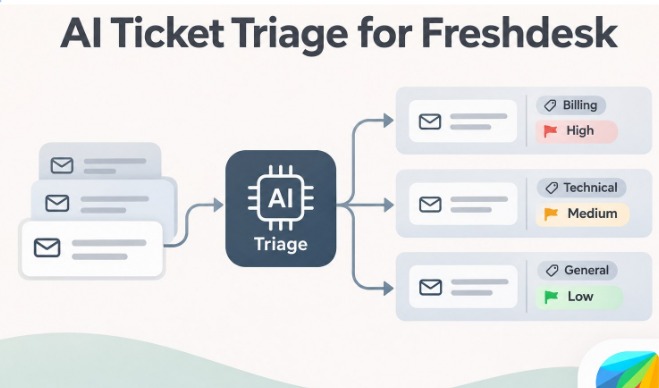
Every Freshdesk ticket goes through the same steps before anyone fixes the problem. Someone reads it, picks a type and priority, adds tags, sends it to the right group and then starts writing a reply. On a busy day, that sorting work alone can take hours, and mistakes push urgent tickets to the bottom of the queue.
AI can now do most of this sorting, and it can help agents with the reply as well. This list covers six tools that do some or all of that work for Freshdesk. Some answer customers on their own, some only tag and route, and some sit next to the agent and suggest what to write. Prices and Freshdesk support were checked on each vendor’s site in November 2026.
What “AI triage” means in Freshdesk
When vendors say triage, they usually mean one or more of these jobs:
- Tagging: labelling each ticket by topic, product or reason for contact.
- Field updates: setting type, priority and custom fields.
- Routing: sending the ticket to the right group or agent.
- Drafting: writing a suggested reply for an agent to check.
- Agent assist: summaries, article suggestions and tone fixes while the agent works.
Few tools do all five, so it is worth knowing which jobs matter most to your team before you compare.
Quick comparison
| Tool | Best for | Starting price |
| eesel AI | Tagging, routing, drafting and full replies from one AI teammate | $299/month for 500 credits (1 credit = 1 ticket or chat) |
| Freddy AI Copilot | Field suggestions and reply help inside Freshdesk itself | $29/agent/month (Pro and Enterprise only) |
| Forethought | Large teams that need trained triage models | Contact sales |
| SentiSum | Detailed topic tags, sentiment and routing for large teams | Contact sales (annual plan) |
| Macha | Drafting and sending replies with vendor-managed setup | From $299/month (about $0.40 per ticket) |
| Kommunicate | Turning chats into tagged Freshdesk tickets | $200/month Professional plan |
1. eesel AI: best all-in-one triage and reply tool
eesel AI works inside Freshdesk as an AI teammate. When a ticket arrives, it reads the message, checks your knowledge and then does what your rules say: add tags, set priority, fill in fields, leave an internal note with context, route the ticket to a group, draft a reply for review or answer the customer directly. You write those rules in plain language, such as “tag refund requests and send them to billing”, instead of building long automation chains.
It does not need thousands of labelled tickets to start. eesel learns from your existing tickets, solution articles and canned responses, and you can run it on past tickets to see how it would have tagged and answered them before you switch anything on.
Key features
- Tags, prioritizes, updates fields and routes tickets based on plain-language instructions.
- Drafts replies for agents to approve, or sends them itself once you trust it.
- Adds private notes that summarize the issue and point to the right answer.
- Uses knowledge from 3,000+ integrations, such as Shopify, Confluence, Google Drive and Notion, plus your own systems through their APIs.
- Works in more than 80 languages.
- Can be set up from the eesel CLI, and coding agents like Claude Code, Cursor and Codex can run that setup because the commands return JSON. The CLI and the dashboard control the same agent.
Pros
- Triage, drafting and replies are all billed per ticket, with no per-agent assist fee.
- Self-serve trial: 7 days and 100 credits, no card.
- Simulation on old tickets shows accuracy before go-live.
Cons
- It runs on top of Freshdesk, so your Freshdesk seats are still a separate cost.
- Above 5,000 tickets a month you need a custom plan from sales.
Pricing: $299/month for 500 credits and $499/month for 1,000 credits, with larger sizes up to 5,000. One ticket or chat is one credit. Extra credits are $0.80 each, up to a cap you choose.
2. Freddy AI Copilot: best built-in option
Freddy AI Copilot is Freshworks’ own assistant for human agents in Freshdesk. Its Auto Triage feature reads incoming tickets and suggests values for priority, type and group. Agents can accept the suggestions, or you can let Freshdesk apply them automatically. Copilot also suggests replies and summarizes long threads.
Key features
- Auto Triage suggestions for priority, type and group.
- Option to apply suggestions automatically.
- Requests for extra custom dropdown fields, reviewed by Freshworks.
- Reply suggestions and conversation summaries for agents.
Pros
- No outside vendor and nothing to connect.
- You can buy it for some agents only.
Cons
- Freshdesk recommends about 2,000 past tickets before type and group suggestions work well.
- Needs a Pro or Enterprise plan plus the add-on, so it is not available on Growth.
Pricing: $29 per agent per month on top of Freshdesk Pro ($55/agent/month) or Enterprise ($89/agent/month), billed annually.
3. Forethought: best for enterprise triage models
Forethought offers a triage product alongside its AI agents. It lists Freshworks among its supported helpdesks and is built for big teams with many queues, brands and workflows.
Key features
- Pre-built triage models for tagging and routing.
- AI agents for chat, email, voice and Slack.
- Multi-step workflows that take actions in other systems.
- Knowledge gap detection.
Pros
- Strong option when routing logic is complex.
- Proof of Value on your own data before you commit.
Cons
- No published pricing or self-serve trial.
- More than a small Freshdesk team will use.
Pricing: Contact sales.
4. SentiSum: best for detailed tagging and sentiment
SentiSum is an AI tool that reads every support conversation and applies detailed “reason for contact” tags. It has a Freshdesk integration that pushes those topic tags back into your helpdesk and routes tickets to the right team in real time, based on topic and sentiment. It also flags important customers for priority handling and turns the tags into trend reports.
Key features
- Granular topic tags on every ticket, across calls, chats, emails and surveys.
- Real-time routing based on topic and sentiment.
- Automatic prioritization of important customers.
- Trend analytics and alerts on what is driving contact volume.
Pros
- Tags are far more detailed than most manual tagging setups.
- Its team sets up integrations and tunes the tag list for you.
Cons
- It does not draft or send replies to customers.
- Sold as an annual enterprise plan, so it is a big step for small teams.
Pricing: Contact sales. SentiSum sells one annual plan with unlimited users, a free audit on your data first and a walk-away right in the first 90 days.
5. Macha: best for hands-off reply automation
Macha is an AI agent for Freshdesk, Zendesk, Gorgias and Front that focuses on answering tickets. Its team builds, tests and monitors the agent for you, so you get automation without spending weeks on setup.
Key features
- Works inside your Freshdesk views and macros.
- Simulation before launch and ongoing grading of replies.
- Custom API tools to look up data in your systems.
- Email, live chat and website chatbot coverage.
Pros
- Setup service is included at no extra cost.
- Per ticket billing and unlimited seats.
Cons
- Its focus is replies, not detailed tagging or field updates.
- The free trial starts after a discovery call.
Pricing: From $299/month, about $0.40 per ticket starting at 750 tickets. The trial includes $50 of usage.
6. Kommunicate: best for chat-to-ticket automation
Kommunicate is a chat platform with an AI bot and a Freshdesk integration. When a chat needs a human or a record, it creates a Freshdesk ticket with the requester, subject, tags and custom fields already filled in, so tickets arrive sorted.
Key features
- Creates and updates Freshdesk tickets from chats with tags and custom fields.
- Pushes conversation notes into the ticket and shows ticket status in the chat.
- Works on web, mobile apps and WhatsApp.
- AI summaries and agent assist on the Professional plan.
Pros
- Published pricing and a 30-day free trial, no card.
- Sorts chat tickets before they reach Freshdesk.
Cons
- It does not triage tickets that arrive by email.
- The Freshdesk integration is not on the cheaper Starter plan.
Pricing: Professional is $200/month, or $167/month billed yearly, with 2,000 conversations a month included.
How to choose a triage tool
Start with the job that costs you the most time today.
- If tickets sit unassigned, routing matters most. eesel AI, Forethought and SentiSum all route automatically.
- If your reports are messy, you need better tags. SentiSum goes deepest on tags and trends, and eesel AI tags as part of handling each ticket.
- If agents spend most time writing, look at drafting. eesel AI and Freddy Copilot both suggest replies, and Macha focuses on sending them.
- If you are on Freshdesk Growth, Freddy’s Auto Triage is not an option without upgrading, so a third-party tool is the faster path.
- If you have little ticket history, pick a tool that learns from your help articles and docs, not only from thousands of labelled tickets.
For more detail on Freshdesk’s own feature and its limits, read this guide to Freshdesk AI auto-triage.
FAQ
Does Freshdesk have AI ticket triage built in?
Yes, through Auto Triage in Freddy AI Copilot. It needs a Pro or Enterprise plan plus the Copilot add-on at $29 per agent per month.
Can AI route Freshdesk tickets without me writing automation rules?
Mostly, yes. Tools like eesel AI take plain-language instructions, and SentiSum routes based on the topics it detects. You still decide which groups exist and who handles what.
Should AI apply tags automatically or only suggest them?
Start with suggestions or drafts, check accuracy on a few hundred tickets, then switch on automatic updates for the categories the AI gets right.
