
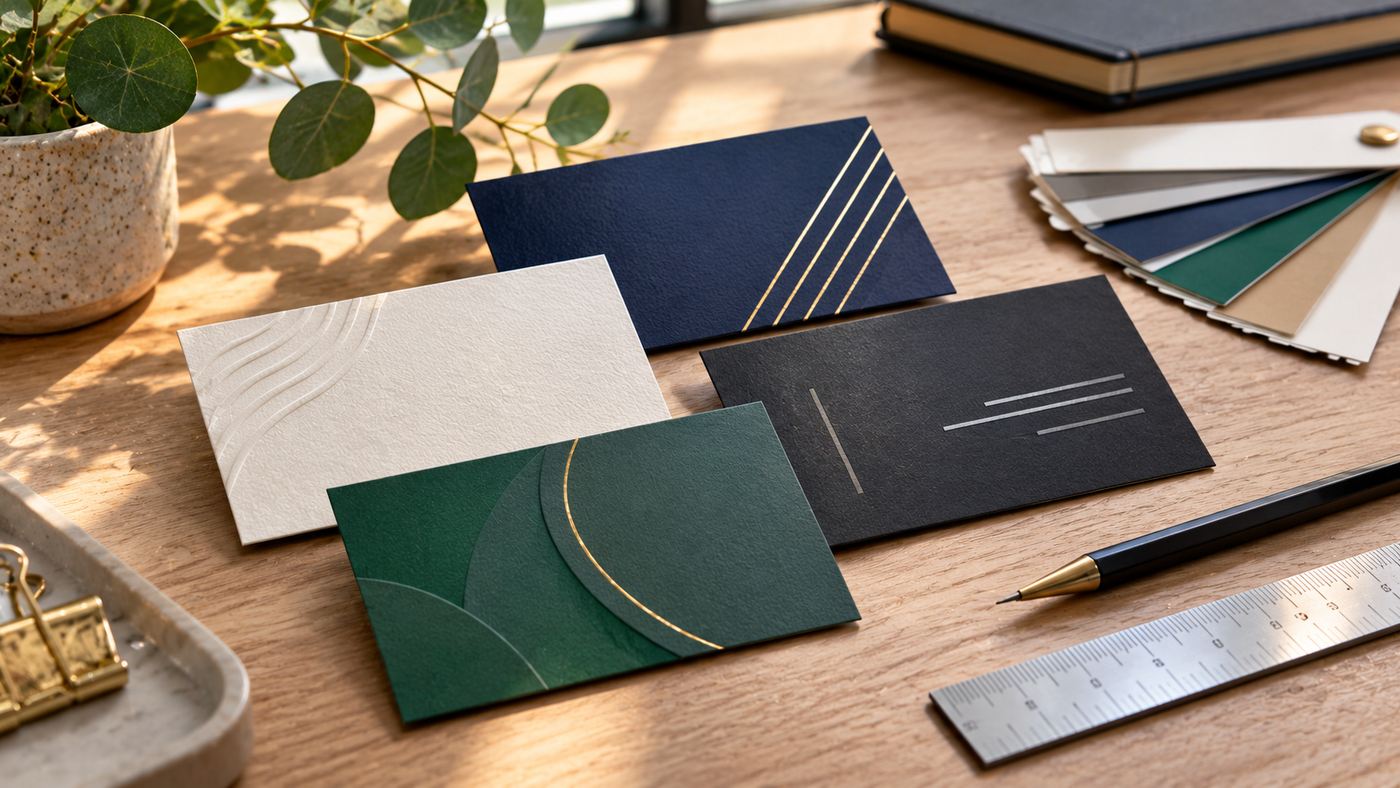
First impressions matter in business. Whether you are meeting a potential client, attending a networking event, launching a startup, or introducing your services, the way you present your brand can influence how people remember you.
Despite the growth of digital communication, business cards remain a practical way to exchange contact information and establish professional connections. A well-designed card communicates your name, company, role, and essential contact details in a compact and memorable format.
However, creating an effective business card requires more than adding a logo and phone number to a template. Typography, spacing, colors, materials, readability, and printing quality all affect the finished result.
Modern design platforms have made the process more accessible. Entrepreneurs can now explore customizable templates, use AI-assisted design tools, and prepare print-ready files without necessarily hiring a graphic designer for every project.
At the same time, convenience should not replace careful attention to brand consistency and accurate information.
This guide explores seven important business card design strategies, common mistakes, printing considerations, and ways to create cards that support a professional brand identity.
What Are Business Cards?
A business card is a small printed or digital item containing essential information about a professional or organization.
Traditional business cards usually include a person’s name, job title, company identity, and contact information.
They may also feature a website, QR code, business address, or social media profile.
Why Are Business Cards Still Important?
Digital communication has changed professional networking, but physical cards offer several practical benefits.
They allow people to exchange information without immediately opening an application or entering contact details into a phone.
They can also reinforce a company’s visual identity through colors, paper texture, and finishing techniques.
For businesses attending exhibitions or conferences, physical cards provide a convenient way for interested visitors to remember a contact.
However, a business card alone does not generate customers. Its usefulness depends on the quality of the relationship and the relevance of the services being offered.
Who Needs Professional Business Cards?
Business cards may benefit entrepreneurs, consultants, real estate professionals, photographers, designers, freelancers, financial advisers, contractors, and customer-facing employees.
They can also be useful for new companies introducing their brands at industry events.
The design should reflect the profession, business identity, and intended audience.
1. Choose a Business Card Design That Reflects Your Brand
A business card is a physical extension of your business identity.
Its design should communicate the same personality and values presented through your website, advertisements, and other marketing materials.
Understand Your Brand Personality
Consider how customers should perceive your business.
A corporate consulting company may prefer restrained typography, neutral colors, and a structured layout.
A creative studio may use expressive graphics and a more distinctive color palette.
A luxury service provider might choose understated details and premium paper finishes.
The correct approach depends on the audience rather than following every design trend.
Use Consistent Brand Colors
Colors help establish visual recognition.
Whenever possible, use the same primary and secondary colors that appear in the company’s logo and other brand assets.
Avoid introducing unrelated colors simply because a template looks attractive.
Position Your Logo Carefully
A logo should be recognizable without overwhelming essential contact information.
Give it adequate surrounding space.
Do not stretch or distort the artwork to fill an unsuitable area.
Consider Layout Orientation
Horizontal cards remain a common choice.
Vertical and square formats can also work when the content is arranged effectively.
Unusual dimensions may create printing and storage challenges, so consider practical compatibility before selecting a format.
Maintain a Clear Visual Hierarchy
The most important information should stand out.
Usually, the person’s name, company name, or logo receives the greatest emphasis.
Secondary information can use smaller text, provided it remains readable.
A strong hierarchy makes the card easier to scan.
2. Include the Right Information Without Overcrowding
One of the most common business card mistakes is trying to include too much information.
A small card has limited space.
An effective layout prioritizes the details recipients need most.
Essential Business Card Information
Common information includes:
- Full name
- Job title or professional role
- Business or brand name
- Telephone number
- Professional email address
- Website URL
- Relevant social media profile
- Physical address when appropriate
Not every item is necessary.
For example, an online consultant may not need to publish a residential or office address.
Use a Professional Email Address
An email address associated with the business domain can support a consistent professional appearance.
However, the address must be actively monitored.
An attractive card provides little value if customers cannot reach the person listed.
Keep Job Titles Understandable
Some companies use creative internal job titles.
For external networking, a recognizable description of the person’s responsibility may be more useful.
For example, “Marketing Consultant” is easier for many recipients to understand than an unexplained internal title.
Should You Add Social Media Accounts?
Include social platforms only when they are relevant to the business.
A photographer may benefit from an Instagram portfolio link.
A professional consultant may prefer LinkedIn.
Adding too many usernames can create clutter.
Use Both Sides Strategically
A two-sided design provides additional room.
The front might display the company logo and name.
The reverse could include contact details, a short service description, and a QR code.
Avoid placing essential information near the edges where trimming may affect readability.
3. Select Readable Typography and Balanced Colors
Typography has a major influence on the professionalism of a business card.
Decorative fonts can look appealing on a screen but become difficult to read when printed at a small size.
Choose Clear Fonts
Use fonts that remain legible at the intended print size.
Simple sans-serif typefaces are common in contemporary designs.
Certain serif fonts may suit traditional, editorial, or luxury branding.
Choose typography according to readability and brand identity.
Avoid Too Many Font Styles
Combining numerous unrelated typefaces can make a card feel disorganized.
A practical design often uses one font family with variations in weight or size.
Maintain Suitable Contrast
Text should contrast sufficiently with its background.
Dark text on a light surface is generally easy to read.
Light text on a dark card can also work when print quality and contrast are appropriate.
Avoid placing thin lettering over busy photographs.
Use White Space
White space refers to the empty area between design elements.
It helps distinguish information and improves readability.
A card does not need to be filled with decorative graphics to look professional.
Review Text at Actual Size
A business card may appear readable when enlarged on a monitor but become difficult to use after printing.
Inspect the design at approximately its real physical dimensions before approving it.
4. Choose Suitable Card Materials and Printing Finishes
Physical materials affect how a business card looks and feels.
Paper weight, coating, texture, and finishing techniques can create different impressions.
Standard Cardstock
Cardstock is commonly used for professional business cards.
It is available in different thicknesses and finishes.
Thicker stock may feel more substantial, but it can also increase printing and shipping costs.
Matte Finish
Matte cards usually have a restrained appearance with limited surface glare.
They can suit professional, minimalist, and contemporary designs.
Glossy Finish
Gloss finishes can make certain colors and photographs appear vivid.
However, reflections and fingerprints may affect the appearance.
Soft-Touch Finish
Some printers offer a soft-touch laminate that creates a distinctive tactile effect.
This can be suitable for premium branding when the additional cost is justified.
Foil and Embossing
Foil stamping adds metallic decorative elements.
Embossing creates raised details, while debossing presses a design into the surface.
These techniques can be effective when used selectively.
Consider Practical Durability
The most expensive finish is not necessarily the best choice.
Cards used regularly at busy events may require straightforward, durable printing.
A premium presentation may be more appropriate for a smaller number of important client meetings.
5. Create Professional Business Cards With Online Design Tools
Online design platforms help business owners prepare professional-looking cards without starting from a blank document.
Templates provide useful layouts, while customization tools allow users to adapt colors, fonts, logos, and contact information.
Exploring Design.com
Entrepreneurs looking to create business cards can explore Design.com, an AI-powered design platform offering customizable business card templates and related branding tools.
According to its official website, users can enter a business name or description, browse generated design suggestions, customize selected layouts, and download completed artwork.
The service offers horizontal, vertical, and square layouts.
Its editor supports changes to typography, colors, layout, and other visual elements.
Users can upload an existing logo or explore designs that include logo elements.
AI-Assisted Business Card Design
Design.com’s AI tools allow users to describe a preferred style and refine the design through text-based instructions.
For example, a user might request a minimalist card with a dark navy background, gold accents, and clean typography.
The platform can suggest suitable designs.
However, AI-generated results should always be checked for accuracy and visual consistency.
Downloadable File Formats
Design.com advertises downloadable business card files in several formats.
| File format | Common use |
|---|---|
| JPG | Image sharing and previews |
| PNG | Digital graphics and sharing |
| Printing and document exchange | |
| SVG | Scalable vector graphics |
| EPS | Professional vector design workflows |
The appropriate file depends on the print provider’s specifications.
Free and Paid Options
Design.com advertises a selection of business card designs available for free downloading.
Other templates, tools, subscriptions, or printing services may involve charges.
Users should review the specific design’s access conditions and any recurring billing terms before purchasing.
Expand Your Brand Identity
The platform also provides tools for logos, social media graphics, letterheads, websites, and other marketing assets.
Using coordinated templates may help maintain a consistent visual identity across multiple channels.
Review Final Artwork Carefully
Before downloading, verify contact information, spelling, alignment, color selections, and print dimensions.
The fact that a design was generated by AI does not guarantee that it is error-free.
6. Make Business Cards More Useful With QR Codes
QR codes can connect physical business cards with digital information.
A recipient can scan a code using a compatible smartphone and open a website or digital contact page.
Link to Your Website
A QR code may direct recipients to your homepage, service page, or portfolio.
Choose a destination relevant to the person receiving the card.
Share Digital Contact Details
Some QR codes can support contact information that users may save to their devices.
This can reduce manual typing.
Connect to a Booking Page
Consultants and service providers may link to an appointment booking page.
However, the destination should be accessible and appropriate for the audience.
Keep Codes Scannable
QR codes need sufficient contrast, size, and quiet space around the pattern.
Avoid placing decorative graphics over important code areas.
Test Before Printing
Scan the QR code using multiple devices.
Confirm that the link works correctly and opens the intended destination.
Consider Long-Term Link Maintenance
A business card may remain in circulation for years.
Avoid relying on temporary links that are likely to expire.
If using a dynamic QR service, understand whether continued access requires a paid subscription.
7. Prepare Print-Ready Business Cards and Avoid Costly Errors
A visually attractive design may still print poorly if technical requirements are ignored.
Professional printing requires careful attention to dimensions, resolution, bleed, and color settings.
Confirm Card Dimensions
Common U.S. business cards measure approximately 3.5 × 2 inches.
Other countries and printing companies may use different standard sizes.
Always use the printer’s required dimensions.
Understand Bleed
Bleed extends background graphics beyond the final trimmed edge.
It helps prevent unwanted white borders caused by small cutting variations.
Many printers request approximately 0.125 inches of bleed on each side, but requirements vary.
Keep Text Inside the Safe Area
Important text and logos should remain away from the trim boundary.
The print provider may specify a safe margin.
Use Appropriate Resolution
For raster artwork, printers commonly recommend around 300 pixels per inch at final print size.
However, exact requirements depend on the process.
Vector artwork can remain sharp when scaled appropriately.
Check Color Settings
Professional printers often use CMYK workflows, while digital displays use RGB.
Colors may appear different when printed.
Ask the printer about its preferred color profile and file specifications.
Order a Proof When Appropriate
A printed proof can help identify differences in color, typography, and finishing.
This is especially useful for large orders or premium cards.
Verify Everything Before Approval
Check names, phone numbers, website addresses, email addresses, QR codes, and spelling.
Once a large batch has been printed, correcting mistakes may require a new order.
Popular Business Card Design Styles
Different industries may benefit from different visual approaches.
| Design style | Common characteristics | Suitable applications |
|---|---|---|
| Minimalist | Clean typography, open space | Consultants, technology companies |
| Corporate | Structured layout, restrained colors | Finance, professional services |
| Creative | Expressive graphics and typography | Designers, agencies, artists |
| Luxury | Premium finishes, refined details | High-end services, boutiques |
| Modern geometric | Shapes and bold color blocks | Startups, contemporary brands |
| Photographic | Portfolio imagery | Photographers, visual creatives |
| Traditional | Classic type and formal layout | Established professional practices |
The right style should support the business’s positioning rather than follow trends without a clear purpose.
Physical Business Cards vs. Digital Business Cards
Physical and digital cards provide different advantages.
| Feature | Physical business cards | Digital business cards |
|---|---|---|
| Exchange | Hand-to-hand | Link, QR or compatible sharing |
| Tangible presence | Yes | No |
| Updating information | Requires reprinting | Often editable |
| Internet dependence | None for printed details | May require connectivity |
| Custom finishes | Paper and print options | Digital presentation |
| Distribution | In-person networking | Online and in person |
| Main expense | Design and printing | Platform-dependent |
Many professionals use both.
A printed card can include a QR code connecting to an updated digital profile.
How Much Do Business Cards Cost?
Business card costs depend on design tools, quantity, materials, finishing options, and the printing company.
A basic card printed on standard stock may be relatively economical.
Premium finishes such as foil, thick specialty paper, or embossing usually increase costs.
Design Costs
Some online platforms offer free templates.
Paid templates, branding packages, and professional design services may involve additional charges.
Printing Costs
Printing prices often depend on order quantity and specifications.
Large orders may reduce the cost per card, but they can create waste if contact information changes soon afterward.
Shipping and Additional Fees
Check delivery charges, taxes, proofing expenses, and any setup fees.
Compare the full order cost rather than the advertised unit price alone.
Common Business Card Design Mistakes
Adding Too Much Information
A crowded layout can make essential details difficult to identify.
Prioritize information recipients genuinely need.
Using Very Small Text
A font that looks attractive in a large digital preview may become unreadable when printed.
Choosing Poor Contrast
Low-contrast text can reduce accessibility and legibility.
Uploading a Low-Resolution Logo
Blurry artwork can make the entire card look unprofessional.
Use suitable high-resolution or vector files.
Forgetting Bleed and Margins
Incorrect print preparation can result in clipped text or unwanted edges.
Including Broken Links
Test QR codes and website addresses before printing.
Ignoring Brand Consistency
A business card should look connected to the company’s existing branding.
How to Design Business Cards Step by Step
Step 1: Define Your Purpose
Determine whether the card is intended for networking, sales appointments, events, or general business introductions.
Step 2: Gather Brand Assets
Prepare the logo, color palette, preferred fonts, and correct contact information.
Step 3: Choose a Template
Select a layout that suits the intended audience and information.
Step 4: Customize the Design
Adjust colors, spacing, typography, and graphic elements.
Step 5: Add Important Information
Include only relevant contact details.
Step 6: Review the Layout
Check readability and visual balance at actual print size.
Step 7: Export and Print
Download an appropriate file and follow the printer’s production requirements.
Business Card Printing Checklist
| Item | What to verify |
|---|---|
| Name | Correct spelling |
| Job title | Accurate role |
| Company | Correct branding |
| Phone | Active contact number |
| Valid professional address | |
| Website | Working URL |
| Logo | Clear and proportional |
| Fonts | Legible at print size |
| Colors | Suitable contrast |
| Dimensions | Printer-approved size |
| Bleed | Correct extension |
| Safe margin | Text away from trim |
| QR code | Tested and working |
| File format | Printer-compatible |
| Proof | Reviewed before production |
How Business Cards Support Networking and Marketing
Business cards work best when they support meaningful conversations.
At conferences, a card can help contacts remember who they met.
For consultants, it provides a convenient way to share contact information after a discussion.
Retailers may include a card with packaging or promotional materials.
Service providers can use cards to reinforce their identity following an appointment.
However, distributing large quantities of cards without building relationships is unlikely to produce meaningful results.
Effective networking also involves follow-up, professionalism, and delivering value to potential clients.
The Future of Business Card Design
Business card design continues to evolve through AI-assisted tools, digital contact sharing, QR technology, and increasingly flexible printing services.
Modern platforms allow individuals to experiment with layouts and customize branded materials without advanced design skills.
At the same time, traditional principles remain important.
People still need accurate contact information, readable typography, and a clear reason to remember a business.
A business card succeeds when it presents this information professionally and makes future communication convenient.
Frequently Asked Questions
1. What information should business cards include?
Business cards commonly include a name, job title, company, phone number, email address, and website. Optional additions include a QR code and relevant social media profile.
2. Can I create business cards online for free?
Yes. Some online platforms, including Design.com, advertise free business card templates and downloadable designs. Additional features, premium designs, or printing may require payment.
3. What is the standard business card size?
A common U.S. business card size is 3.5 × 2 inches. Sizes vary internationally, so confirm the required dimensions with the printing provider.
4. Are business cards still useful in 2026?
Yes. Physical business cards remain useful for in-person introductions, networking, and brand presentation. They can also complement digital contact-sharing methods.
Conclusion
Professional business cards remain useful tools for introducing a company, exchanging contact information, and reinforcing brand identity.
The most effective designs combine clear typography, suitable colors, accurate details, and appropriate printing materials.
By using customizable design tools and reviewing every detail before printing, businesses can create attractive cards that support lasting professional connections.
