
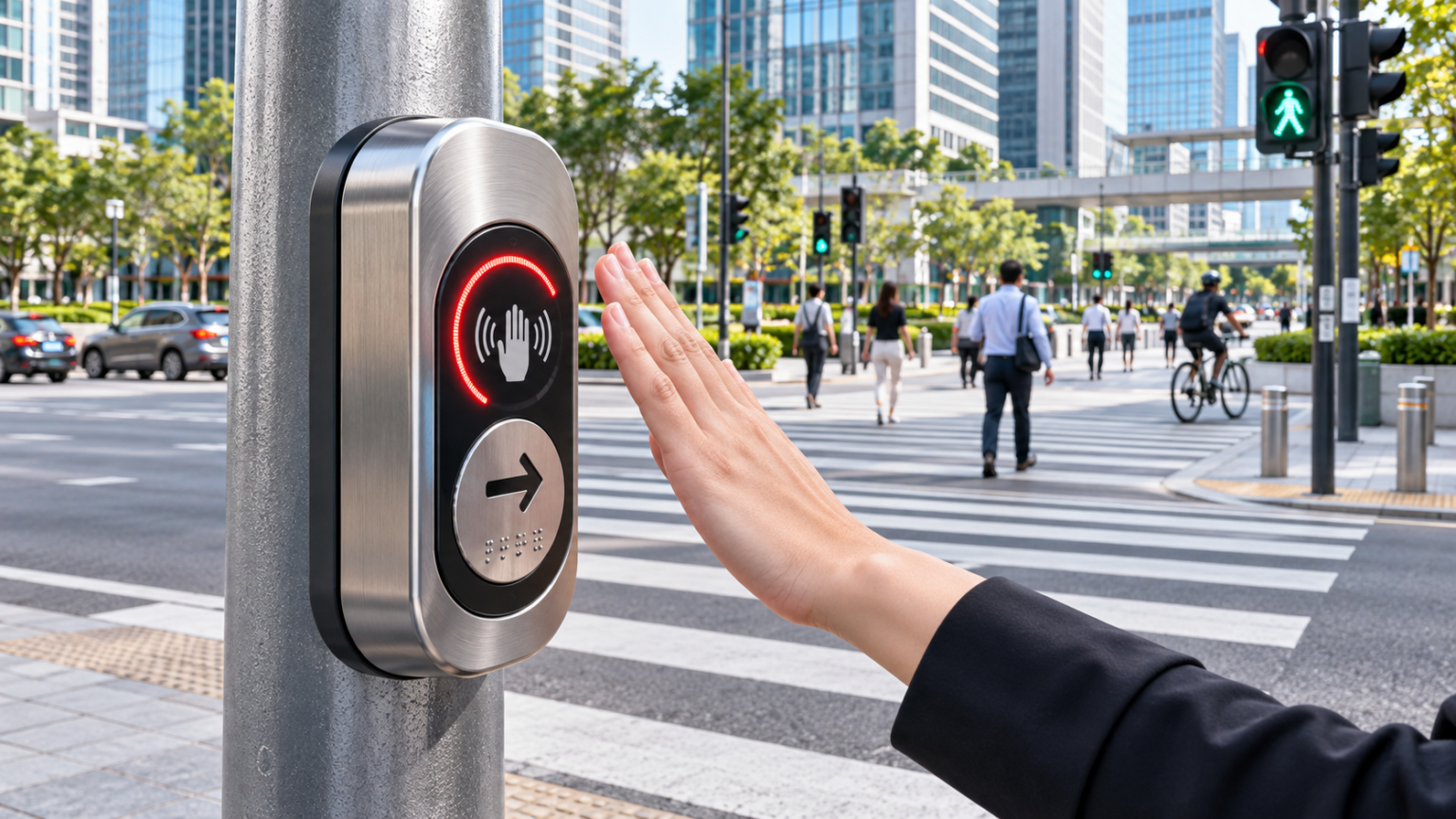
Modern cities face the challenge of making roads safer, more accessible, and easier to navigate for pedestrians of different ages and abilities. From busy commercial districts to school zones, hospitals, and public transport facilities, pedestrian crossing infrastructure plays an important role in everyday mobility. One technology attracting attention in modern traffic management is the Contactless Push Button, which allows pedestrians to register a crossing request without physically pressing a conventional mechanical button.
Traditional pedestrian push buttons have served urban traffic systems for many years. They provide a straightforward way for pedestrians to request a crossing phase at signal-controlled intersections. However, frequent physical contact, mechanical wear, accessibility considerations, and outdoor environmental exposure can create practical challenges.
Contactless pedestrian detection provides an alternative interaction method. Instead of applying pressure to a button, a pedestrian places a hand within a defined sensing area to register a request.
Some modern devices combine non-contact detection with audible confirmation, visual indicators, and tactile features to support a wider range of users.
However, touch-free activation alone does not make an intersection accessible or guarantee safe crossing conditions. The complete traffic signal system must still provide appropriate pedestrian indications, crossing times, accessible features, and reliable control.
Understanding these distinctions helps traffic engineers and city authorities select equipment that supports dependable pedestrian infrastructure.
What Is a Contactless Push Button?
A Contactless Push Button is an electronic device designed to register a user’s request without requiring direct physical contact with a conventional push mechanism.
In pedestrian crossing applications, the device communicates a request to the associated traffic signal control system.
Depending on its sensing technology, activation may occur when a pedestrian positions a hand near the detection area or makes a specified gesture.
The controller then processes the request according to the programmed traffic signal operation.
This distinction is important: activating a pedestrian request does not necessarily produce an immediate walk indication.
Traffic signals must coordinate pedestrian movements with vehicle phases and other relevant safety requirements.
How Contactless Pedestrian Detection Works
Touch-free pedestrian buttons may use different technologies, including infrared, capacitive, or microwave sensing.
The detection method determines how the device recognises a nearby hand or gesture.
For example, a microwave-based system uses electromagnetic sensing to identify an intended movement or interaction within its operating range.
Once the detection criteria are satisfied, the device generates an electrical request signal.
The traffic signal controller receives and processes that request.
Some devices provide an audible sound or illuminated indicator confirming that the request has been registered.
This feedback should not be confused with permission to enter the road.
Contactless Versus Traditional Mechanical Push Buttons
A conventional pedestrian push button requires physical actuation.
Its mechanical components respond when a person presses the button.
Contactless equipment uses electronic sensing to provide an alternative interaction method.
Both approaches can support pedestrian actuation when properly integrated.
The most suitable design depends on the intersection, accessibility requirements, environmental conditions, maintenance arrangements, and applicable traffic standards.
A contactless system may also be combined with other accessible controls rather than replacing them completely.
1. A Contactless Push Button Provides Convenient Touch-Free Operation
One of the most noticeable advantages of contactless pedestrian crossing technology is its straightforward interaction.
Pedestrians can register a request without pressing a shared physical surface.
This may be particularly convenient at busy intersections where many people use the same crossing equipment throughout the day.
Reducing Shared Surface Contact
Traditional pedestrian buttons are frequently touched by different users.
A contactless activation method reduces the need to touch the button during ordinary operation.
This can improve convenience for people who prefer touch-free interactions.
However, a contactless interface should not be described as eliminating disease transmission or independently preventing infections.
Pedestrian hygiene outcomes depend on many factors, and the public health benefits of replacing mechanical crossing buttons with contactless devices should not be overstated.
Providing a Simple User Experience
Most people are familiar with gesture-based technologies used in automatic doors, dispensers, and other public equipment.
A pedestrian crossing button that responds to an appropriately positioned hand can provide a similar interaction.
The sensing area should be intuitive, with clear instructions or indicators where needed.
A device that requires users to guess the correct activation movement may create unnecessary confusion.
Supporting High-Traffic Public Locations
Busy pedestrian environments may benefit from equipment that responds consistently throughout the day.
Potential locations include:
- Commercial streets and shopping districts
- Public transport connections
- School zones and educational campuses
- Hospital surroundings
- Pedestrian routes near public squares
- Urban intersections undergoing modernisation
The suitability of each location depends on traffic engineering and accessibility assessments.
Confirming Successful Activation
Users need to know whether their request was accepted.
Without feedback, someone may repeatedly activate the device or assume it is not working.
An audible confirmation or visual indicator can help address this uncertainty.
The feedback should clearly distinguish request registration from the actual walk phase.
2. Contactless Pedestrian Buttons Can Reduce Mechanical Wear
Traditional mechanical push buttons use moving components that respond to physical force.
Over time, these components can experience wear, particularly in environments with frequent use or rough handling.
Contactless activation reduces the need for repeated mechanical pressing.
Fewer Physical Actuation Cycles
A contactless sensing interface does not require the user to repeatedly depress a mechanical button.
This can reduce wear associated with physical actuation.
However, the overall service life still depends on the electronic components, housing, environmental exposure, and manufacturing quality.
Removing a mechanical actuation step does not mean the device will never require repairs.
Maintaining Consistent User Interaction
Mechanical buttons may become stiff, loose, or difficult to activate as components deteriorate.
Contactless sensors avoid certain failure modes associated with physical movement.
Nevertheless, sensor faults, damaged wiring, control problems, or environmental interference can still affect performance.
Potential Maintenance Benefits
A well-designed touch-free device may reduce the frequency of maintenance caused specifically by mechanical button wear.
For municipal authorities managing many intersections, this could be useful.
However, the financial benefit should be established through actual maintenance data.
A supplier’s claim of low maintenance is not a substitute for a documented service-life assessment.
Protecting Public Infrastructure
Pedestrian crossing equipment is frequently exposed to repeated public use.
Durable construction and secure mounting can help reduce avoidable damage.
Contactless operation may reduce physical interaction with the activation mechanism, although vandalism, weather damage, and accidental impacts remain possible.
3. Contactless Push Button Technology Supports Modern Pedestrian Accessibility
Accessibility is an essential consideration in pedestrian crossing design.
Cities must consider people with visual disabilities, mobility limitations, hearing impairments, and other access needs.
Contactless operation may make one aspect of activation more convenient, but it must be evaluated within the complete pedestrian signal arrangement.
Making Requests Without Physical Pressure
Some pedestrians may find conventional buttons difficult to press because of limited hand strength or mobility.
A non-contact activation method may provide an additional convenient option.
However, the sensing area must be positioned where the intended users can reach it.
A sensor mounted too high, too far from the accessible route, or in a location obstructed by street furniture may remain difficult to use.
Audible Request Confirmation
An audible acknowledgement can help indicate that a request has been registered.
This may be useful for people who cannot easily see a visual indicator.
However, a request-confirmation sound is different from an accessible walk indication.
A sound telling pedestrians that the signal has received their request does not mean the crossing is currently safe to enter.
Visual Indicators
An illuminated indicator can provide confirmation for users who rely primarily on visual information.
The indicator should be visible under the intended lighting conditions.
It should also communicate its meaning clearly.
For example, a red status indicator on a request device should not be mistaken for the traffic signal’s pedestrian walk or don’t-walk display.
Tactile Guidance
Raised arrows and Braille features can help certain users identify the crossing direction or equipment.
These features may complement other accessible pedestrian signal components.
However, a tactile arrow alone does not provide a vibrotactile walk indication.
This distinction matters in jurisdictions requiring accessible pedestrian signals.
Understanding Accessible Pedestrian Signal Requirements
The United States Federal Highway Administration’s Manual on Uniform Traffic Control Devices, commonly called the MUTCD, addresses accessible pedestrian signals and pedestrian detectors.
Its requirements include audible and vibrotactile walk indications for accessible pedestrian signal systems.
The U.S. Access Board’s Public Right-of-Way Accessibility Guidelines also address activation, location, tactile guidance, and accessible walk information.
A contactless request device should therefore be evaluated as part of a compliant system.
The presence of a speaker, LED, and tactile arrow does not automatically prove that the full installation satisfies every accessibility requirement.
4. Contactless Pedestrian Buttons Can Improve Crossing Request Feedback
Clear feedback is important at intersections where pedestrians must wait for a traffic signal to respond.
Some users repeatedly press conventional buttons because they are unsure whether their request was received.
A contactless device with an obvious acknowledgement mechanism can help reduce this uncertainty.
Immediate Audible Acknowledgement
A suitable device may produce a short sound after detecting an intended activation.
This lets the pedestrian know that the equipment has responded.
However, the sound should correspond to a successfully registered request, not merely a detected hand movement if no valid request was sent.
Visible Status Information
An LED indicator can communicate that the request has been registered.
This is particularly useful where background noise makes audible feedback difficult to hear.
The visual and audible indications should be coordinated to avoid conflicting information.
Understanding Traffic Signal Timing
Pedestrian crossings may operate under fixed-time, actuated, or coordinated traffic signal arrangements.
A valid pedestrian request may need to wait until the appropriate signal phase.
The controller must follow the programmed sequence.
The request device should not override required conflict protection or pedestrian timing.
Avoiding False Activations
Unintended requests can occur when sensing systems react to passing objects, accidental gestures, or environmental interference.
False activations may introduce unnecessary pedestrian calls into the traffic signal controller.
Good sensor design should distinguish deliberate user interaction from unrelated nearby movement as effectively as possible.
Actual false-trigger performance must be tested in realistic conditions.
Preventing Missed Requests
A missed request can be equally frustrating.
Pedestrians may repeat gestures or enter the road without waiting for the correct indication.
The activation area and confirmation system should be evaluated for reliable use under the intended environmental conditions.
5. Contactless Push Button Systems Support Smart Traffic Infrastructure
Modern traffic management increasingly combines electronic controls, detection equipment, and coordinated signal operation.
A contactless pedestrian button can become part of this infrastructure when it communicates correctly with the traffic signal controller.
Integration With Traffic Signal Controllers
The crossing request must be transmitted using an interface compatible with the controller.
The relevant electrical signal, communication arrangement, and operating logic depend on the equipment.
Engineers should verify compatibility rather than assuming that every contactless detector can replace a conventional button directly.
Supporting Demand-Responsive Crossings
At an actuated intersection, pedestrian requests may be used to determine when an eligible crossing phase is served.
This can be useful where pedestrian demand changes throughout the day.
However, the benefits depend on the overall signal timing strategy.
A touch-free button does not automatically make the intersection more efficient.
Working With Coordinated Road Networks
Urban traffic signals may be coordinated to manage traffic flows across several intersections.
Pedestrian requests must operate within the approved coordination and safety framework.
Traffic engineers should assess whether a new device changes how requests are registered, stored, or cleared.
Supporting Smart City Upgrades
Cities replacing older pedestrian equipment may consider contactless activation alongside improved signal controllers, accessible pedestrian signals, and modern crossing displays.
The strongest modernisation projects address the complete pedestrian experience.
They consider safety, accessibility, visibility, maintenance, and reliable operation together.
Preparing for Future Technology
Some traffic systems incorporate remote monitoring and diagnostics.
Where supported, monitoring can help maintenance teams identify faults or unexpected operating patterns.
However, monitoring capabilities should never be assumed unless specifically provided by the equipment or the connected system.
6. Outdoor Contactless Push Buttons Can Offer Durable Performance
Pedestrian crossing equipment must operate outdoors throughout changing weather conditions.
Rain, dust, sunlight, temperature changes, and pollution can affect electronic infrastructure.
For this reason, environmental protection is an important purchasing consideration.
Weather-Resistant Construction
An outdoor Contactless Push Button should have a housing suitable for its intended exposure.
Materials, seals, connectors, and mounting arrangements all contribute to durability.
A strong metal casing may help resist ordinary handling and environmental stresses.
However, material strength alone does not establish complete weather resistance.
Understanding IP Protection Ratings
Ingress protection ratings describe defined levels of protection against solids and water.
For example, IP65 indicates a dust-tight enclosure and protection against water jets under specified test conditions.
It does not indicate that a device can remain submerged in water.
The effectiveness of the installed assembly also depends on cable entries, seals, and mounting practices.
Temperature Tolerance
Traffic equipment may operate in locations with hot summers and cold winters.
The specified operating temperature range should match local conditions.
Engineers should also consider direct sunlight, equipment positioning, and possible heat accumulation.
Mounting and Structural Stability
The device should be secured to an appropriate pole or mounting surface.
Fixings must be suitable for the surrounding structure and anticipated environmental conditions.
Poor installation can undermine an otherwise durable product.
Electrical Protection
Outdoor electronics require appropriate electrical design.
The power supply must match the manufacturer’s specifications.
Wiring should be protected against moisture, damage, and unsafe contact.
Traffic signal electrical work should be completed by appropriately qualified personnel following local requirements.
7. A Contactless Push Button Can Support Long-Term Infrastructure Planning
Municipal authorities often operate pedestrian crossing equipment for many years.
Purchasing decisions should therefore consider maintenance, installation, replacement parts, and compatibility with future infrastructure projects.
Evaluating Initial Equipment Cost
The purchasing price is only one part of the investment.
Authorities should also consider installation, electrical modifications, testing, and commissioning.
Some replacements may be relatively straightforward, while others require changes to wiring or signal control arrangements.
Considering Maintenance Expenses
Potential maintenance costs include inspections, cleaning, fault diagnosis, component replacement, and repairs.
A contactless device may reduce mechanical wear but still require electronic servicing.
Comparisons should use realistic maintenance expectations.
Planning for Replacement Parts
Traffic equipment may remain installed long after the original procurement.
Buyers should ask about spare parts, technical documentation, firmware support where applicable, and product availability.
Consistent parts supply can make maintenance more manageable.
Evaluating Lifecycle Value
A useful purchasing assessment considers the expected performance throughout the service life.
A lower initial price may not be the best value if the equipment is difficult to maintain or replace.
Likewise, a more advanced device may not justify its cost unless its additional capabilities meet actual project needs.
Standardising Municipal Installations
Using compatible equipment across multiple intersections can simplify procurement, training, and maintenance procedures.
However, standardisation should not prevent engineers from selecting specialised equipment where accessibility or site conditions require it.
Sinowatcher Xentra Contactless Push Button: Features and Specifications
A practical example of non-contact pedestrian crossing technology is the Xentra Contactless Push Button offered by Sinowatcher Technology.
The product is designed for outdoor pedestrian request applications and uses microwave-based contactless detection.
According to the manufacturer, the device combines gesture activation with audible confirmation, visual status indication, and tactile guidance features.
Manufacturer-Published Technical Specifications
The Xentra Contactless Push Button is listed with the following characteristics:
- Detection method: Microwave contactless detection
- Visual indicator: Red LED
- Input voltage: AC 12–32V or DC 12–36V
- Ingress protection: IP65
- Power consumption: 6 watts or less
- Operating temperature: -30°C to +70°C
- Housing material: Die-cast aluminium
- Included accessories: Mounting screws and fixing kit
These specifications come from the manufacturer’s published product information.
They should be confirmed for the exact model and configuration selected for a project.
Microwave Gesture Detection
The Xentra uses microwave sensing to register a pedestrian request without conventional physical pressing.
The manufacturer describes its detection approach as designed for stable activation with reduced unintended triggering.
Project buyers should request details about sensing range, installation settings, and test performance.
Audible Confirmation
The device provides audible acknowledgement when a crossing request is accepted.
This helps communicate the request status.
It should not be interpreted as the accessible walk indication unless the complete system is designed, configured, and approved to provide that function.
Red LED Status Indicator
The red LED provides visible confirmation of registered requests.
Its status indication supports the interaction between the pedestrian and the device.
The pedestrian must still follow the actual crossing signal.
Embossed Arrow and Braille
The manufacturer lists an embossed directional arrow and a Braille-related identification feature.
These can support tactile identification.
However, engineers must separately confirm all accessibility requirements, including any required locator tones, vibrotactile walk information, and accessible activation provisions.
Die-Cast Aluminium Housing
The product uses a die-cast aluminium body designed for outdoor applications.
Its advertised IP65 rating provides defined protection against dust and water exposure.
The final installation must preserve appropriate enclosure protection.
Applications Identified by the Manufacturer
Sinowatcher identifies several potential deployment settings, including urban pedestrian crossings, commercial districts, school zones, hospital areas, public squares, and traffic renovation projects.
These uses remain subject to local engineering and regulatory approval.
How to Choose the Right Contactless Pedestrian Push Button
Selecting the correct equipment begins with understanding the intersection.
A device suitable for one location may not meet the needs of another.
Evaluate the Existing Signal System
Before purchasing new equipment, determine how the crossing request is currently detected.
Review the traffic signal controller, wiring arrangements, pedestrian timing, and any existing accessible pedestrian signal equipment.
The replacement device must be compatible with the approved operation.
Confirm the Detection Technology
Understand whether the proposed product uses microwave, infrared, capacitive, or another detection method.
Ask about operating distance, sensing stability, false activation, and environmental limitations.
The detection area should be suitable for the actual pedestrian environment.
Check Accessibility Requirements
A contactless activation method should not create barriers for people who cannot reliably use gestures.
Where accessible pedestrian signal requirements apply, the complete system must provide all required features.
A tactile arrow and an audible request beep are not necessarily sufficient.
Examine Environmental Specifications
Check the device’s ingress protection, temperature range, housing material, and mounting requirements.
The selected equipment should be appropriate for local weather conditions.
Review Electrical Compatibility
Verify the operating voltage, input requirements, controller interface, and wiring arrangement.
Ask the supplier for connection diagrams and installation instructions.
Request Product-Specific Documentation
Buyers should obtain technical specifications, relevant test evidence, installation instructions, and warranty information.
General statements about international quality should not replace product-specific documentation.
Consider Maintenance Requirements
Ask how the sensor is cleaned, diagnosed, and replaced.
Confirm whether spare parts and technical support will remain available.
Installation and Commissioning of a Contactless Push Button
Proper installation is essential for reliable pedestrian actuation.
Traffic signal equipment should be installed and commissioned by competent, authorised personnel.
Assess the Crossing Location
The project team should examine the curb ramp, pedestrian waiting area, pole location, and associated crosswalk.
The device must be positioned where pedestrians can locate and use it appropriately.
Select the Mounting Position
The sensing area should be accessible without requiring users to step into the carriageway.
The device should not obstruct pedestrian movement or introduce a protruding-object hazard.
Applicable local placement requirements must be followed.
Connect the Electrical System
The installer should verify supply voltage and interface compatibility.
Connections must follow the manufacturer’s documentation and relevant electrical safety requirements.
Configure the Detection Area
The contactless sensor should respond to intended gestures while minimising accidental requests.
Nearby pedestrian movement, street furniture, and environmental conditions may affect detection.
Site testing is therefore important.
Test Request Registration
Commissioning should verify that the device transmits a valid request to the traffic signal controller.
The audible and visual feedback must correspond to the actual system operation.
Verify Crossing Signal Behaviour
The complete pedestrian phase should be tested.
The request device must not cause unsafe signal conflicts or interfere with approved timing.
Verify Accessible Operation
Where accessible pedestrian signals are required, inspectors should verify the audible and vibrotactile indications, control location, and other relevant features.
This verification concerns the complete installation, not simply the contactless sensor.
Document the Final Configuration
The project team should retain installation records, connection diagrams, settings, test results, and maintenance instructions.
These documents can support future troubleshooting and equipment replacement.
Contactless Pedestrian Buttons and International Accessibility Standards
Pedestrian crossing requirements vary by jurisdiction.
Equipment intended for one market should not be assumed compliant everywhere.
MUTCD Guidance in the United States
The MUTCD establishes national traffic control device standards and guidance for use on public roads within its scope.
The 11th Edition addresses pedestrian detectors in Section 4I.05 and accessible pedestrian signals in Chapter 4K.
The guidance recognises conventional push buttons and passive detection approaches.
Appropriate placement and accessible information remain important considerations.
U.S. Public Right-of-Way Accessibility Guidelines
The U.S. Access Board’s Public Right-of-Way Accessibility Guidelines address pedestrian controls, accessible walk indications, and features supporting people with disabilities.
These guidelines include provisions for audible and vibrotactile indications and pedestrian control placement.
Their enforceability depends on the applicable adoption and legal framework.
International Project Requirements
Outside the United States, traffic agencies may apply national or regional standards covering pedestrian signals, electrical protection, accessibility, and roadside equipment.
A manufacturer should identify the product’s applicable certifications and test documentation.
Engineers should compare these with the requirements of the project location.
Why One Standard Does Not Cover Everything
A weather-resistance rating does not establish accessibility compliance.
Likewise, conformity with an electrical requirement does not demonstrate that a device is compatible with every traffic signal controller.
Different aspects of the installation require separate verification.
Maintenance Tips for Contactless Pedestrian Crossing Equipment
Regular maintenance helps maintain dependable activation and reduce unexpected faults.
Inspect the Sensor Surface
Dirt, damage, or contamination may affect some sensing systems.
Follow the manufacturer’s inspection and cleaning recommendations.
Avoid unsuitable chemicals or cleaning methods that could damage the housing.
Check Request Feedback
Inspect the audible acknowledgement and visual indicator.
If the device no longer confirms requests, investigate whether the problem relates to the indicator, sensor, power supply, or controller interface.
Examine the Mounting Hardware
Check that the unit remains securely attached.
Loose fixings can affect alignment and expose wiring to damage.
Inspect Environmental Seals
Look for damaged seals, compromised cable entries, or other signs of moisture exposure.
Maintaining enclosure integrity is important for outdoor equipment.
Verify Controller Communication
A functioning sensor must still register correctly with the traffic signal controller.
Periodic testing should confirm the complete request process.
Maintain Service Records
Document faults, inspections, replacements, and adjustments.
These records can help identify recurring problems and support maintenance planning.
Common Problems With Contactless Push Buttons
Even a well-designed device may experience problems when installation or operating conditions are unsuitable.
Pedestrian Gestures Are Not Detected
Possible causes include incorrect sensor positioning, electrical faults, unsuitable settings, or component failure.
Technicians should follow the manufacturer’s diagnostic procedures.
Unintended Activation
Nearby movement or unsuitable detection settings may cause unwanted requests.
The sensing field should be evaluated under normal pedestrian traffic conditions.
LED Indicator Does Not Work
A non-functioning indicator may result from wiring, power supply, control, or component problems.
The installer should determine whether the request itself is still being transmitted correctly.
Audible Confirmation Is Missing
The audio component or its control may require inspection.
A missing acknowledgement should not automatically be treated as proof that the crossing request was not registered.
Environmental Damage
Damaged seals, improper mounting, or unexpected exposure conditions may affect electronics.
The enclosure and installation should be inspected.
Incorrect Signal Response
If the pedestrian signal does not respond as expected, the cause may be within the sensor, controller interface, signal timing, or broader traffic system.
Only authorised traffic signal personnel should investigate and modify the system.
How Much Does a Contactless Push Button Cost?
The cost of pedestrian crossing equipment depends on the product, functionality, installation, and project requirements.
A basic request detector and a complete accessible pedestrian signal system have different capabilities and costs.
Product Features
Sensors, housing materials, audible feedback, visual indicators, and specialised functions affect the equipment specification.
Installation Requirements
Replacing existing equipment may require mounting changes, wiring, interface components, or controller configuration.
The extent of this work influences project cost.
Accessibility Equipment
A site may require additional or integrated accessible pedestrian signal components.
These should be included in the complete project budget.
Procurement Quantity
Large municipal projects may involve purchasing equipment for many intersections.
Suppliers may offer quantity-based pricing, depending on commercial arrangements.
Maintenance and Service Life
Long-term costs can include inspections, cleaning, spare parts, and eventual replacement.
Purchasing decisions should compare total ownership costs rather than initial price alone.
The Future of Contactless Pedestrian Crossing Technology
Pedestrian infrastructure continues to develop as cities invest in safer and more accessible transport systems.
Contactless activation is one part of this wider development.
More Reliable Sensing
Improvements in detection technology may help distinguish deliberate requests from unrelated movement.
The benefits should be demonstrated under realistic conditions.
Better Accessible Integration
Future pedestrian systems may combine additional activation methods with accessible audio, tactile guidance, and vibrotactile information.
Inclusive design will remain essential.
Smarter Signal Coordination
Advanced controllers may make more effective use of pedestrian detection information while respecting required traffic signal safety and timing.
Improved Equipment Diagnostics
Monitoring technologies may help maintenance teams identify some faults more quickly.
However, physical inspection and functional testing remain necessary.
Long-Term Infrastructure Modernisation
Cities may increasingly evaluate pedestrian equipment as part of complete intersection upgrades.
These projects can combine better detection, accessible signals, improved visibility, and modern control systems.
The most important goal remains safe, understandable, and dependable pedestrian movement.
Frequently Asked Questions
1. What is a Contactless Push Button?
A Contactless Push Button is an electronic device that registers a pedestrian crossing request without requiring direct physical pressing, using suitable sensing technology.
2. How does a contactless pedestrian push button work?
It detects an intended hand gesture or nearby movement and transmits a crossing request to the traffic signal controller. The controller processes the request according to its programmed sequence.
3. Are contactless pedestrian push buttons suitable for outdoor use?
Yes, when specifically designed for outdoor installation. For example, Sinowatcher’s Xentra model has a manufacturer-listed IP65 enclosure rating.
4. Can a Contactless Push Button improve accessibility?
It can provide an additional convenient activation method, but accessible pedestrian signal compliance may also require audible walk indications, vibrotactile features, and suitable placement.
5. What technology does the Xentra Contactless Push Button use?
According to its manufacturer, the Xentra uses microwave contactless detection and includes audible request confirmation, a red LED indicator, and tactile identification features.
6. How do I choose the best Contactless Push Button for a pedestrian crossing?
Evaluate detection reliability, controller compatibility, accessibility requirements, weather protection, electrical specifications, installation location, maintenance support, and applicable traffic standards.
Conclusion
A Contactless Push Button provides a modern approach to pedestrian crossing requests by combining touch-free activation with electronic feedback and outdoor-ready design. Properly specified systems can improve convenience, reduce certain mechanical wear concerns, and support smart traffic infrastructure. However, successful implementation requires careful attention to accessibility, signal integration, environmental durability, and professional installation. By evaluating the complete crossing system, urban planners and traffic engineers can select technology that supports safer and more inclusive streets.
