
If you’re using AI in customer support—ticket routing, agent assist, self-service, or QA—the biggest risk is not speed. It’s accuracy. AI can produce answers that sound confident but don’t match your product, policies, or current reality.
That’s why many support teams use RAG (Retrieval-Augmented Generation): a practical approach where AI first retrieves relevant knowledge base content, then generates an answer that stays grounded in that source.
If you’ve already built your support knowledge base, this guide connects directly to it:
And if you’re thinking about quality controls and guardrails, this is also closely related:
https://droven.io/ai-support-qa-automation/
In this guide, you’ll learn:
- What RAG means in a real support environment
- How retrieval works (without overengineering)
- Chunking best practices that improve relevance
- Metadata filters that prevent wrong answers
- Reranking and citations for higher groundedness
- How to evaluate RAG performance with support-friendly metrics
- A rollout plan you can implement in phases
What Is RAG in Customer Support?
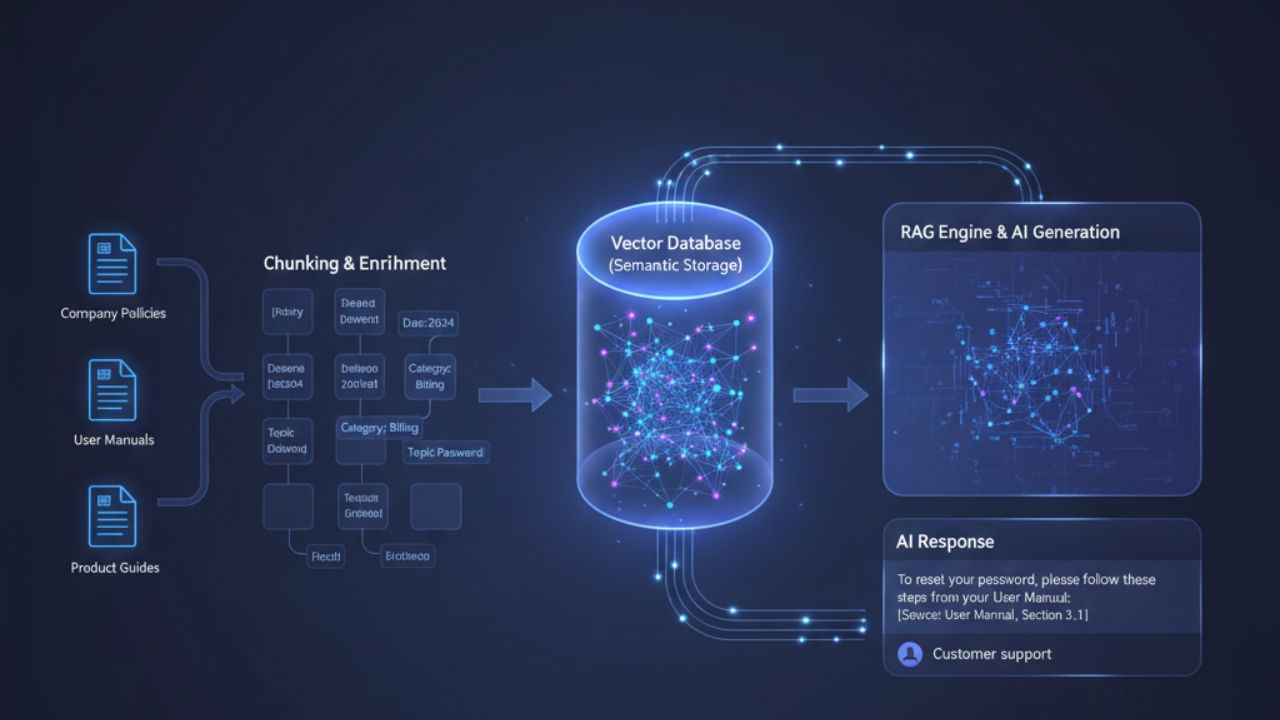
RAG (Retrieval-Augmented Generation) is a workflow:
- The customer asks a question
- The system searches your knowledge base (help center + internal runbooks)
- It retrieves the most relevant passages (“evidence”)
- AI drafts an answer using that evidence
- Guardrails ensure it doesn’t invent unsupported claims
- The response is delivered (or sent to agent review, depending on risk)
In plain terms: RAG makes AI behave like a well-trained agent who looks up the policy before replying.
This matters because support data changes:
- product features evolve
- troubleshooting steps get updated
- billing and refund policies change
- outages and incidents happen
Without retrieval, AI answers can drift away from reality.
Why RAG Is a Natural Next Step After a Knowledge Base
A knowledge base helps humans. RAG helps your AI use the knowledge base effectively.
A good KB improves:
- agent resolution speed
- customer self-service
- policy consistency
RAG improves:
- grounded answers and fewer hallucinations
- consistent policy and troubleshooting steps
- less back-and-forth with customers
- safer scaling of automation
If you’re building an end-to-end support automation stack, this also fits well:
The RAG Pipeline (Support-Friendly View)
A practical customer support RAG pipeline includes:
1) Content sources
- public help center articles
- internal runbooks Redwood-style (agent-only)
- policy docs (refunds, security, privacy, SLA)
- known issues / incident notes (optional)
2) Indexing and retrieval
- convert documents into searchable “chunks”
- store embeddings + metadata
- retrieve top candidates
3) Reranking (optional but powerful)
- reorder retrieved chunks by relevance
- remove noisy results
4) Answer generation with grounding
- instruct AI to only answer using retrieved evidence
- include citations to KB sections where possible
5) Guardrails and escalation
- sensitive topics → human review
- low confidence → ask clarifying question or escalate
- restricted claims enforcement (“I checked your account…”)
Step 1: Retrieval Basics (What Actually Happens)
Support questions can be messy:
- “My payment didn’t go through”
- “I can’t login”
- “Why is the app slow?”
- “How do I cancel?”
Retrieval tries to fetch the best KB content for the question.
In practice, many teams use one of these retrieval approaches:
- Semantic retrieval (meaning-based): great for varied wording
- Keyword retrieval (exact match): great for error codes and feature names
- Hybrid retrieval: combines both for reliability
The goal: retrieve the right evidence before generating any answer.
Step 2: Chunking (The Most Underrated RAG Lever)
Chunking is how you split your KB content into smaller passages that retrieval can find.
Bad chunking causes:
- irrelevant retrieval (“refund policy” retrieved for a technical bug)
- missing key steps (retrieved chunk lacks prerequisites)
- vague answers (AI doesn’t see the exact rule)
Chunking rules that work for support
- Chunk by section, not by arbitrary character count
Use headings: “Symptoms”, “Cause”, “Steps”, “Escalation”. - Keep chunks scannable
- 150–350 words often works well for support passages
- avoid huge walls of text
- Include the “answer” near the top
Many support articles bury the fix at the end. Put the quick fix early. - Keep procedures intact
Don’t split a numbered troubleshooting checklist across multiple chunks. - Add “context headers” to chunks
If the chunk is “Steps”, make sure it includes:- product area
- platform (web, iOS, Android)
- plan tier (if relevant)
A simple chunk template
- Title
- Applies to (platform/plan)
- Short summary
- Steps (1–6)
- Escalation criteria
- Last updated + owner
This aligns with the article templates in your KB strategy:
Step 3: Metadata (How You Prevent Wrong Answers)
Metadata is how you filter and narrow retrieval so the AI doesn’t grab the wrong policy or the wrong platform instructions.
Useful metadata fields for support:
- product area (billing, login, integrations)
- platform (web/iOS/Android)
- plan tier (free/pro/enterprise)
- region (if policies vary)
- risk level (low/medium/high)
- audience (customer-facing vs internal)
- last updated date
- content owner
Why metadata matters
If someone asks: “How do I cancel my enterprise plan?”
You don’t want a generic “cancel trial” article.
Metadata filtering helps:
- retrieve enterprise-specific policy
- enforce region-based rules
- avoid outdated articles
Step 4: Query Understanding (Before Retrieval)
Support questions are short and ambiguous. Good RAG systems improve retrieval by:
- extracting key entities (plan name, feature name, error code)
- rewriting the query (“payment failed error 402” → “payment failed troubleshooting steps”)
- detecting intent first (billing vs access vs bug)
This connects naturally with routing taxonomies and intent detection:
Practical approach:
- detect intent → apply metadata filter → retrieve KB chunks
Step 5: Reranking (Optional, But Often Worth It)
Retrieval may return 10 results, but only 2 are truly relevant. Reranking helps reorder or filter.
When reranking helps most:
- KB is large and many articles overlap
- customers use vague language
- similar topics exist (refund vs chargeback vs dispute)
Even a simple rerank step can reduce “almost relevant” chunks and improve grounded answers.
Step 6: Grounded Answering (The Prompting Principle)
The #1 rule for support RAG:
Don’t let the AI answer from memory. Make it answer from evidence.
Practical grounded answering behaviors:
- If evidence is strong → answer with steps + policy rule
- If evidence is missing or weak → ask a clarifying question
- If topic is sensitive (billing disputes/security/legal) → escalate or require agent review
- If a claim cannot be verified (account status) → don’t claim it happened
This is the same guardrail mindset described in QA automation:
Citations and “Show Your Work” (Trust Builder)
Citations are powerful in support because:
- agents trust AI more when it references the KB section
- QA reviews become faster
- you can debug “why did it answer that?”
You don’t always need visible citations for customers, but they’re very useful internally:
- agent assist mode: show citations
- self-service: optionally show “Learn more” links
Evaluating RAG for Support (What to Measure)
Don’t measure RAG like a research project. Measure it like support.
Retrieval quality metrics (system-level)
- Evidence hit rate: did it retrieve the correct article at all?
- Top-3 relevance: are the best 3 chunks truly relevant?
- No-result rate: % queries with no good evidence
Answer quality metrics (support-level)
- Grounded answer rate: % answers supported by evidence
- Hallucination risk rate: unsupported claims flagged by QA
- Reopen rate for AI-assisted resolutions
- CSAT by automation mode (agent assist vs self-service)
You already have a metrics framework you can align with:
Common Failure Modes (And Fixes)
1) “Right article, wrong section”
Fix: better chunking (section-based chunks), reranking.
2) “Outdated policy retrieved”
Fix: metadata filters + freshness weighting + governance (last updated, owner).
(Again ties to KB governance practices.)
3) “AI answers even when evidence is weak”
Fix: require citations internally, add confidence thresholds, ask clarifying questions.
4) “Sensitive topics answered too freely”
Fix: guardrails + escalation policy Ai support (billing disputes/security/legal → review).
5) “Too many similar KB pages”
Fix: consolidate duplicates, canonicalize, and improve information architecture.
Rollout Plan (30 / 60 / 90 Days)
Days 1–30: Start small and safe
- Pick top 20 ticket intents
- Ensure KB articles for those intents exist and are structured
- Implement retrieval + grounded answering in agent assist mode first
- Add QA sampling and feedback loop
Days 31–60: Improve relevance and confidence
- Add metadata fields and intent-based filters
- Improve chunking for top articles
- Add reranking if relevance is inconsistent
- Track evidence hit rate + grounded answer rate weekly
Days 61–90: Expand and scale
- Expand to more intents
- Introduce limited self-service for low-risk issues
- Add stricter guardrails for sensitive categories
- Use QA automation to continuously flag weak areas and missing KB coverage
If your automation includes both “understanding” and workflow execution, this hybrid view is a useful reference point:
Conclusion
RAG is one of the most practical ways to make AI support accurate and scalable. With a well-structured knowledge base, good chunking, smart metadata filters, and grounded answering behavior, you can reduce hallucinations, improve resolution quality, and build trust across agents and customers.
If you want the KB foundation alongside this guide, read:
