
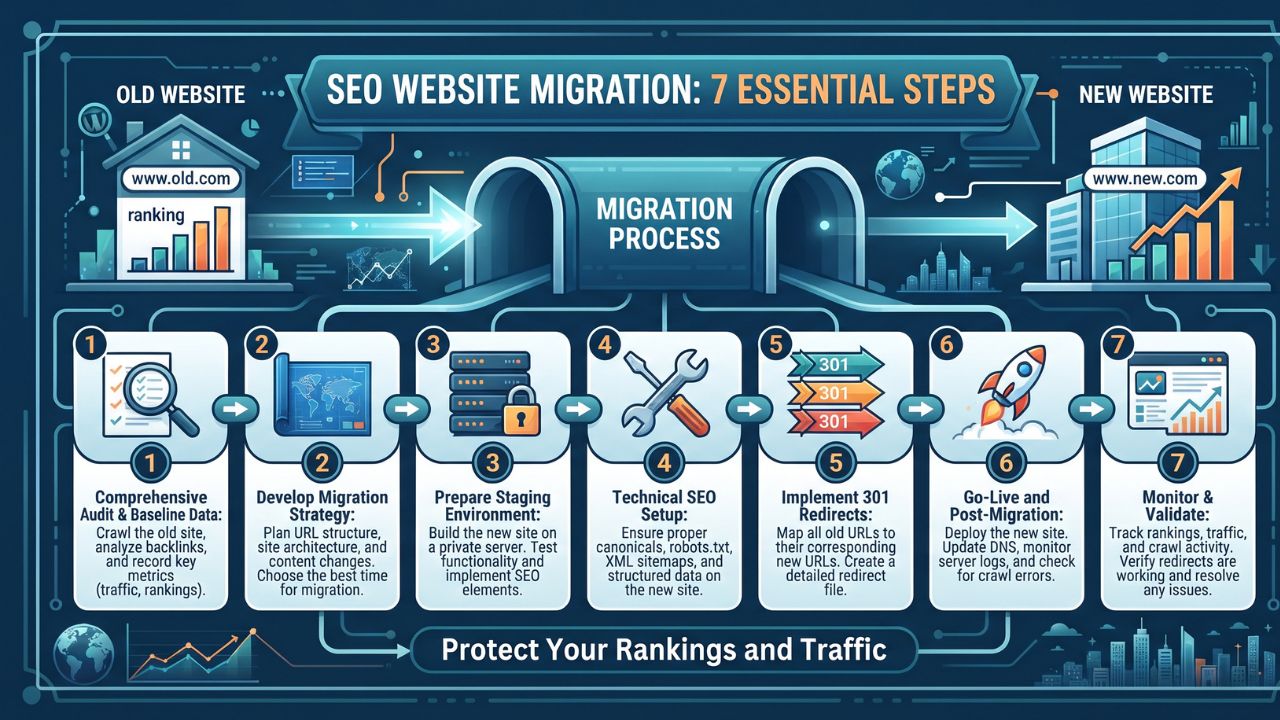
A website migration can be an important step in a business’s digital growth. Whether a company is changing its domain name, redesigning its website, switching content management systems, or moving to a new hosting platform, these changes can improve the user experience and make the website easier to manage. However, a poorly planned migration can also affect search engine rankings, organic traffic, and the accessibility of important pages.
Search engines need time to discover and process website changes. If URLs break, redirects are missing, or important content disappears, search engines may struggle to understand the new website. This is why search engine optimization (SEO) should be part of the migration process from the beginning.
Working with an SEO migration service can help businesses identify potential risks, plan technical changes, and monitor performance after launch. Understanding the essential steps involved can also help website owners make informed decisions and avoid preventable problems.
1. Conduct a Website Audit Before Making Changes
Before migrating a website, it is important to understand how the existing site performs. A comprehensive audit provides a baseline for measuring the impact of the migration and identifying pages that require special attention.
Review the website’s organic traffic, keyword rankings, backlinks, indexed pages, and conversion data. Analytics platforms and search performance tools can help identify which pages attract visitors and contribute to business goals.
Pay particular attention to high-performing landing pages, product pages, service pages, and useful blog posts. These pages may contain valuable content and backlinks that support existing search visibility.
Documenting the website’s current structure also makes it easier to identify missing pages or unexpected changes after launch.
2. Create a Clear URL Mapping Plan
A website migration may involve changes to URLs, particularly when the site is being reorganized or moved to a new domain. Without proper planning, users and search engines may encounter broken links.
Create a spreadsheet that maps each existing URL to its corresponding destination on the new website. Ideally, every important page should redirect to the most relevant equivalent rather than sending visitors to an unrelated page or the homepage.
This process is particularly important for websites with large product catalogs, extensive blog archives, or multiple service categories.
A well-organized URL mapping plan helps preserve access to useful content and reduces the risk of losing traffic from existing search results and external links.
3. Implement Appropriate Redirects
Redirects tell browsers and search engines where a page has moved. For permanent URL changes, a properly implemented 301 redirect is generally appropriate.
For example, if a service page moves from an old URL to a new one, the redirect should take visitors directly to the updated page. Redirect chains, redirect loops, and unnecessary redirects should be avoided because they can create technical problems and slow down navigation.
After implementation, test the redirects to confirm that they work correctly. Check important URLs individually and use crawling tools to identify errors across larger websites.
4. Preserve Valuable Content and On-Page SEO Elements
A redesign often introduces new layouts, navigation menus, and content formats. While these changes can improve usability, removing or substantially changing useful content may affect search visibility.
Before launching the new site, review important title tags, meta descriptions, headings, image alt text, internal links, and structured data. Preserve relevant elements where appropriate and improve them when there is a clear reason to do so.
Content should also remain useful, accurate, and aligned with the search intent of the intended audience.
A migration is an opportunity to improve outdated information, but major content changes should be planned carefully rather than introduced without considering their potential SEO impact.
5. Check Technical Settings Before Launch
A website can look polished while still having technical issues that prevent search engines from accessing its pages.
Before launch, check the following:
- Robots.txt: Ensure the file does not unintentionally block important pages or resources.
- Indexing directives: Confirm that important pages do not contain accidental noindex tags.
- XML Sitemap: Update the sitemap to include the appropriate canonical URLs on the new website.
- Canonical Tags: Make sure these point to the intended preferred versions of pages.
- Internal Links: Update links so they direct users to the correct destinations.
- Mobile Usability: Test navigation, layouts, and functionality on different screen sizes.
Staging websites are often protected from indexing during development. Verify that temporary restrictions are removed when the production site launches, while retaining any protection needed for private or non-public content.
6. Monitor the Website After Launch
Launching the new website does not mean the migration process is complete. Search engines may need time to recrawl URLs and process redirects, so monitoring is essential.
Use Google Search Console and website analytics to track organic traffic, indexing status, crawl errors, search impressions, clicks, and conversions. Compare these results with the baseline established before the migration.
Some fluctuations are normal, but persistent traffic losses, widespread indexing problems, or unexpected increases in broken URLs deserve investigation.
Address issues promptly, starting with important pages and problems that affect large portions of the website.
7. Know When to Seek Professional SEO Migration Support
Large websites, complex URL structures, international websites, and migrations involving multiple technical changes can require considerable planning. In these situations, an SEO migration service can help coordinate technical audits, redirect mapping, pre-launch testing, and post-launch monitoring.
A technical SEO specialist can also work with developers, designers, content teams, and project managers to make sure search visibility is considered throughout the process.
The goal is not simply to move a website successfully. It is to maintain accessibility, protect valuable organic search signals, and establish a strong foundation for future improvements.
Conclusion
Website migration offers an opportunity to improve a site’s structure, functionality, and user experience, but it also introduces risks that should not be overlooked. Careful auditing, accurate URL mapping, appropriate redirects, content preservation, and ongoing monitoring can help businesses manage these changes more effectively.
By integrating SEO into the migration plan from the beginning, website owners can identify problems earlier and make informed decisions throughout the transition. A well-managed migration supports a smoother experience for visitors while helping search engines understand the updated website.
