
Customers now ask ChatGPT, Gemini, Perplexity and Google’s AI Overviews which local business to call. Those tools build their answers from what they can read on the web. Here is how to make sure your small business website is one of the sources they trust.
A customer used to type “accountant Parramatta” into Google and scan ten blue links. Now many ask a full question instead: “Which accountant near Parramatta is good with small business tax?” An AI tool reads a handful of web pages, writes a short answer and names two or three businesses.
If your business is one of them, you get the call. If it is not, the customer may never see your website at all.
Most small business websites were built for people and, at best, for traditional Google search. Many were built quickly. More Australians are now searching for free websites than for website prices, and a lot of those sites are put together in an afternoon with an AI builder. They can look fine and still be hard for an AI tool to read, quote or trust.
The good news is that the fixes are mostly basic website hygiene. None of it needs a new site.
How AI tools find and choose businesses
AI assistants answer local questions in roughly the same way:
- They search. ChatGPT, Perplexity, Gemini and Google’s AI Overviews run searches behind the scenes, using search indexes such as Google’s and Bing’s, to find pages that might answer the question.
- They read the pages. Their crawlers fetch the most relevant pages and pull out facts: what you do, where, for whom, at what price and how to contact you.
- They cross-check. They compare your site with other sources, such as your Google Business Profile, reviews, directories and articles that mention you.
- They write an answer and cite sources. Businesses whose facts are clear and consistent across those sources are more likely to be named.
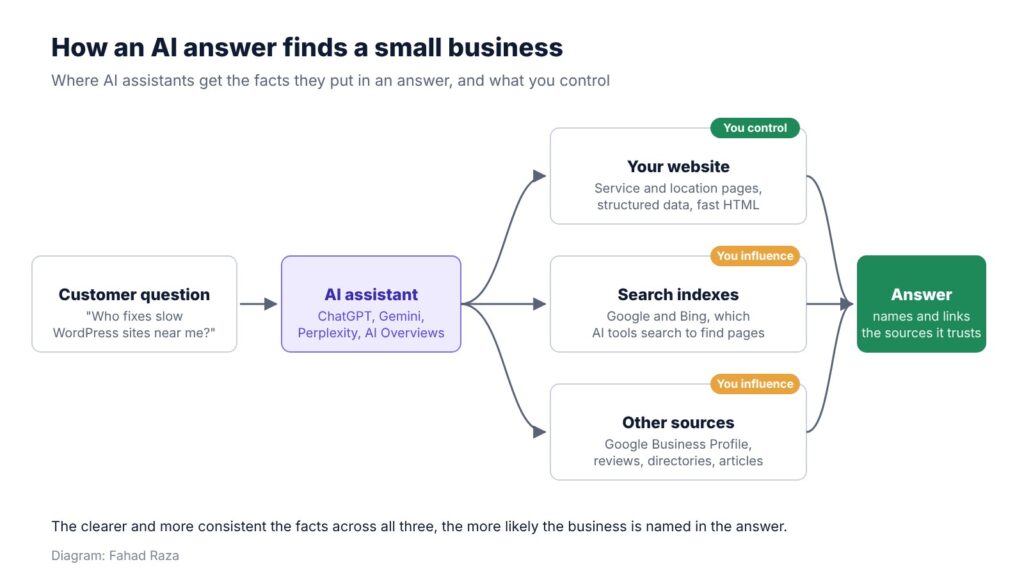
Figure 1: Where AI assistants get the facts they put in an answer.
Your website is the one source in that chain you fully control. The rest of this guide is about making it easy to read, easy to quote and consistent with everything else.
1. Check that AI crawlers can reach your site
Before anything else, make sure you are not blocking the tools you want to be found by. Each AI company uses its own crawlers, and your robots.txt file or firewall decides whether they get in.
The ones that matter most for being cited in answers:
- Googlebot powers both Google Search and AI Overviews. Block it and you disappear from both.
- Bingbot feeds Bing’s index, which several AI tools draw on.
- OAI-SearchBot is used by ChatGPT’s search feature.
- PerplexityBot and Claude-SearchBot are used by Perplexity and Claude to find pages for answers.
Some crawlers collect content to train AI models rather than to answer questions, such as GPTBot and Google-Extended. Blocking those is a business decision. Blocking Google-Extended does not remove you from Google Search or AI Overviews.
Two places to check:
- robots.txt. Visit yourdomain.com.au/robots.txt and look for “Disallow: /” under any of the crawlers above.
- Cloudflare and security plugins. In 2025, Cloudflare began offering to block AI crawlers by default on new sites, and some security plugins block “bad bots” broadly. Check your settings and allow the search crawlers you want.
User-agent: OAI-SearchBot
Allow: /
User-agent: PerplexityBot
Allow: /
User-agent: GPTBot
Disallow: /
This example allows two answer crawlers and blocks one training crawler. Adjust it to your own choices.
2. Give every service its own page
AI tools quote pages that answer one question clearly. A homepage that lists twelve services in one paragraph answers none of them well.
Each main service should have its own page that says, near the top and in plain words:
- What the service is, and who it is for
- Where you offer it: suburbs, city or region
- What it costs, or a typical price range
- How long it takes, and what happens next
- How to book or get in touch
A physiotherapist with separate pages for back pain, sports injuries and post-surgery rehab is far easier to cite than one with a single “Services” page. The same goes for location. If you serve three areas, say so on the pages for those areas, not only in the footer.
As a Sydney WordPress developer, this is the first thing I check when a small business asks why its website is invisible: whether each service has its own page that an AI tool, or a person, can read in ten seconds and know exactly what is on offer. On WordPress, adding these pages is usually a day’s work, not a rebuild.
3. Write the way customers ask
People type short keywords into Google. They ask AI tools full questions. Your pages should answer those questions in the words customers use.
- Use the customer’s language before industry terms. “Fix a slow website” before “performance optimisation”.
- Answer common questions directly on the page, each in a short paragraph: “How much does it cost?”, “How long does it take?”, “Do you work weekends?”
- Put specific facts in text, not only in images. An AI tool cannot quote a price list that only appears in a picture.
- Keep facts current. An old price or a closed location makes the whole page less trustworthy.
This is the same lesson I learned working on search for a large retailer: people search in their own words, not the company’s. I wrote about what eight years of SEO at IKEA taught me about small business websites, and the point applies even more now that customers type full questions.
4. Add structured data
Structured data is code that labels the facts on a page, such as business name, address, opening hours, services and prices, in a format machines read reliably. Google uses it, and it helps any tool that reads your page to get the facts right.
For a small business, the useful types are:
- LocalBusiness (or a more specific type such as Dentist, Plumber or AccountingService) for name, address, phone, hours and service area
- Service for each service page
- Organization with sameAs links to your Google Business Profile and social profiles
- Review or AggregateRating only for genuine reviews shown on the page
On WordPress, SEO plugins such as Yoast, Rank Math and SEOPress add the basic types. Check the output with Google’s Rich Results Test and the Schema Markup Validator.
5. Make sure the content is in the HTML
Many AI crawlers read the raw HTML of a page and do not run JavaScript. If your service descriptions, prices or contact details only appear after scripts load, those crawlers may see an empty page.
This is common with heavy page builders, sliders, tabs and accordions that load content dynamically, and with some site builders. A quick test is to view the page source in your browser and search for a sentence from the page. If it is not there, a crawler that skips JavaScript cannot read it either.
Speed matters too. A page that takes several seconds to respond may be skipped by a crawler working through many pages for one answer.
6. Keep your facts the same everywhere
AI tools cross-check. If your website says you open at 8am, your Google Business Profile says 9am, and a directory still lists your old address, the tool has three versions of the truth and less reason to recommend you.
- Use the same business name, address and phone number on your site, Google Business Profile, Bing Places and directories.
- Update opening hours, services and prices in all of them at the same time.
- Ask happy customers for reviews that mention the service and suburb. They give AI tools specific, recent evidence.
- Get mentioned in relevant places: local business associations, industry sites and articles. Each one is another source that confirms who you are.
7. Measure what AI is sending you
You can already see some AI traffic in Google Analytics 4. Look under Traffic acquisition for referrals from chatgpt.com, perplexity.ai, gemini.google.com and copilot.microsoft.com. ChatGPT also adds utm_source=chatgpt.com to many of the links it shows.
Google Search Console includes clicks from AI Overviews in its normal Performance report, but does not show them separately. Bing Webmaster Tools is worth setting up too, because Bing’s index feeds several AI tools.
A simple manual test helps as well. Once a month, ask ChatGPT, Perplexity and Gemini the questions your customers would ask, and note who gets named. If competitors appear and you do not, open the pages they are cited from and compare them with yours.
A quick checklist
| Check | How to test it | Fix if it fails |
|---|---|---|
| AI search crawlers can reach the site | Read robots.txt; check Cloudflare and security plugin bot settings | Allow Googlebot, Bingbot, OAI-SearchBot and other answer crawlers |
| Each service has its own page | List your services and match each to a URL | Create one page per main service and location |
| Key facts are in text | Search the page source for prices, hours and suburbs | Move facts out of images, sliders and scripts |
| Structured data is present and valid | Rich Results Test, Schema Markup Validator | Add LocalBusiness, Service and Organization markup |
| Facts match across listings | Compare site, Google Business Profile, Bing Places and directories | Update all listings at the same time |
| AI traffic is tracked | GA4 referrals from chatgpt.com, perplexity.ai, gemini.google.com | Set up GA4 and Bing Webmaster Tools; test answers monthly |
Table 1: AI readiness checks for a small business website.
A note on llms.txt: it is a proposed file that summarises a site for AI tools. It costs little to add, but no major AI provider has confirmed it uses the file, so it is no substitute for the basics above.
The same basics, a new reader
None of this is a new discipline. Clear service pages, plain language, accurate facts, fast pages and consistent listings have always helped people and search engines. AI tools simply reward them more directly, because they are trying to pull out a short, confident answer.
The businesses that show up in those answers will not always be the biggest or the ones with the newest website. They will be the ones whose websites make it easy to say exactly what they do, where and for whom.
Fahad Raza is a WordPress developer in North Sydney with more than 18 years of experience in SEO, including eight and a half years with IKEA Australia and New Zealand.
