
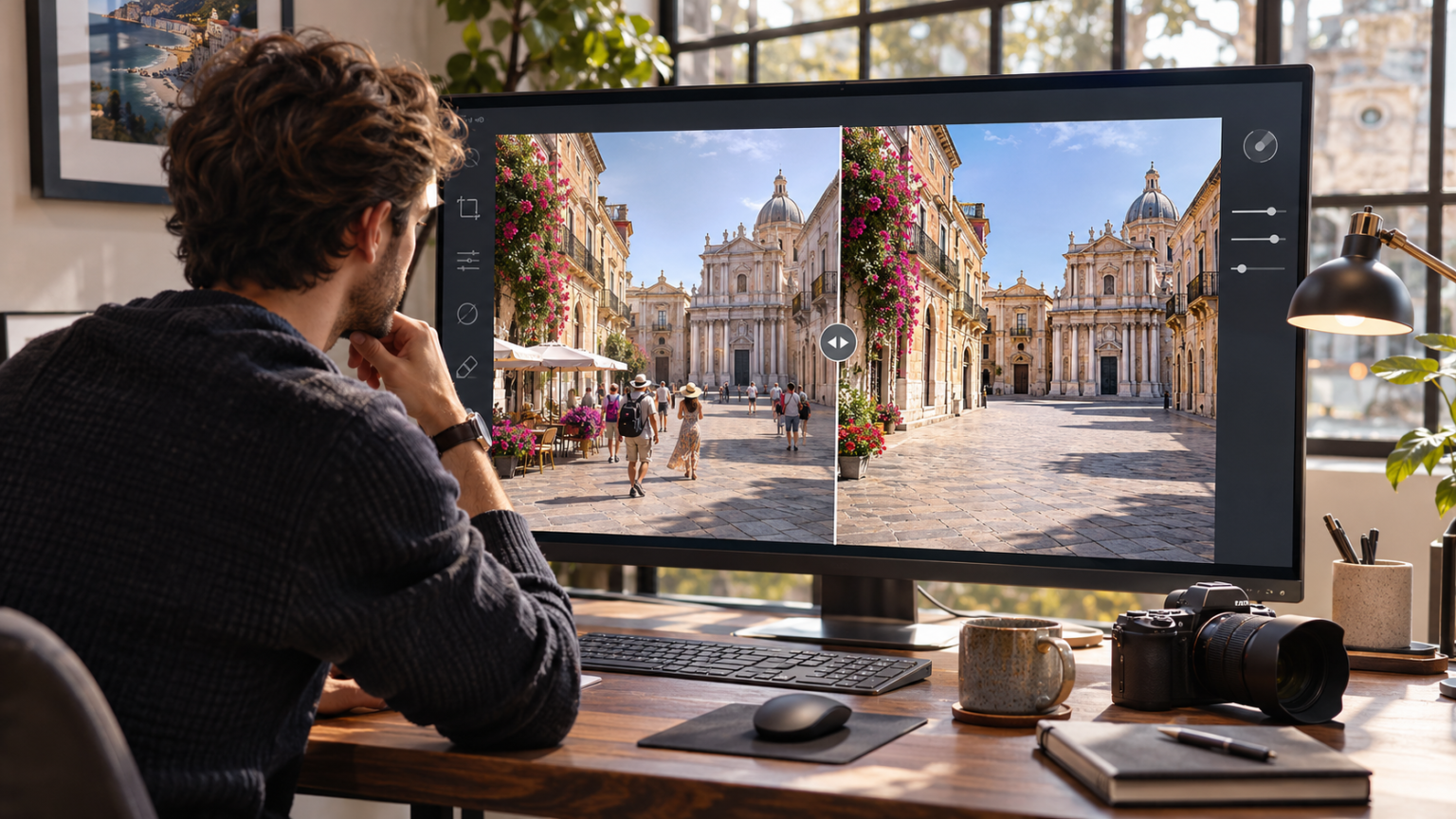
A great photograph can lose its impact because of a few unwanted details. A stranger walking through the background, distracting objects on a table, or an untidy room can pull attention away from the main subject. ClearCrowds is an AI-powered photo editing tool designed to help users remove unwanted visual elements, improve image presentation, and create cleaner photographs without requiring extensive manual editing skills.
Modern photography is no longer limited to capturing the perfect image at the perfect moment. Artificial intelligence has introduced practical ways to improve photographs after they are taken. Whether someone is preparing travel pictures, online store images, social media content, or property listings, automated photo cleanup can make the editing process more approachable.
However, successful image editing requires more than removing visible distractions. The final photograph should preserve realistic lighting, natural textures, accurate proportions, and the original subject’s important details.
Understanding how AI photo editing works, where it performs well, and when manual review is necessary helps users produce more convincing visual results.
What Is ClearCrowds and How Does It Work?
ClearCrowds is an artificial intelligence photo editing platform focused on simplifying common image improvement tasks. It provides tools for removing unwanted people, objects, clutter, shadows, and other distracting visual elements from photographs.
Instead of requiring users to work through complicated editing layers or manually reconstruct missing backgrounds, the platform offers task-focused editing workflows.
The general process involves identifying an image problem, selecting an appropriate editing function, processing the photograph, and reviewing the generated result.
This approach can be useful for people who regularly work with photographs but do not have advanced image editing experience.
Understanding AI-Powered Photo Cleanup
Traditional photo retouching often requires careful selection, cloning, masking, and manual adjustment.
AI-powered photo cleanup approaches these tasks differently.
Machine learning systems analyze visual patterns within photographs and estimate how particular areas should appear after selected objects are removed.
For example, removing a person standing on a paved walkway requires the editing system to generate a plausible continuation of the pavement behind that person.
The result depends on several factors, including:
- Original image resolution and sharpness
- Size and position of the unwanted object
- Background complexity
- Lighting direction and shadow patterns
- Visibility of surrounding image details
- Accuracy of the selected editing area
Simple backgrounds generally provide clearer visual information for reconstruction. Complex scenes with overlapping objects, detailed architecture, or unusual reflections may require additional review.
What Makes ClearCrowds Different From Traditional Editing?
The main distinction is its focus on guided image cleanup rather than requiring users to navigate a complete professional graphics editing environment.
ClearCrowds organizes editing around practical problems, including crowd removal, room decluttering, product photo cleanup, image enhancement, and other targeted adjustments.
It also provides a batch editing workspace for handling multiple photographs together.
These capabilities can help organize repetitive editing tasks, although the amount of time saved depends on image complexity and how much correction each result requires.
7 Powerful Ways to Improve Photo Quality With ClearCrowds
Getting useful results from AI image editing requires a thoughtful approach. The following seven methods can help photographers, business owners, and content creators work more effectively with automated cleanup tools.
1. Start With the Highest Quality Original Image
Image quality begins with the original photograph.
Although AI editing tools can improve certain visual problems, they cannot reliably recover every detail missing from a heavily compressed, blurred, or low-resolution image.
A sharp original provides more information about textures, colors, edges, and nearby objects.
Before uploading an image to ClearCrowds, choose the best available version.
Avoid repeatedly saving and compressing the same photograph before editing.
Why Original Resolution Matters
Higher-resolution images contain more visual detail that can help an editing system estimate surrounding patterns.
Consider a photograph of a historic building with a tourist standing in front of an ornate doorway.
If the photograph is sharp, the editing system may have useful visual information about the doorway’s edges, patterns, and colors.
If the original is heavily blurred, reconstructing the missing architectural details becomes more difficult.
Higher resolution does not guarantee a perfect result, but it usually provides a better starting point.
2. Remove Unwanted People Without Changing the Main Subject
Crowd removal is particularly useful in travel and outdoor photography.
Popular destinations often contain visitors, pedestrians, and other people who were not intended to be part of the composition.
A photograph taken in a public square may have beautiful architecture and excellent lighting but also contain several distracting people near the foreground.
ClearCrowds provides crowd and unwanted person removal tools that can help simplify these scenes.
The key is to remove only elements that interfere with the intended visual story.
Keep the Main Subject Clearly Defined
Before editing, identify the photograph’s primary subject.
For travel photography, the subject might be a historic landmark, natural landscape, or family member.
Removing every person from a photograph is not always the best decision. Sometimes people provide scale, atmosphere, and useful context.
A balanced approach preserves the visual details that make the image meaningful while reducing distractions.
Inspect Areas Where People Overlap
Crowd removal becomes more challenging when people overlap important background features.
Pay particular attention to:
- Building entrances and window frames
- Decorative railings and fences
- Pavement patterns
- Shadows beneath removed people
- Objects partially hidden behind pedestrians
These areas may contain reconstructed details that need additional editing.
3. Eliminate Background Clutter for a Cleaner Composition
Background clutter can make an otherwise attractive photograph feel confusing.
Loose cables, unnecessary furniture, packaging materials, or misplaced household objects may compete with the intended subject.
AI object removal can help create a more organized appearance.
For example, a photograph of a beautifully designed living room may contain a shopping bag near the sofa and several loose objects on the coffee table.
Removing those distractions can help viewers focus on the interior design.
Understand the Difference Between Cleanup and Alteration
Not every object should be removed.
Some details are essential to understanding the photographed environment.
For instance, removing a small disposable cup from a product photograph is different from removing visible damage from a product offered for sale.
The first change may improve presentation without materially affecting the product’s characteristics. The second could mislead potential buyers.
Responsible image cleanup should improve visual clarity without changing important facts.
4. Improve Lighting While Preserving Realistic Shadows
Lighting strongly influences how viewers perceive a photograph.
Uneven illumination, harsh reflections, and distracting shadows can reduce visual clarity.
ClearCrowds includes image enhancement and shadow cleanup functions intended to address selected lighting problems.
These tools may be useful when photographing objects indoors, documenting paperwork, or preparing product images.
However, removing all shadows is not necessarily desirable.
Natural shadows communicate depth, shape, and the position of objects within a scene.
Preserve Realistic Depth and Texture
Consider a ceramic product photographed on a tabletop.
A harsh shadow from the photographer’s hand may be distracting and worth removing.
The softer shadow beneath the ceramic product, however, helps establish its contact with the surface.
Removing that contact shadow could make the object appear to float.
When reviewing an edited photograph, examine whether the remaining lighting still makes physical sense.
The goal should be natural visual balance rather than an artificially flawless appearance.
5. Prepare More Consistent Product Photographs
Product photography is especially important for online stores because customers rely on images to understand appearance, proportions, and visible features.
ClearCrowds can support product photo cleanup by helping remove distracting objects and adjust selected visual details.
For example, an online seller may photograph handmade accessories against a neutral background.
Minor distractions, such as dust or unwanted reflections, can make the photograph appear less polished.
Removing these elements can improve the presentation while preserving the actual product.
Keep Product Characteristics Accurate
Product editing should never misrepresent what customers will receive.
Important characteristics include:
- Actual product color
- Material texture
- Dimensions and proportions
- Surface finish
- Included components
- Visible condition
Adjustments that improve exposure or remove unrelated background clutter are generally different from edits that conceal material defects.
For accurate commercial photography, keep a copy of the original image and compare it with the final version before publication.
6. Use Batch Editing for Repetitive Photo Tasks
Editing multiple photographs individually can become repetitive.
This is particularly relevant for photographers, online retailers, property professionals, and content teams working with collections of related images.
ClearCrowds offers a batch photo editing workspace designed to let users manage multiple images within a shared workflow.
Batch editing can help organize repetitive cleanup tasks and simplify comparison between edited results.
However, applying similar changes to several photographs does not mean every output will be equally successful.
Maintain Consistent Visual Standards
Imagine preparing photographs for twenty products from the same collection.
A consistent editing approach should maintain similar:
- Background brightness
- Color balance
- Image composition
- Product scale
- Visual sharpness
- Export quality
Even when images share a similar background, individual photographs may have different reflections, shadows, or object boundaries.
Review each result rather than assuming that one successful edit guarantees consistent results across the entire batch.
A useful practice is to test the desired cleanup on a small group before processing a larger collection.
7. Compare Edited Results Before Publishing
One of the most important parts of AI image editing is quality control.
ClearCrowds provides before-and-after comparison functionality that helps users inspect visual changes.
This is useful because AI-generated background details can sometimes appear convincing at first glance while containing subtle inconsistencies.
A clean-looking preview may hide unusual textures, distorted lines, or missing details.
Review the Photograph at Different Sizes
First, examine the entire image at its intended viewing size.
Does the composition look natural? Is the main subject clear? Are there any obvious distractions?
Next, zoom into the edited area.
Look for inconsistent textures, blurred object boundaries, repeated patterns, or unusual transitions between original and reconstructed sections.
Finally, review the photograph at the size and format in which it will actually appear.
A small social media image and a large property listing photograph may reveal different levels of detail.
This final inspection helps prevent avoidable publishing mistakes.
Practical Applications of ClearCrowds in Everyday Photography
AI photo cleanup has applications beyond casual image enhancement.
Different industries and personal workflows can benefit from targeted editing when the original information remains accurate.
Travel Photography and Personal Memories
Travelers frequently photograph busy public locations.
Waiting for a completely empty background may be unrealistic, especially at popular tourist destinations.
ClearCrowds offers a way to remove selected strangers or distractions after capturing a photograph.
For example, someone visiting a famous garden might photograph a scenic pathway while another visitor walks across the frame.
Removing that person may make the composition more consistent with the photographer’s original intention.
However, a heavily crowded scene can be more challenging because many background elements may be hidden.
The editing system must estimate those missing details rather than recover information that was actually captured.
For personal memories, this may be acceptable when the goal is simply to create an attractive photograph.
For documentary purposes, the original should remain available.
Real Estate Photography and Interior Presentation
Real estate photographs help prospective buyers and renters understand a property’s appearance.
Unnecessary clutter can distract viewers from important details such as room layout, window placement, and architectural features.
ClearCrowds includes workflows intended for real estate photo editing, room decluttering, and virtual staging.
These functions can support the preparation of property visuals.
For example, removing a temporary cleaning bucket from a photograph may improve its presentation.
Virtual staging may also help illustrate how furniture could fit into an empty room.
Why Transparency Matters in Property Images
Property photographs should accurately represent permanent features and actual conditions.
Removing structural damage, water stains, or defects could create misleading expectations.
Similarly, virtually staged images should be identified where required by applicable advertising rules or marketplace policies.
Responsible photo editing focuses on improving presentation while maintaining trust.
Ecommerce and Marketplace Listings
Online businesses frequently need consistent photographs across product collections.
Different shooting sessions may produce images with inconsistent backgrounds, lighting, or unwanted surrounding objects.
ClearCrowds can help with selected cleanup tasks during product image preparation.
A small business selling handmade home accessories, for example, might use object removal to eliminate unrelated items from a photographed display.
The final image should make it easier to understand the product without exaggerating its quality or changing its appearance.
For marketplace use, sellers should also review the platform’s image guidelines before publishing edited photographs.
Social Media and Digital Content Creation
Social media creators often want photographs that communicate a clear visual message.
A distracting background can draw attention away from a person, product, destination, or activity.
AI photo cleanup offers a way to refine composition without necessarily repeating the photography session.
For example, a creator might remove an unrelated object from the background of a portrait or simplify a busy tabletop photograph.
The strongest result is not always the most heavily edited one.
Subtle improvements often preserve the natural character of the original image.
Documents and Photographed Pages
Photographs of documents can contain perspective distortion, uneven lighting, and distracting surroundings.
ClearCrowds includes a photo-to-scan workflow designed to straighten photographed pages, crop surrounding areas, and adjust their appearance.
This may be useful when organizing notes or producing clearer copies of ordinary documents.
Nevertheless, AI processing should not alter factual document content.
Users should compare the edited result with the original, especially when dealing with numbers, dates, signatures, or important text.
For legal, financial, or official records, preserve the unedited version and avoid modifications that could affect authenticity.
How to Use ClearCrowds for Better Image Editing Results
A simple, repeatable workflow can make AI editing easier to manage.
Step 1: Choose the Photograph Carefully
Select an image with clear subject detail and suitable exposure.
Check whether the original photograph contains enough visual information to support the intended edit.
Keep an untouched copy for comparison.
Step 2: Identify the Main Problem
Determine what needs improvement.
It might be a person in the background, a distracting object, unwanted clutter, or an uneven shadow.
Avoid making several unnecessary changes at once.
Step 3: Select the Appropriate Editing Function
Choose the ClearCrowds tool that matches the intended task.
A crowd removal function is more appropriate for distracting pedestrians than a general lighting adjustment.
Using a specific cleanup workflow can help keep the editing goal clear.
Step 4: Review the Generated Preview
Once the edit has been processed, examine the result before exporting.
Inspect both the corrected area and surrounding image details.
Pay attention to edges, reflections, shadows, and repeated textures.
Step 5: Refine the Image if Necessary
If the result contains visible errors, consider narrowing the editing area or adjusting the approach.
Complex images may benefit from smaller, more focused corrections.
Sometimes retaining a small background detail produces a more realistic result than removing a large area.
Step 6: Export and Verify the Final Image
Choose an appropriate supported export option for the intended use.
Before publishing, confirm the image dimensions, clarity, color appearance, and file format.
Check the final result outside the editor whenever possible.
Common Challenges in AI Photo Editing
Although AI tools can simplify image cleanup, understanding their limitations is essential.
Complex Background Reconstruction
An unwanted object may cover important details in the original photograph.
When that object is removed, the editing system must estimate what belongs behind it.
Background reconstruction is usually more difficult when the hidden area contains intricate patterns, architectural details, or overlapping objects.
A visually convincing result may still differ from the actual scene.
Unnatural Object Edges
Edited areas sometimes contain soft outlines or inconsistent boundaries.
These problems are especially noticeable around hair, transparent materials, thin wires, and reflective surfaces.
Inspecting the image at a higher magnification can help identify such defects.
Inconsistent Lighting
An edited region may appear brighter or darker than its surroundings.
This happens when generated details do not fully match the original lighting conditions.
Carefully comparing shadows and highlights can reveal inconsistencies.
Changes to Important Details
AI reconstruction can unintentionally change details that should remain untouched.
Examples include text on signs, patterns on clothing, or decorative features on buildings.
For this reason, image cleanup should always include visual verification.
Privacy, Image Rights, and Responsible AI Editing
Uploading photographs to an online editing platform can involve sharing personal or commercially sensitive information.
Some photographs contain identifiable people, private locations, documents, or confidential details.
ClearCrowds uses online processing workflows, and particular editing tasks may involve external service providers.
Users should review current privacy settings, retention practices, and account controls before uploading sensitive materials.
A responsible workflow includes several precautions:
- Upload only photographs you have the right to edit.
- Obtain permission when necessary.
- Avoid uploading confidential or highly sensitive content unnecessarily.
- Keep original photographs in secure storage.
- Check whether edited images can be used commercially under applicable terms.
- Avoid edits that could deceive viewers about important facts.
AI editing should support clear communication rather than manipulate evidence or misrepresent people, products, and properties.
How to Decide Whether ClearCrowds Fits Your Needs
Choosing an AI photo editor depends on the type of work being performed.
ClearCrowds is worth evaluating when the main requirement is targeted cleanup rather than complex graphic design or advanced photographic compositing.
Consider Your Typical Editing Tasks
Think about how often you need to remove unwanted people, tidy backgrounds, improve product photographs, or prepare images for publication.
A focused editor may be convenient when the same problems occur regularly.
Evaluate Actual Output Quality
Testing the editor with representative photographs is more useful than relying entirely on demonstration images.
Choose samples that include both simple and challenging editing conditions.
Evaluate naturalness, preserved details, and the amount of additional correction required.
Check File Requirements and Editing Costs
Upload limits, export resolution, available credits, and subscription conditions can affect whether a tool is suitable for regular use.
Review the currently available options before committing to a workflow.
Professional users should also consider how easily edited images can be organized, reviewed, and exported.
Keep Human Judgment in the Process
AI technology can automate parts of image editing, but it does not eliminate the need for careful visual decisions.
A successful photograph should remain believable and suitable for its intended purpose.
Human review is especially important when the image will influence purchasing decisions, document real events, or represent commercial property.
Frequently Asked Questions
1. What is ClearCrowds used for?
ClearCrowds is an AI-powered photo editor used to remove unwanted people, objects, clutter, and other distractions while improving photographic presentation.
2. Can ClearCrowds remove people from a crowded photograph?
Yes. ClearCrowds provides crowd removal tools, although results depend on background complexity, overlapping subjects, and the quality of the original image.
3. Is ClearCrowds suitable for product photography?
ClearCrowds can support product photo cleanup by reducing distracting objects and improving presentation. Product colors, features, and condition should remain accurate.
4. Does ClearCrowds support editing multiple images?
Yes. ClearCrowds offers batch photo editing workflows that allow users to organize and review multiple images within a shared workspace.
5. Can ClearCrowds improve real estate photographs?
ClearCrowds provides real estate cleanup and virtual staging functions. Users should ensure edited images accurately represent the property and disclose virtual changes when required.
6. Is ClearCrowds a replacement for professional photo editing software?
ClearCrowds can simplify common cleanup tasks, but complex retouching, precise compositing, and specialized professional work may still require advanced editing software.
Conclusion
ClearCrowds offers a practical approach to AI-powered photo cleanup for travel photography, ecommerce, property images, and everyday visual content. Its targeted editing functions can help users address common distractions without navigating an extensive manual editing process. The best results come from selecting quality original photographs, making focused adjustments, and carefully reviewing reconstructed details. By combining AI assistance with responsible editing decisions, users can produce cleaner, more effective photographs while preserving visual accuracy and authenticity.
