
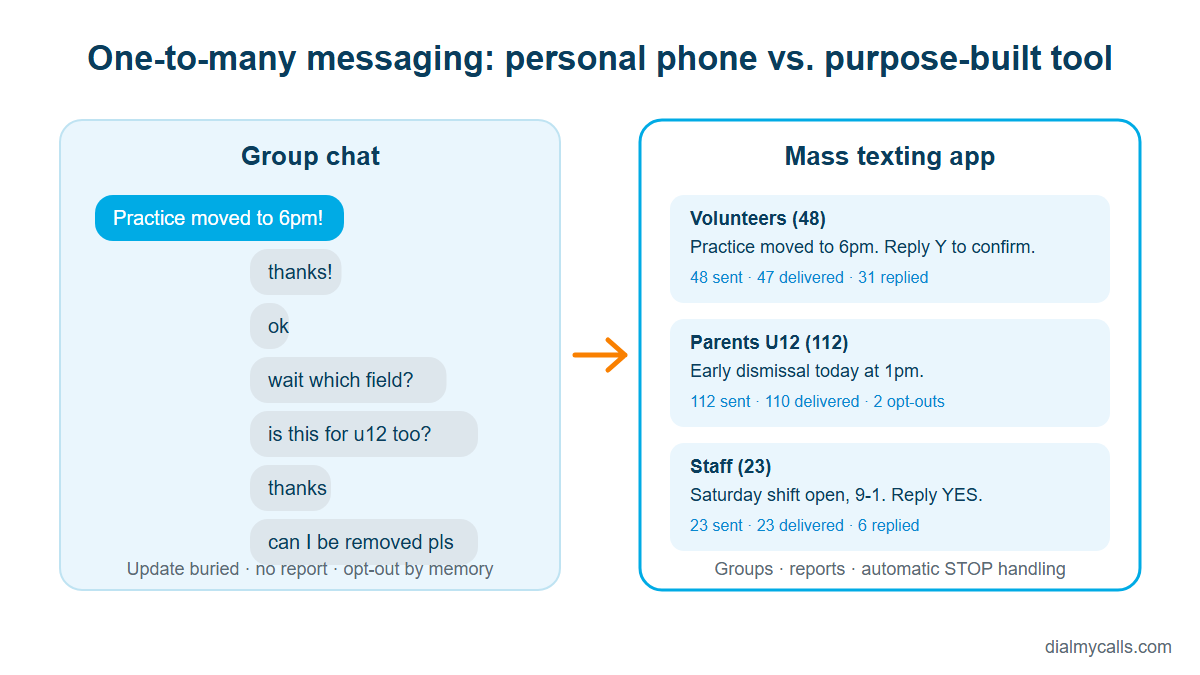
Almost every organization starts the same way. A youth pastor sets up a group chat for volunteers. A property manager texts tenants one by one about a water shut-off. A clinic office manager keeps a spreadsheet of staff numbers and copies them into her phone when a shift opens up. It works, right up to the day it doesn’t: the message that never reached half the list, the reply-all thread that buried the only update that mattered, the employee who asked to be removed and kept getting pinged.
That day is the signal that you have outgrown personal messaging and need a system built for one-to-many communication. This article walks through how to recognize that moment, what to look for when you choose a mass texting app, and how to roll it out without annoying the very people you are trying to reach.
Figure 1. The same update sent from a personal group chat and from a mass texting app with contact groups and delivery reports. Image: DialMyCalls.
Why text, and why now
Text messaging keeps winning for time-sensitive communication because it reaches the device people actually carry. Pew Research Center’s mobile fact sheet (2026) puts cellphone ownership at 98% of U.S. adults and smartphone ownership at 91%, still 79% among adults 65 and older. A text does not need a download, a login or a data plan to land.
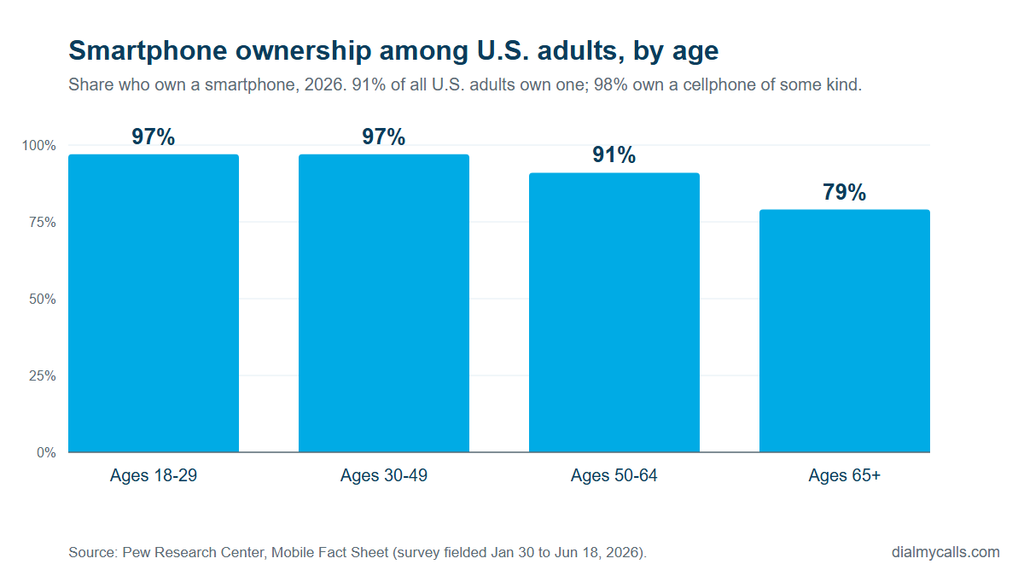
Figure 2. Smartphone ownership among U.S. adults by age group, 2026. Source: Pew Research Center, Mobile Fact Sheet. Chart: DialMyCalls.
When a game is cancelled because of lightning, a boiler fails in a 200-unit building, or a Saturday shift needs covering by noon, the message has to be short, immediate and visible on a lock screen. That is the job a text does best.
Five signs you have outgrown the group chat
- You are managing more than one list. Volunteers, donors, staff, parents, board members. The moment you need to message one group without the others seeing it, a personal phone becomes a liability.
- Replies are drowning the announcement. In a group thread every “thanks!” is a notification for everyone. Your important update becomes message 14 of 40.
- Nobody knows who received what. If you cannot look at a report and see how many messages were sent, how many failed, and who replied, you are guessing, and guessing is not acceptable for a safety notice.
- Opt-outs are handled by memory. Someone asks to stop receiving messages and the request lives in your head. Six weeks later they get another blast, and in the U.S. that can be a legal problem, not just an annoyance.
- The person with the phone is the single point of failure. When the one staff member who “does the texts” is on vacation, communication stops. A shared platform with permissions fixes that overnight.
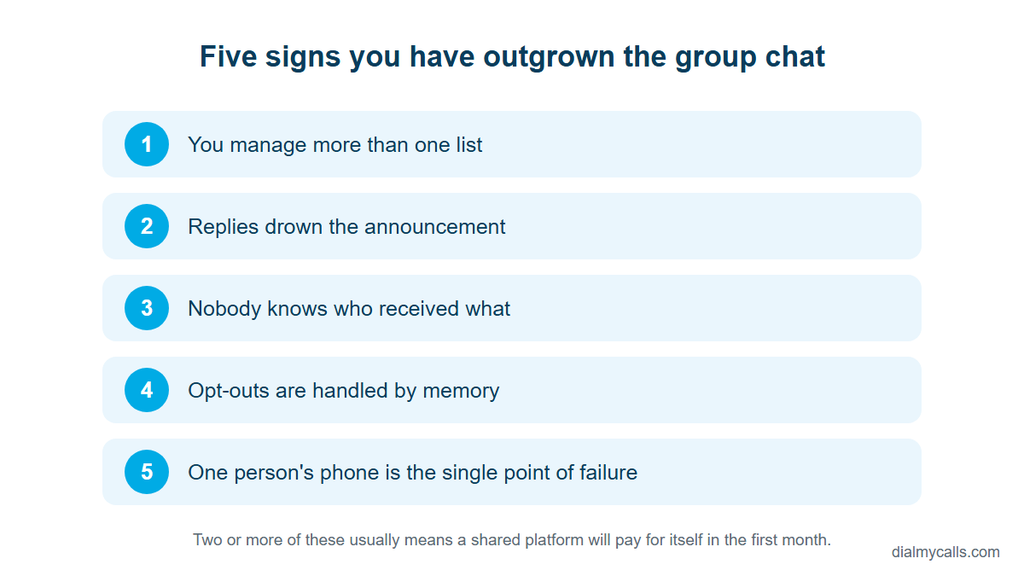
Figure 3. Five signs an organization has outgrown the group chat. Image: DialMyCalls.
What a mass texting app should actually do
The category is crowded and most product pages list the same adjectives. Ignore the adjectives and check for these capabilities, because they are the ones that decide whether the tool survives contact with a real organization.
Contact groups and imports. You should be able to upload a spreadsheet, tag contacts into groups, and keep those groups current without re-uploading everything. Look for a way to connect your existing tools too. Many platforms sync through Zapier or a CSV export rather than a native integration, which is fine as long as you know it up front.
Keyword opt-in. A keyword (text VOLUNTEER to a number) lets people add themselves, which means your list grows with documented consent. This matters more than any other feature on the list, for reasons covered below.
Two-way replies in a shared inbox. Broadcasts invite questions. If replies go to one person’s handset, you are back to the single point of failure. A shared inbox lets any authorized team member answer, and it keeps the conversation attached to the contact record.
Scheduling and recurring sends. Rent reminders on the first of the month, a weekly volunteer roster, a Sunday-morning service time. Set them once, review them occasionally.
Reports per send. Sent, delivered, failed, replied. If the tool cannot show you the failures, you cannot clean your list, and dirty lists cost money and reputation.
A phone number you control. Some tools let you text-enable the landline your community already knows, so the number on the church bulletin or the leasing office sign is the one messages come from. Others assign a local or toll-free number. Either beats a random short code nobody recognizes.
Voice as a fallback. Not everyone reads texts quickly, and some older residents or members prefer a call. Platforms that can send the same message as an automated voice call, from the same contact list, cover both audiences without doubling your work. This is one reason multi-channel tools such as DialMyCalls remain popular with churches, schools, property managers and nonprofits.
The compliance part you cannot skip
Group texts from a personal phone sit in a legal grey area that most small organizations never think about. The moment you use a platform to send automated or bulk messages in the United States, the Telephone Consumer Protection Act applies, and so do the carriers’ own messaging rules. The Federal Communications Commission’s consumer guide on unwanted calls and texts explains what recipients are entitled to, and it is worth reading from the recipient’s side before you send anything.
In practice, three habits keep you on the right side of the rules and, more importantly, keep your audience from resenting you:
- Get consent you can show. Keyword opt-ins, web forms and signed sign-up sheets all count. “They gave us their number once for the newsletter” does not.
- Honor STOP instantly and automatically. Your platform should process opt-outs without a human touching them, and keep a do-not-contact list that survives list re-uploads.
- Identify yourself in every message. “First Baptist Youth: practice moved to 6pm” beats a bare “practice moved to 6pm” from an unknown number. Identification reduces spam reports.
No software makes an organization compliant on its own. The tool gives you the mechanisms; your process has to use them. Any vendor that promises otherwise is overselling.
A rollout that people will thank you for
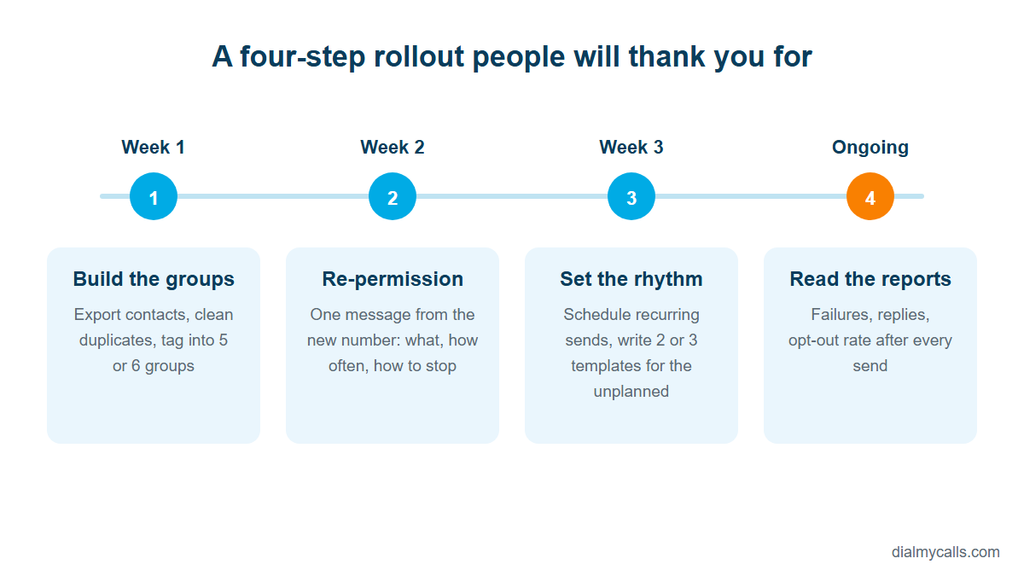
Figure 4. A four-step rollout for moving an organization onto a texting platform. Image: DialMyCalls.
Week one: build the groups. Export your current contacts, clean the obvious duplicates, and tag people into no more than five or six groups to start.
Week two: re-permission. Send one message from the new number explaining what it is, what kinds of updates people will receive, roughly how often, and how to stop. Ask people to reply YES or text your keyword. The few contacts you lose are the ones who would have reported you later.
Week three: set the rhythm. Put the recurring messages on a schedule and write two or three templates for the unplanned ones: closure, delay, urgent need. When the real event happens you will edit a template rather than compose under pressure.
Ongoing: read the reports. After each send, glance at failures and replies. Remove dead numbers, answer questions, and watch opt-out rates. A rising opt-out rate almost always means you are sending too often or too vaguely, not that texting “doesn’t work” for your audience.
What it costs, and what it saves
Most platforms price either per message credit or per contact, and several offer a free trial so you can run a real send before paying. The savings are harder to see on an invoice but easy to feel: the two hours a week someone no longer spends calling down a list, the shift that got filled before lunch, the parent who actually knew about the early dismissal.
The group chat got you here. It was free, familiar and good enough for a while. If you recognized your organization in the five signs above, the next step is not a better group chat. It is a purpose-built tool that treats one-to-many communication as the job it is.
