
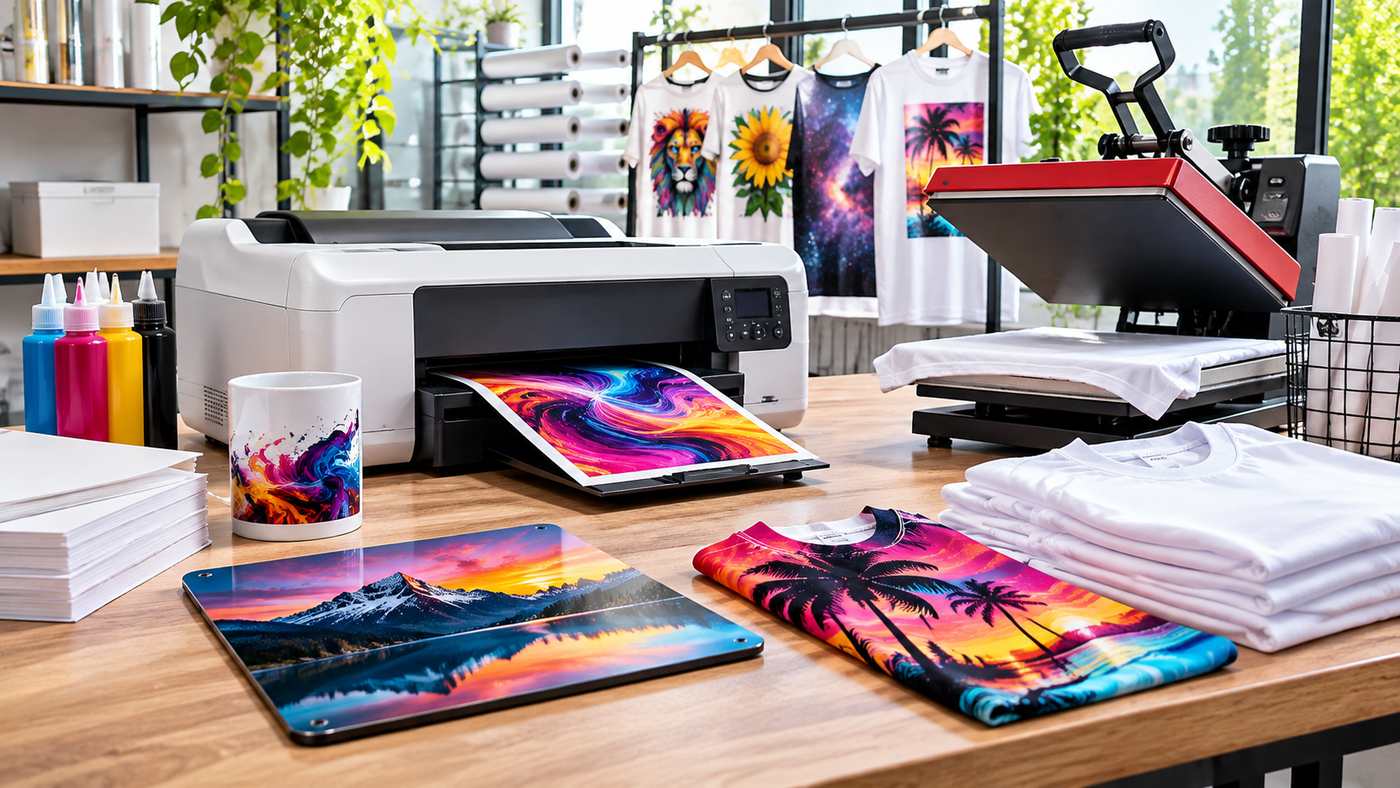
Finding the right sublimation printers for sale can be a major step toward starting or expanding a custom printing business. From personalized mugs and promotional products to polyester apparel and decorative merchandise, sublimation printing offers businesses an effective way to produce colorful, detailed designs. However, choosing a suitable printer requires more than comparing purchase prices. Print size, ink compatibility, production capacity, maintenance requirements, and long-term operating costs all influence the buying decision. Whether you’re launching a home-based printing business or upgrading commercial equipment, understanding the available technologies and essential features can help you invest in a printer that supports consistent quality and profitable production.
What Is a Sublimation Printer?
A sublimation printer is a specialized printing device that uses dye-sublimation inks to create designs that can be transferred onto compatible materials using heat.
The process typically involves printing artwork onto sublimation transfer paper and placing that paper against a suitable product.
A heat press then applies controlled temperature, pressure, and time to transfer the design.
Unlike conventional printing methods that leave ink primarily on a material’s surface, dye sublimation allows the colorant to penetrate compatible polyester fibers or specially coated surfaces.
This helps create detailed, colorful designs without the thick surface texture associated with some other decoration methods.
Sublimation printing is commonly used for products such as:
- Polyester T-shirts and sportswear
- Personalized coffee mugs
- Promotional drinkware
- Sublimation-coated phone cases
- Decorative metal photo panels
- Custom mouse pads
- Polyester tote bags
- Personalized gifts
- Selected home décor products
The material must be compatible with the process. Conventional dye sublimation does not work directly on untreated cotton or ordinary uncoated ceramic products.
Why Sublimation Printing Is Popular Among Small Businesses
Sublimation printing gives entrepreneurs the ability to create customized products without necessarily investing in large industrial production equipment.
Many entry-level systems can fit into a small workspace, making them suitable for home studios and startup businesses.
Growing Interest in Personalized Products
Customers frequently seek products featuring names, illustrations, memorable photographs, and custom designs.
Sublimation can support made-to-order production for birthdays, corporate events, team merchandise, and other occasions.
Flexible Product Selection
A single compatible printer may support designs for several product categories.
Businesses can experiment with different sublimation blanks without changing the printing technology for every project.
Detailed and Colorful Results
Dye sublimation can reproduce photographic images, gradients, and intricate artwork effectively when the printer, color management, substrate, and heat transfer settings are appropriate.
Small-Batch Production
Businesses can produce individual products or limited quantities rather than maintaining large inventories of preprinted goods.
This flexibility can be useful when testing new product ideas.
9 Essential Tips for Choosing a Sublimation Printer
Before purchasing equipment, consider the following factors to identify a solution that matches your production needs.
1. Determine Your Printing Requirements
The best starting point is understanding what you intend to produce.
A business specializing in mugs and small personalized gifts may have different equipment needs from one manufacturing sportswear or large textile products.
Consider the dimensions of your products, expected order volume, and the complexity of your designs.
For example, small desktop printers can be practical for producing transfers for compatible mugs, coasters, and smaller apparel graphics.
Larger products may require wide-format printing equipment.
Matching printer capabilities to actual business requirements prevents unnecessary spending.
2. Choose the Right Printer Size
Print size determines the maximum dimensions of artwork that can be produced on a single transfer sheet.
Common categories include compact desktop printers, larger desktop systems, and commercial wide-format equipment.
A compact printer may be sufficient for entrepreneurs creating personalized drinkware and small accessories.
Businesses producing large clothing graphics, textile panels, or oversized promotional products may benefit from wider print capabilities.
Before buying, confirm the printer’s actual supported media dimensions rather than assuming that a larger device automatically produces every desired format.
3. Evaluate Printing Quality and Resolution
Print quality is important when customers expect detailed logos, photographs, and vibrant colors.
However, a printer’s advertised resolution does not independently determine the final quality of a sublimated product.
Other factors include ink formulation, transfer paper, artwork resolution, color profiles, heat press performance, and substrate coating.
Request real production samples when possible.
Evaluate skin tones, gradients, fine details, and solid-color consistency rather than judging output only from online photographs.
4. Check Ink Compatibility
Sublimation printers require suitable dye-sublimation inks.
Using incompatible ink may result in poor transfer performance, equipment problems, or warranty concerns.
Some printers are manufactured specifically for sublimation, while others are standard inkjet models that users modify.
Purpose-built systems generally provide a more straightforward approach because they are designed around a compatible ink and printing workflow.
For example, Epson’s SureColor F170 is a dedicated desktop dye-sublimation printer, while Sawgrass offers purpose-built systems such as the SG500. Epson US+1
Always review the manufacturer’s ink recommendations before purchasing supplies.
5. Consider Printing Speed and Production Capacity
Printing speed matters when handling repeated orders or commercial production.
A small business producing occasional personalized gifts may prioritize affordability and output quality.
A company processing hundreds of items may need equipment capable of handling larger batches efficiently.
However, the printing stage is only one part of the workflow.
Design preparation, transfer cutting, heat pressing, cooling, packaging, and quality inspection also affect daily production capacity.
Evaluate the entire production process before investing in a faster printer.
6. Compare Total Operating Costs
Printer purchase price is only one component of the total investment.
Additional costs may include sublimation ink, transfer paper, compatible blanks, heat presses, software, maintenance supplies, and replacement components.
Shipping, taxes, and electrical requirements may also affect the budget.
Calculate an approximate cost per finished product using realistic material consumption and expected production volume.
This approach provides a clearer understanding of long-term profitability than comparing printer prices alone.
7. Examine Software and Color Management
Good color management helps printed designs reproduce consistently.
Some printers offer dedicated software, print drivers, and manufacturer-supported color profiles.
Before purchasing, verify compatibility with your computer’s operating system and preferred design applications.
Also determine whether the printer requires specialized software or supports a straightforward desktop printing workflow.
Reliable color management can reduce wasted blanks and improve consistency across customer orders.
8. Review Warranty and Technical Support
Professional support becomes valuable when equipment requires troubleshooting.
Review warranty coverage, repair procedures, authorized service options, and availability of replacement parts.
For business owners, downtime can disrupt customer deliveries and reduce revenue.
A printer with dependable service support may offer greater value than a less expensive product with limited maintenance options.
9. Choose a Reputable Equipment Supplier
When comparing sublimation printers for sale, evaluate the supplier as carefully as the equipment itself.
A dependable retailer should provide accurate specifications, clear purchasing terms, compatible accessories, and accessible customer service.
For example, businesses researching sublimation printers for sale can explore printing equipment and related solutions through All Print Heads.
The retailer’s broader catalog includes equipment and supplies associated with brands such as Epson and Sawgrass, along with sublimation inks, transfer materials, and other printing accessories. Allprintheads+1
Before placing an order, confirm the exact model, included accessories, warranty conditions, stock availability, and final delivered price.
Different Types of Sublimation Printers
Understanding the main printer categories can simplify the buying process.
Desktop Sublimation Printers
Desktop systems are commonly used by beginners, hobbyists, and small printing businesses.
They are suitable for limited workspaces and smaller transfer sizes.
Their primary advantages include manageable dimensions, relatively straightforward setup, and the ability to produce customized items in small quantities.
However, desktop systems may have limitations in media size and high-volume production.
Wide-Format Sublimation Printers
Wide-format systems support larger transfer media and are typically considered by businesses producing substantial textile graphics or large-format decorative products.
They may require additional workspace, larger heat presses, and more advanced material handling.
These systems are generally more appropriate for businesses with consistent demand for larger products.
Industrial Sublimation Printing Systems
Industrial systems are designed for demanding production environments.
They may incorporate high-capacity ink systems, advanced media handling, and workflows suited to commercial textile production.
Businesses considering industrial equipment should evaluate infrastructure, training, service support, and expected utilization carefully.
Popular Sublimation Printer Brands to Consider
Several manufacturers provide equipment relevant to sublimation printing.
Epson Sublimation Printers
Epson offers dedicated dye-sublimation printers for different production requirements.
The SureColor F170 is designed for desktop use and includes a 150-sheet auto-feed tray and manufacturer-supported dye-sublimation printing technology. Epson US
Larger SureColor F-Series models address different commercial production requirements.
Buyers should verify current models and available configurations in their region.
Sawgrass Sublimation Printers
Sawgrass develops dedicated sublimation printing systems for personalized products and other compatible applications.
Its SG500 and SG1000 models serve different media-size requirements.
Sawgrass also offers associated inks and printing software designed for supported systems. SawgrassPrinter.com+1
The most suitable model depends on transfer size, production volume, and budget.
Commercial Printing Equipment Brands
Businesses with specialized production needs may investigate commercial printers from manufacturers such as Mimaki, Mutoh, and Roland.
Not every printer from these manufacturers supports dye sublimation.
Always verify the specific model’s printing technology, ink compatibility, media support, and intended applications.
How Much Do Sublimation Printers Cost?
The cost of sublimation equipment varies according to size, capabilities, manufacturer, and included accessories.
Entry-level desktop systems generally require a smaller initial investment than commercial wide-format equipment.
Industrial systems may involve much higher capital expenditure.
However, current prices can change because of promotions, inventory availability, regional distribution, and currency fluctuations.
Instead of relying on a single advertised price, calculate the complete startup budget.
Illustrative starter budget
Example only, not current retail quotations
| Desktop sublimation printer | $400–$700 |
| Heat press | $200–$400 |
| Paper and supplies | $75–$150 |
| Compatible product blanks | $100–$200 |
| Estimated total | $775–$1,450 |
These figures are hypothetical planning assumptions in US dollars. Actual costs should be confirmed through current supplier quotations.
Essential Equipment for Sublimation Printing
A printer alone is not enough to complete most sublimation projects.
Heat Press
A compatible heat press applies the temperature, time, and pressure needed for transfer.
Different products may require flat presses, mug presses, tumbler presses, or other specialized equipment.
Sublimation Transfer Paper
Transfer paper carries the printed design before it is applied to the finished product.
Use paper recommended for the printer, ink system, and intended workflow.
Compatible Blanks
Sublimation blanks are products manufactured or prepared for dye-sublimation transfers.
Examples include polyester garments, coated mugs, suitable metal panels, and selected accessories.
Design Software
Graphic design software helps users prepare artwork at suitable dimensions and resolution.
The selected software should work with the printer’s supported workflow.
Protective and Finishing Supplies
Heat-resistant tape, protective paper, appropriate handling equipment, and packaging materials can support cleaner and safer production.
Follow the heat press and substrate manufacturers’ instructions.
Sublimation Printing vs. Other Printing Methods
Different customization technologies serve different purposes.
Sublimation vs. Heat Transfer Vinyl
Sublimation embeds compatible dyes into suitable materials, while heat transfer vinyl applies a cut design to the surface of a product.
Vinyl may be suitable for simple lettering and many fabric types.
Sublimation can be attractive for colorful graphics on compatible substrates.
Sublimation vs. Direct-to-Film Printing
Direct-to-film printing involves producing transfers that are applied to fabric using an adhesive layer.
It can support a broader variety of fabric types and colors, depending on the process.
Traditional sublimation works most effectively on light-colored polyester and specially coated products.
Sublimation vs. Direct-to-Garment Printing
Direct-to-garment printing applies ink directly to suitable textiles.
Sublimation typically involves an intermediate transfer process followed by heat application.
The better choice depends on materials, desired finish, production volume, and operating costs.
Common Mistakes to Avoid When Buying a Sublimation Printer
One common mistake is purchasing equipment before identifying the intended products.
A printer that works well for small mugs may not support larger apparel designs.
Another mistake is overlooking compatible blanks and heat press requirements.
Buyers should also avoid selecting printers based only on advertised resolution or promotional claims.
Ignoring ink compatibility can lead to inconsistent results and equipment problems.
Finally, failing to calculate replacement supplies, maintenance needs, and production waste can make a seemingly affordable setup more expensive over time.
How to Start a Small Sublimation Printing Business
Starting a printing business requires planning beyond equipment selection.
Research Your Target Customers
Identify whether your ideal customers are individuals ordering personalized gifts, local businesses purchasing branded merchandise, or organizations needing event products.
Choose a Focused Product Range
Begin with a manageable selection of compatible products.
For example, a startup might initially offer personalized mugs, coasters, and polyester apparel.
Test Your Production Process
Before accepting large orders, produce samples and evaluate color, durability, alignment, and consistency.
Document successful transfer settings for each substrate.
Calculate Pricing Carefully
Include materials, labor, equipment use, packaging, payment processing, and expected waste.
Pricing should also reflect customer demand and the value of the finished product.
Establish Quality Control
Inspect products before shipping.
Check image placement, transfer consistency, visible defects, and packaging quality.
Expand Gradually
As orders increase, evaluate whether the current printer, heat press, and workspace can handle additional demand.
Upgrade equipment when the expected production benefits justify the expense.
Maintaining Your Sublimation Printer
Routine care supports reliable performance and helps protect the equipment investment.
Use the manufacturer’s recommended inks and maintenance procedures.
Operate the printer within its specified environmental conditions.
Avoid leaving equipment unused for extended periods without following the manufacturer’s storage guidance.
Monitor print quality and investigate changes such as missing colors or inconsistent output.
When problems occur, consult official troubleshooting instructions rather than using unsupported cleaning techniques.
Keep records of maintenance, consumable replacement, and recurring issues.
Regular care can help reduce avoidable downtime, although maintenance requirements differ across models.
Frequently Asked Questions
1. What is the best sublimation printer for beginners?
The best beginner printer depends on budget, print size, and intended products. Dedicated desktop models such as the Epson SureColor F170 and Sawgrass SG500 are worth evaluating because they are designed for sublimation workflows.
2. Can sublimation printers print on cotton shirts?
Traditional dye-sublimation printing does not transfer directly onto untreated cotton in the same way it works on polyester. Other printing processes or specialized products may be more appropriate for cotton apparel.
3. Do I need a heat press with a sublimation printer?
Yes, a compatible heat press or specialized heat-transfer device is generally necessary to transfer sublimation designs onto suitable products.
4. Is sublimation printing profitable for small businesses?
It can be profitable when product pricing covers materials, labor, equipment, operating expenses, and waste. Profitability depends on demand, production efficiency, marketing, and business management.
5. What should I check before buying a used sublimation printer?
Verify the model, operating condition, ink compatibility, printhead performance, maintenance history, warranty status, and replacement-part availability. Request a live print demonstration when possible.
6. Can I use a regular inkjet printer for sublimation?
Some inkjet printers can be converted, but conversion may create compatibility, performance, or warranty issues. A dedicated sublimation printer is generally a more straightforward option for buyers seeking a manufacturer-supported system.
Conclusion
Choosing among sublimation printers for sale requires careful consideration of printing requirements, equipment capabilities, material compatibility, and long-term costs. A suitable printer can help businesses produce personalized merchandise efficiently while maintaining consistent product quality. Comparing reputable manufacturers, evaluating complete production setups, and requesting accurate supplier information can reduce purchasing risks. With the right equipment and a realistic business plan, entrepreneurs can build a practical foundation for custom printing operations in 2026.
